QR Code Finder Patterns: Why There Are Squares in the Corners of Every QR Code
by KoloQR TeamBasics
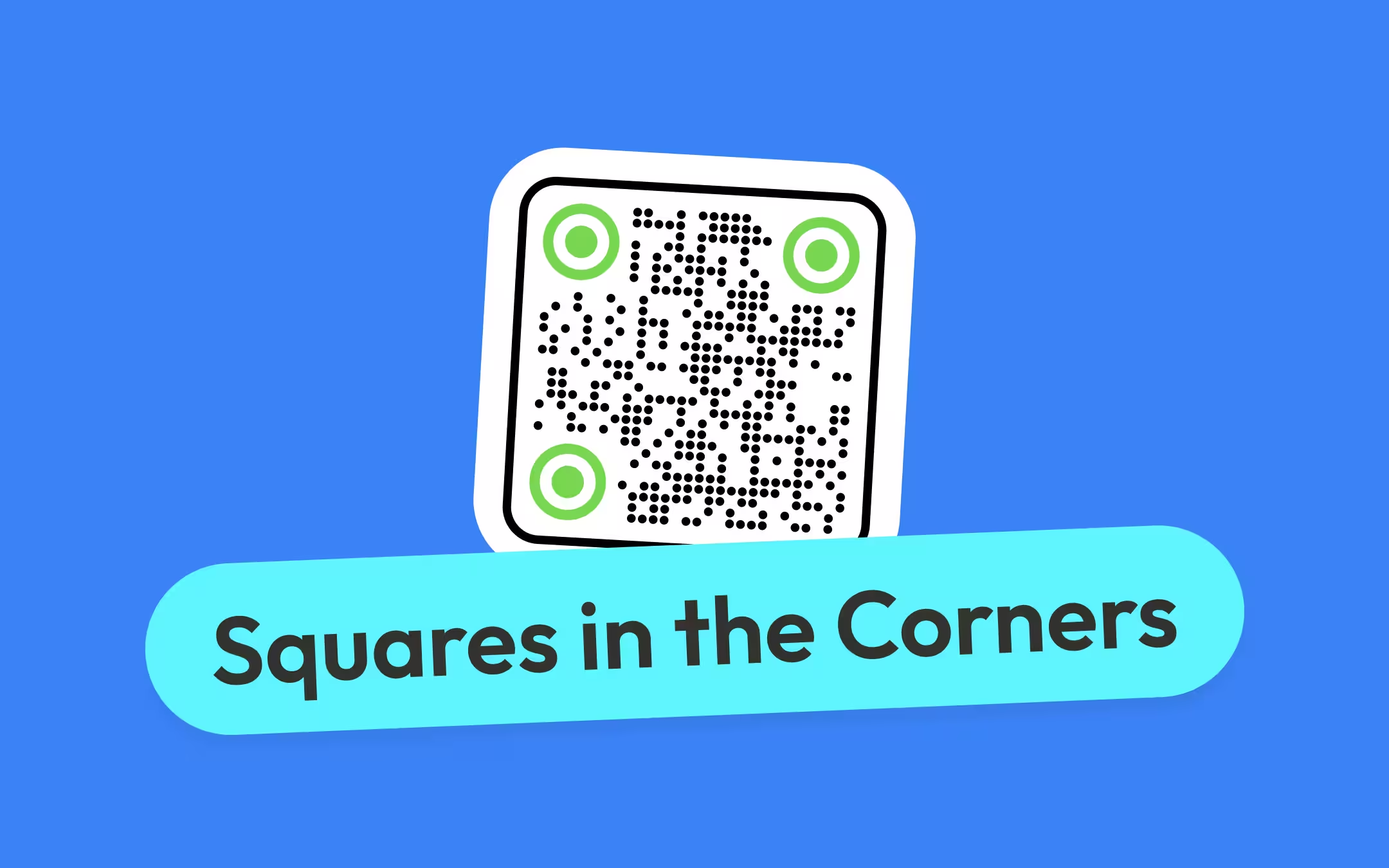
A finder pattern is one of the three concentric squares in a QR code's corners that a scanner uses to locate the symbol and work out its rotation. Each one is seven modules square, they sit in the top-left, top-right and bottom-left corners, and the fourth corner is deliberately empty - that asymmetry is what tells a decoder which way up the code is. They are not decoration and not a logo slot: a QR code with one corner covered is usually a QR code that no scanner reports at all.
Key points
- A finder pattern is one of the three concentric squares in a QR code's corners that a scanner uses to locate the symbol and work out its rotation. Each is 7 × 7 modules, with a one-module light separator around its inner sides.
- There are three rather than four so the symbol is asymmetric. Three corners define a square and the empty fourth corner tells the decoder which way up the code is, at any rotation.
- A scan line crossing a finder pattern through its centre produces dark and light runs in a 1:1:3:1:1 ratio, and that ratio is the same from every direction and at every printed size.
- Covering a finder pattern is not the same as damaging data. Error correction repairs the data area; nothing repairs a finder pattern, because detection happens before decoding starts.
- In a version 1 QR code, 233 of the 441 modules - 52.8% - are structure rather than data. By version 40 that share is 5.4%, which is why small codes hold so little.
What Is a Finder Pattern on a QR Code?
A finder pattern is one of the three concentric squares in a QR code's corners that a scanner uses to locate the symbol and work out its rotation. Each finder pattern is 7 × 7 modules: a solid 3 × 3 dark square in the middle, a one-module light ring around it, and a one-module dark ring around that.
Around the inner sides of each finder pattern runs a separator - the one-module light border drawn between the finder pattern and the data area, so the finder's outer edge stays measurable. Finder plus separator occupies an 8 × 8 block in each of the three corners, which is 192 modules of every QR code ever generated, at every symbol version, regardless of what the code says.
The job those 192 modules do is detection, not decoding. Before a scanner can read a single character it has to answer three questions about the camera image: is there a QR code in this picture, where are its edges, and which way up is it. The finder patterns answer all three, and they answer them from a photograph taken at an angle, in poor light, of a code the camera has never seen.

Why Three Corners and Not Four
Three finder patterns make the symbol asymmetric, and the asymmetry is what encodes orientation. Three corners are enough to define a square: two of them give the decoder a side and its length, the third gives the perpendicular, and the fourth corner is then already known. Putting a finder pattern there as well would add nothing and remove the one clue that says which way up the code is.
That is why a QR code can be scanned upside down, sideways, or reflected in a shop window and still read. The decoder finds three squares, works out which one sits at the corner between the other two - that is the top-left - and reorients the whole grid from there. A four-square symbol would decode four different ways and have no means of choosing between them.
The empty corner is not left empty for long. From version 2 upward the bottom-right area carries an alignment pattern instead, which is a smaller 5 × 5 square that does a different job, described below. A reader who notices that a big QR code has a fourth, smaller square in the corner is looking at an alignment pattern, not at a shrunken finder.
The same logic explains why Micro QR Code has only one finder pattern. It is a much smaller symbol, never more than 17 × 17 modules, and three 8 × 8 blocks would consume most of it. The trade is a symbol that has to be presented more squarely to the camera, which is acceptable for marking small parts and not acceptable for a code on a poster.
The 1:1:3:1:1 Ratio That Makes a QR Code Findable
A scan line crossing a finder pattern through its centre produces dark and light runs in a 1:1:3:1:1 ratio, and that ratio is what a decoder actually searches for. It does not look for squares. It reduces the camera image to black and white, then walks across each row of pixels measuring how long each run of one colour lasts, and flags any place where five consecutive runs fall in that proportion.
The ratio is chosen because it survives everything that happens to a code between the generator and the camera:
- Scale. A ratio has no units. The same 1:1:3:1:1 appears whether one module is three pixels wide or thirty, so the decoder does not need to know the printed size or the camera distance in advance.
- Rotation. The pattern is concentric, so a line through the centre gives the same run lengths at any angle. This is why a QR code has no up, and why rotating one in a layout is safe.
- Partial views. Rows near the top and bottom of the finder produce different ratios, so false positives are cheap to reject. The decoder only has to confirm the ratio in a column too, at the same place.
- Ordinary artwork. The 1:3:1 core is unusual in printed material. A run of dark three times the width of the runs on either side of it, in both axes, at the same point, is rare enough that photographs and typography do not trigger it often.
Once three candidate centres are confirmed the rest follows quickly: the decoder measures the distance between them to estimate the module size, uses the timing patterns to lock the grid onto the symbol, and reads the format information beside the finders to learn the error correction level and mask before touching a single data module.
This sequence is the reason a code with a damaged corner behaves so differently from a code with a damaged middle. A scratch across the data area is arithmetic the decoder can undo. A sticker over a finder pattern removes the thing that starts the process, and the phone simply shows nothing - see why a QR code is not scanning for how to tell that failure from the others.
What Else in a QR Code Is Structure Rather Than Data
Five things in a QR code are fixed by the standard rather than by the payload: the finder patterns with their separators, the timing patterns, the alignment patterns, the format information, and - on version 7 and above - the version information. Together they are called function patterns, and they occupy the same positions in every code of a given version.
| Part | Size | Where it is | What it does |
|---|---|---|---|
| Finder pattern | 7 × 7 modules, three of them | Top-left, top-right and bottom-left corners | Locates the symbol and establishes its rotation |
| Separator | 1 module wide, around each finder | Between each finder pattern and the data area | Keeps the finder's outer edge measurable against neighbouring modules |
| Timing pattern | One row and one column of alternating modules | Row 6 and column 6, running between the finders | Tells the decoder where the module grid falls, so it can count cells |
| Alignment pattern | 5 × 5 modules, from version 2 upward | At fixed coordinates across the symbol | Corrects perspective distortion on an angled or curved code |
| Format information | 31 modules, in two copies | Beside the finder patterns | Records the error correction level and mask pattern |
| Version information | 36 modules, from version 7 upward | Beside the top-right and bottom-left finders | States the symbol version so the decoder need not infer it |
The practical consequence is worth stating plainly: a QR code is not a grid of data with a few decorations on it. It is a grid of structure with data poured into the gaps, and on small codes the structure is most of the picture.
How Much of a QR Code Is Not Your Data
In a version 1 QR code, 233 of the 441 modules - 52.8% - are function patterns and format information rather than data. More than half of the smallest QR code is spent describing itself. The share falls as the symbol grows, because the function patterns barely grow while the data area grows with the square of the side.
| Version | Modules per side | Total modules | Structure modules | Share that is structure |
|---|---|---|---|---|
| 1 | 21 | 441 | 233 | 52.8% |
| 2 | 25 | 625 | 266 | 42.6% |
| 3 | 29 | 841 | 274 | 32.6% |
| 4 | 33 | 1,089 | 282 | 25.9% |
| 6 | 41 | 1,681 | 298 | 17.7% |
| 7 | 45 | 2,025 | 457 | 22.6% |
| 10 | 57 | 3,249 | 481 | 14.8% |
| 15 | 77 | 5,929 | 686 | 11.6% |
| 20 | 97 | 9,409 | 726 | 7.7% |
| 40 | 177 | 31,329 | 1,681 | 5.4% |
Read down the last column and one row breaks the trend. Version 7 is a higher share of structure than version 6 - 22.6% against 17.7% - because two things arrive at once at version 7: the version information appears, costing 36 modules, and the number of alignment patterns jumps from one to six. After that the share resumes falling and never rises again.
This table is the real answer to a question people usually ask a different way. A short URL in a version 2 code and a long one in a version 10 code do not differ by a factor of ten in data, even though both are QR codes of similar visual complexity - the small one is spending 42.6% of itself on being findable. QR code capacity takes the data side of that arithmetic version by version.
Alignment Patterns: The Fourth Square People Notice
An alignment pattern is a five-module square that lets a decoder correct for perspective distortion when a QR code is photographed at an angle or printed on a curved surface. It is a 5 × 5 block - a dark ring, a light ring inside it, and a single dark module at the centre - and it appears from version 2 onward.
Their number is fixed by the version, not by the payload:
| Version | Modules per side | Alignment patterns |
|---|---|---|
| 1 | 21 | None |
| 2 to 6 | 25 to 41 | 1 |
| 7 to 13 | 45 to 69 | 6 |
| 14 to 20 | 73 to 97 | 13 |
| 21 to 27 | 101 to 125 | 22 |
| 28 to 34 | 129 to 153 | 33 |
| 35 to 40 | 157 to 177 | 46 |
The reason they matter grows with the code. On a version 2 symbol the decoder can map the grid from the three finder patterns alone, because 25 modules of drift is small. On a version 25 symbol the same estimate has to hold across 117 cells, and a small angular error at the corners compounds into a whole module of drift by the far side. The alignment patterns are reference points inside the symbol that let the decoder re-fit the grid locally instead of trusting one estimate across the whole code.
This is also the practical reason a large code on a curved surface - a bottle, a mug, a cable drum - still reads. It is not that the curvature is small; it is that the decoder has interior reference points and re-fits the grid between them. A curved code with a covered alignment pattern loses that, and starts failing at exactly the angles a person naturally holds a phone at.
Timing Patterns and Format Information
A timing pattern is the single row and single column of alternating dark and light modules that tells a decoder where the module grid falls. One runs along row 6 between the top-left and top-right finders, the other down column 6 between the top-left and bottom-left finders, and both always start and end on a dark module.
Their job is counting. Having found the symbol's corners, the decoder knows the outer boundary but not how many cells sit inside it - a 25-module code and a 29-module code look identical from the outside. Walking the alternating run along row 6 gives the module pitch directly, which fixes the grid for the whole symbol.
Format information is the strip of modules beside the finder patterns that records the error correction level and the mask pattern used by the symbol. It occupies 31 modules, it is protected by its own BCH error-correcting code, and it is written twice in different places, so a symbol with one copy destroyed still reports its own level correctly. The QR code decoder reads both values off any code image.
That redundancy is a deliberate asymmetry in the design, and it is worth knowing when diagnosing a damaged code. The format information is the only part of the structure with protection of its own. The finder, timing and alignment patterns have none - not because they were forgotten, but because there is no point protecting data that has to be read before any protection can be applied.
Version information appears from version 7 upward: 36 modules, in two copies, beside the top-right and bottom-left finder patterns, stating the symbol version explicitly. Below version 7 a decoder infers the version by counting modules, which is reliable enough on a 21 to 41 module symbol and less so on a 177 module one.
What Happens When a Finder Pattern Is Covered
A QR code with a covered finder pattern usually does not scan at all, and the failure is silent rather than slow. There is no partial read and no error message: the decoder never concludes there is a symbol in the frame, so the phone behaves exactly as it does when pointed at a blank wall.
The single most useful thing to know about this failure is that error correction cannot help with it. Reed-Solomon recovery repairs codewords in the data area, and it runs after the symbol has been located, its version determined and its mask removed. A finder pattern is used to reach that point, so damage there removes the process rather than adding errors to it. Raising the level from M to H does nothing except make every module smaller - the mechanism is in error correction levels L, M, Q and H.
The ways a corner gets covered, in rough order of how often they reach print:
- A logo placed in a corner instead of the centre. The centre of a QR code is data, which error correction protects. The corners are structure, which nothing protects. This one decision is the difference between a code that reads and a code that does not.
- A sticker, price label or seal applied over the code. Common on packaging and on menus that get relabelled. If it has to overlap, keep it clear of all three corners.
- A frame or badge overlapping the outer ring. The finder's outer dark ring is one module thick, and a decorative frame that eats it changes the run lengths the decoder is measuring.
- A trim or die-cut through a corner. A round sticker cut close to a square symbol takes its margin at the corners first - which is where all three finders are.
- Heavy styling on the corner modules. Corner shapes that round the finder aggressively, or fill the light ring with a tint, alter the 1:1:3:1:1 proportion that detection depends on.
- A fold, spine or bend across a corner. The crease shadows the pattern and stops the two halves being coplanar, which affects the ratio measurement more than the same crease elsewhere.
The test is quicker than the theory. Cover the centre of a printed code with your thumb and most codes still scan; cover any one corner and almost none do. That difference is the whole of this page in one experiment.
Styling the Corners of a QR Code Without Breaking It
Custom corner shapes are safe when they preserve the 1:1:3:1:1 proportion along every line through the centre, and unsafe when they change it. That is the whole rule, and it explains why some styled codes read perfectly and others fail on half the phones that try.
What that permits and what it does not:
- Rounded corners on the finder's outer ring. Safe in most decoders, because a line through the centre still crosses the same run lengths. The rounding removes ink at the pattern's own corners, which the centre line never touches.
- A different colour for the finders. Safe as long as the dark parts stay dark against the light parts by the same contrast the rest of the code needs. The decoder works in black and white after binarisation, so a dark blue finder on white is a dark finder.
- Circular finders. Usually readable, and the least forgiving of the popular styles - a circle inscribed in the 7 × 7 block shortens the dark runs measured off-centre, so the tolerance for print quality drops.
- A light ring tinted rather than left blank. Risky. The middle light ring is one of the five runs being measured, and a mid-tone there can binarise dark under shop lighting.
- Merging the finders into a logo lockup. Unsafe. Anything that changes the size of the 3 × 3 core relative to the rings changes the ratio that detection depends on.
- Removing a finder pattern for symmetry. Never. Some mock-ups drop one corner or add a fourth for visual balance; the first is undetectable, the second is ambiguous.
KoloQR, a free QR code generator with circular and custom-shaped QR codes, draws the finder patterns as part of the symbol in every shape it offers, so the corners keep their proportions when the module style changes. Styling never improves scan performance - a decorated code needs its corners at least as intact as a plain one, and usually a little more, because decorative modules put less ink in each cell. See QR code shapes for the range, round QR codes for the circular treatment, and do custom QR shapes scan for what the trade-off costs in practice.
Whatever generator produced the file, the check is the same and takes a minute: export the styled code, print it at the size it will actually be used at, and scan it with an iOS and an Android phone. Native camera apps are stricter than dedicated scanner apps, and they are what people will use. Steps for both phones are in how to scan a QR code.
How to Read a QR Code's Structure by Eye
Anyone can identify a symbol's version, count its structure and confirm its corners without software. The procedure below takes about five minutes and is the fastest way to sanity-check a code you were sent with no notes.
- Count the modules along the top edge. Count the cells across one full side of the symbol, excluding the margin. The number is always 4V + 17 for version V, so 21 is version 1, 25 is version 2, 33 is version 4, 57 is version 10.
- Check all three corners for a 7 × 7 finder. Top-left, top-right and bottom-left. Each should show a solid 3 × 3 core, a clear one-module ring, and an unbroken one-module dark ring, with a clear module of separator on the inner sides.
- Find the timing patterns. Look along the seventh row and seventh column from the top-left corner, between the finders. You should see a strictly alternating dark-light run that starts and ends dark. A break in it is a broken code.
- Locate the alignment patterns. From version 2 there is at least one 5 × 5 square near the bottom-right. Version 7 and above have six or more, spaced evenly across the symbol.
- Confirm the fourth corner is not a finder. The bottom-right corner should hold data modules, or an alignment pattern set in from the edge. A fourth 7 × 7 square means the image is not a valid QR code.
- Measure the margin against one module. The clear space around the symbol should be at least four modules on every side. Compare it to the width of a single cell rather than judging it against the code as a whole - see the quiet zone.
- Run the file through a validator. The QR code validator reports the module size, the margin on each side and the contrast, and confirms the symbol decodes.
Two findings from this check account for most bad files in circulation: a code cropped so tightly that a separator is missing, and a code placed so that something in the layout sits on a corner. Both are visible in under a minute once you know where to look.
Common Mistakes With QR Code Corners
The most common mistake is treating the corners as the safe place to put something, on the reasoning that the middle holds the data. It is exactly backwards: the middle is protected by error correction and the corners are protected by nothing.
| Do | Why |
|---|---|
| Put a logo in the centre of the code | The centre is data area, and error correction is designed to absorb a loss there |
| Keep all three corners fully clear of artwork | Detection uses the finder patterns and runs before any recovery is possible |
| Preserve the 1:1:3:1:1 proportion when styling corners | The ratio is what the decoder searches for; the shape it draws is not |
| Check a styled code with a native phone camera | Native cameras are stricter than dedicated scanner apps, and are what readers will use |
| Treat the code as symbol plus four modules of margin | The corners are where a tight crop or a die-cut takes clear space first |
| Don't | Why |
|---|---|
| Place a logo, badge or sticker over a corner | A covered finder pattern is not damage the code can recover from; it is a code that is never detected |
| Raise the error correction level to protect the corners | Recovery applies to the data area only, and the higher level makes every module smaller |
| Add a fourth corner square for visual symmetry | The missing fourth corner is what encodes the symbol's orientation |
| Tint the light ring inside a finder pattern | That ring is one of the five runs being measured, and a mid-tone can binarise dark under poor light |
| Assume a styled code is fine because it scanned on screen | A display gives even light, high contrast and hard edges - the three things print does not |
Make Your QR Code
Free, with no account and no watermark. Choose a shape, add a logo, check the contrast, and export SVG, PDF, EPS or PNG - a static code with no subscription behind it.
Generate QR CodeQuestions? Answered
They are finder patterns. Each is a 7 × 7 module concentric square in the top-left, top-right and bottom-left corner, and a scanner uses them to locate the symbol in the camera image and work out its rotation before it decodes anything. The QR standard, ISO/IEC 18004, calls them position detection patterns.
Three corners define a square while leaving the symbol asymmetric, and that asymmetry is what tells a decoder which way up the code is. A fourth square would make all four orientations identical. It is also why a QR code reads upside down, sideways or at any angle in between.
No. The corners hold the finder patterns, which a scanner needs to detect the code at all, and error correction does not protect them. Place the logo in the centre instead, where the data area sits and recovery applies. A centre logo covering up to about 20% of the area is reliably recoverable at level H.
That is an alignment pattern - a 5 × 5 module square that lets a decoder correct for perspective distortion when the code is photographed at an angle or printed on a curved surface. It appears from version 2 upward. Version 7 and above have six or more, spaced across the symbol.
Because detection happens before decoding. The scanner searches the image for three finder patterns in a 1:1:3:1:1 ratio of dark and light runs, and with one missing it never concludes there is a code in the frame. Nothing is decoded, so there is nothing for error correction to repair.
Usually, if the 1:1:3:1:1 proportion along a line through each finder's centre is preserved. Rounding the outer ring is generally safe; filling the light ring with a tint, or resizing the 3 × 3 core relative to the rings, is not. Print the styled code at final size and test it with a native phone camera before committing.
Less than people expect on small codes. A version 1 symbol spends 233 of its 441 modules - 52.8% - on structure, leaving 208 for data and error correction together. By version 10 the structure share is 14.8%, and at version 40 it is 5.4%. This is why capacity climbs so steeply with size.
It is the single row and column of alternating dark and light modules running between the finder patterns, along row 6 and column 6. It tells the decoder where the module grid falls, so it can count cells accurately after locating the symbol's boundary. It always begins and ends on a dark module.
Yes. All three are 7 × 7 modules with the same concentric structure, at every symbol version from 1 to 40, whatever the code encodes. Only their spacing changes, because the symbol grows around them. Micro QR Code is the exception: it is a different symbol type with a single finder pattern.
Keep Exploring
Pages that pick up where this one leaves off - the same setting, the same kind of code, or the next thing worth deciding.
QR Code Shapes
The whole shape taxonomy - modules, eyes and frames - with the trade-offs behind round, triangle, hexagon and square codes.
Creative QR Codes
Design directions and real examples for QR codes that look intentional without giving up scan reliability.
A Round QR Code Is a Square QR Code in a Costume
Shaped codes scan, because the shape never touches the data. What a shape actually costs is width: a triangular code needs a base about 2.6 times the width of the matrix inside it.
Pinterest QR Code
Open a Pinterest board, profile, or Pin from a printed page in one scan.
QR Code Contrast Checker
Judge a colour pair the way a scanner does: the contrast ratio, the luminance difference a camera sees, and whether it survives print.
QR Code Capacity: How Much Data Fits, by Symbol Version and Encoding Mode
The capacity of every QR code version in all four encoding modes, why the same URL fits in a smaller code in capitals, and how payload length decides the smallest size a code can be printed at.
Why KoloQR?
- Create QR codes for websites, menus, Wi-Fi, PDFs, and business cards
- Customize colors, logos, and unique shapes
- Download high-quality PNG and SVG files
- Built for both print and digital
