Free QR Codes for Nonprofits and Charity Fundraising
A donation QR code works when it is big enough for the distance it is read from, printed into the artwork rather than stuck on afterwards, and pointed at a page that takes a card payment in one hand. Size follows read distance - roughly 1 cm of code width for every 10 cm of scanning distance - so a 3 cm code on an appeal letter is right and the same 3 cm code on a gala banner raises nothing.
Generate QR Code- Free, no sign-up
- SVG and PNG export
- Logo and brand colors
What Nonprofits Actually Use QR Codes For
A QR code is a printed link, so it earns its place wherever a nonprofit already makes an ask: in the post, on a collection tin, on a banner behind a speaker, or on the last page of an impact report.
The Donation Happens While the Ask Is Still in Front of Them
Most people who intend to give later do not give later. A QR code beside the ask closes the gap between reading an appeal and paying it, because the donation page opens in the same few seconds the reader is still holding the letter, standing at the stand, or listening to the speaker.
Card and Wallet Payments Replace the Cash Nobody Carries
A collection tin only takes what is in someone's pocket. A QR code on the same tin opens a donation page that accepts a card, Apple Pay or Google Pay, which is the only money most passers-by are carrying. Set the page to offer two or three preset amounts so giving takes one tap rather than a typed figure.
Every Donation Page Collects What a Bucket Cannot
A donation page can capture an email address, a Gift Aid declaration in the UK, and the written receipt that US donors need for gifts of $250 or more, all at the moment of giving. Cash dropped in a bucket arrives anonymous, unclaimable and impossible to thank.
Volunteering, Legacies and Impact Updates Use the Same Route
Fundraising is not the only ask a nonprofit makes. Separate codes can open a volunteer sign-up form, a legacy giving page, a food bank's current shopping list or a service referral form, each pointed at one page rather than at a homepage the reader then has to navigate.
Two Things to Settle Before You Print a Donation Code
A donation QR code fails in one of two ways: it points at a page that asks too much of someone standing in the street, or nobody completed a real donation through the printed version before 5,000 letters went out.

One Stable Donation URL on a Domain Donors Recognize
Point the code at a web address on your own domain - yourcharity.org/donate - rather than at a shortened link or a deep URL inside a fundraising platform. A donor who is about to enter card details reads the domain that appears after the scan, and an unfamiliar one is where giving stops. Keep the printed URL short enough that someone can type it instead of scanning.
- One Ask per Code - a donation code, a volunteer code and a newsletter code, rather than one code landing on a page of choices nobody reads in the cold.
- A Page That Works One-Handed on a Phone - wallet payment enabled, two or three preset amounts, no account required, and no PDF anywhere in the path.
- An Address That Outlives the Appeal - /donate rather than /winter-appeal-2026, so next year's campaign arrives at an address that is already printed on 5,000 pieces of paper.
One Real Donation Made Through the Printed Piece
Scan the printed code on one iPhone and one Android phone, then complete an actual donation of the smallest amount the page allows and refund it afterwards. A test scan proves the code decodes; a test donation proves the payment step works on a phone, the receipt email arrives, and the Gift Aid or acknowledgment box appears where a donor expects it. Do this on the physical print, under the light the piece will live in, before the print run rather than after.
Generate QR Code
How to Make a Donation QR Code
Generating the code takes about a minute. The size, surface and trust decisions below are what decide whether it raises anything.
Generate QR Code- 1
Paste the Donation Page URL
Paste the address the code should open - your donation page, a specific appeal, a volunteer form or a legacy giving page. Use the https:// version, and open it on a phone first: a QR code cannot rescue a donation form that needs pinch-zoom to fill in.
- 2
Apply Your Charity's Colors and Logo
Choose a square or circular symbol, set your brand colors and place your logo in the center. Keep the code darker than its background - dark modules on white or a very light tint scan reliably, and a light code on a dark appeal photo is the most common reason a printed donation code fails.
- 3
Download SVG for Print, PNG for Screens
Download SVG for anything going to a printer, because a vector file stays sharp at 3 cm on a reply slip and at 50 cm on a stage banner. Download PNG for slides, email footers and social posts, exported at least three times the size it will be shown at.
Where Donation QR Codes Go, and What Size Each One Needs
Size follows read distance. The working rule is roughly 1 cm of code width for every 10 cm of scanning distance, with 2 cm as the practical minimum for any printed code. Every size below is that rule applied to a real fundraising surface.
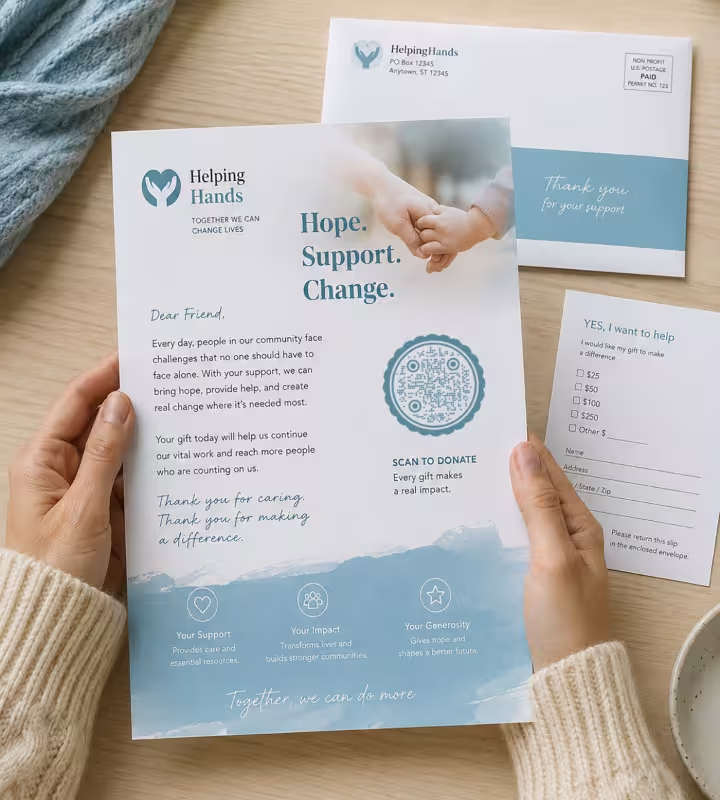
Appeal Letters and Reply Envelopes
Print the code 2.5-3 cm wide beside the ask, not on the reverse of the sheet, because a letter read at about 30 cm needs 3 cm of code and a reader who has to turn the page usually does not. Keep the reply slip and the freepost envelope in the pack: the donors who respond best to direct mail are often the ones least likely to scan.
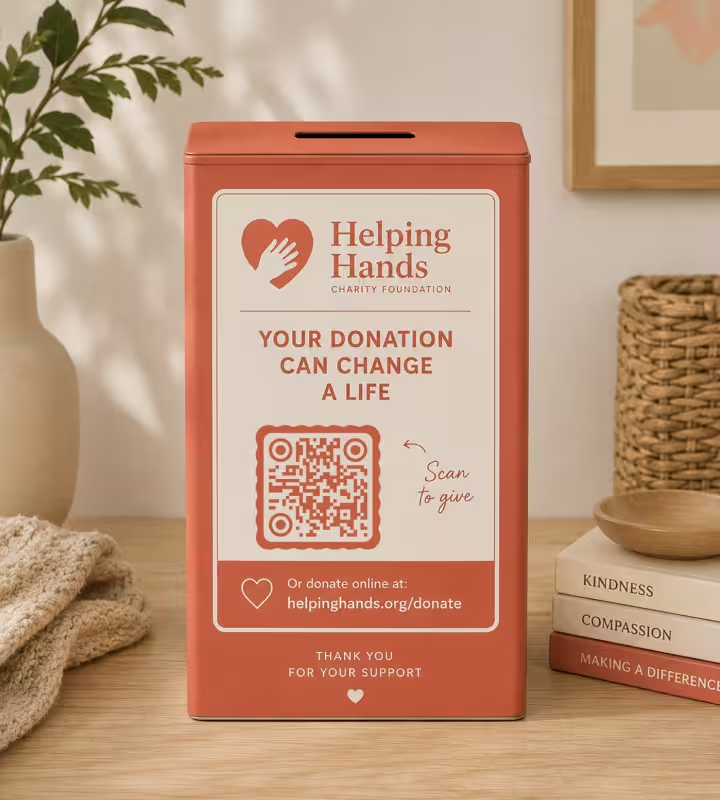
Collection Tins, Buckets and Donation Boxes
Use a 3 cm code on a flat, rigid panel on the front of the tin, read from about 30 cm. Never wrap a code around the curve of a bucket or a tube - a QR code bent around a cylinder distorts its module grid and stops decoding. Add the charity name and the donation URL in text on the same panel so the tin still identifies itself when the phone fails.
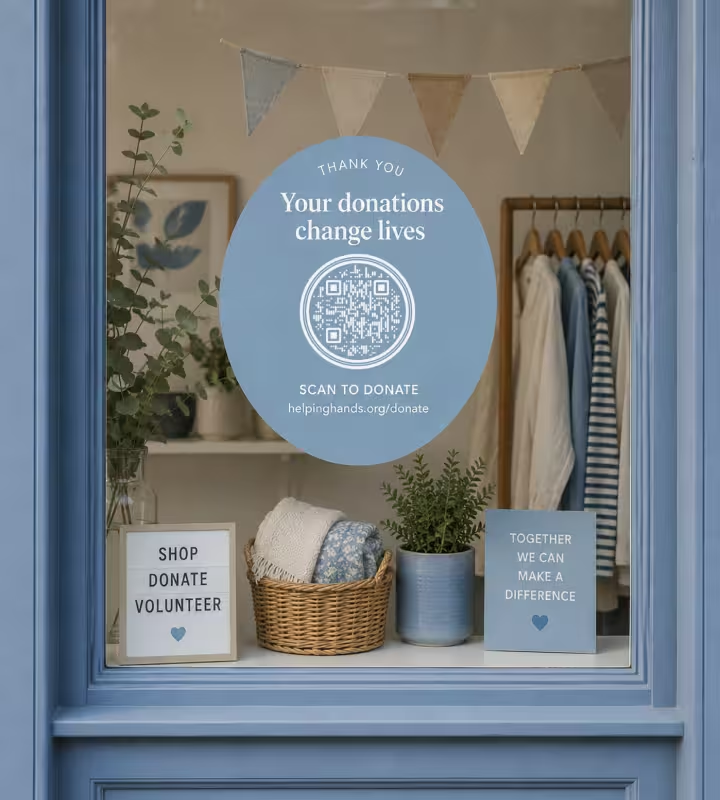
Charity Shop Windows and Counters
A window code read from the pavement at 2 m needs about 20 cm. A decal applied to the inside of the glass must be printed reversed so it reads correctly from the street, because a mirrored QR code will not decode on most phone cameras. At the counter, a 4 cm code on an upright stand beats a sticker lying flat, which nobody can angle a phone over while holding a bag.
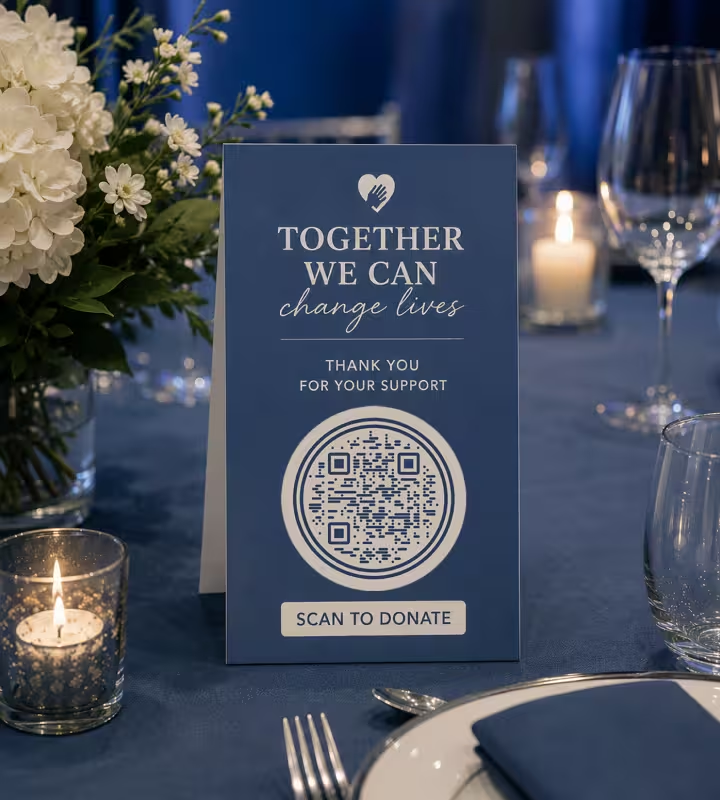
Fundraising Event Banners and Table Cards
A stage or backdrop banner read from 5 m needs roughly 50 cm of code; a table card read at 40 cm needs about 4 cm. Gala lighting is dim and banner fabric creases, so keep the code on a flat panel of the design away from seams and folds, and print it dark on a pale block rather than over a photograph.
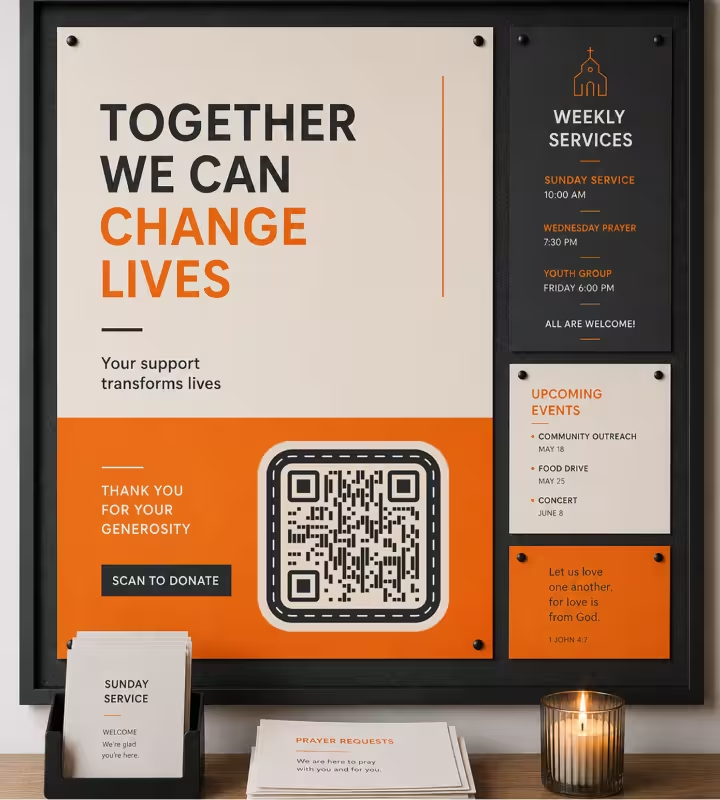
Noticeboards, Posters and Church Service Sheets
A 3-4 cm code works on an A4 or A3 poster read at arm's length, placed in the lower third where a standing reader's hand reaches. On a projected slide, make the code at least one sixth of the slide height and leave it up for 20 seconds or more - a congregation or an audience needs time to find a phone, not just to scan.
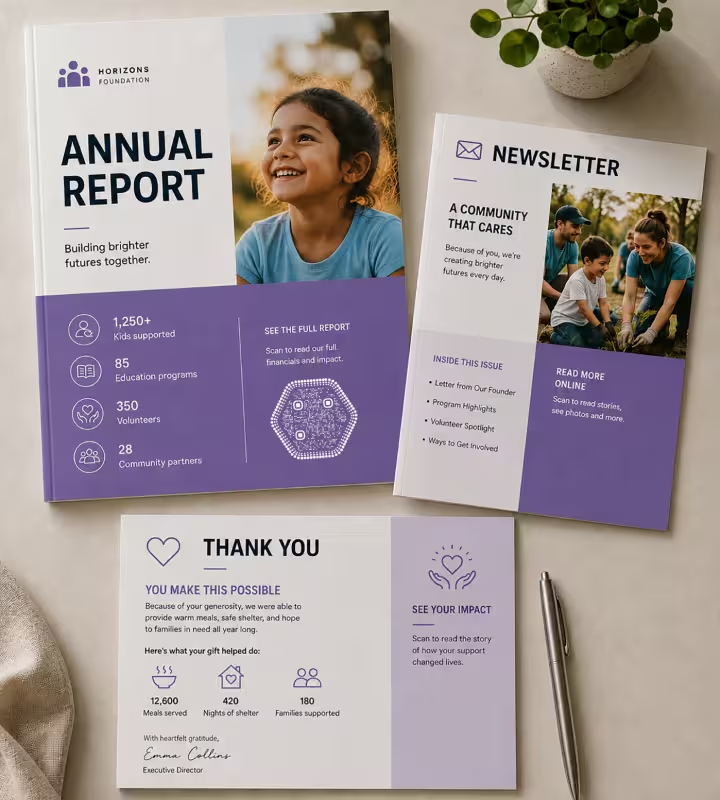
Annual Reports, Newsletters and Thank-You Letters
A 2.5-3 cm code in a report or newsletter should open the specific thing the page is about: the full accounts, the impact story, the volunteer form. A thank-you letter is the one place to point a code at something other than a donation page - a story about what the last gift paid for is what earns the next one.
Rules That Keep Donation QR Codes Working and Trusted
A donation code carries money and a charity's name, so it has two failure modes that other QR codes do not: it can stop scanning, and it can be tampered with. These checks cover both.
Print the Code Into the Artwork, Not as a Loose Sticker
A QR code printed as part of the poster, tin or banner design is far harder to cover than a sticker, and fraudulent stickers placed over legitimate codes are a known problem on unattended signage. Where a sticker is unavoidable, use tamper-evident labels and check unattended codes on a schedule rather than waiting for a donor to report it.
Always Print the Donation URL in Text Beside the Code
A printed URL serves the donor whose camera will not focus, whose phone is old, or who is using a screen reader - a QR code is an image and carries no accessible text. It also lets a cautious donor check the domain before scanning, which is the simplest defense against a swapped code.
Keep the Required Charity Details on the Same Panel
A QR code carries a link and nothing else, so any statement your regulator requires on fundraising material has to appear in the printed text around it. In England and Wales, for example, registered charities above the £10,000 income threshold must state their registered charity number on documents that ask for money.
Keep the Code Dark on a Light Background
Print dark modules on white or a very light tint, and do not invert the code to light-on-dark to sit on an appeal photograph. Phone cameras expect a dark symbol on a light field, and inverted codes read inconsistently across devices even when a test on one phone succeeds.
Size the Code to the Read Distance, Then Round Up
Apply roughly 1 cm of code width per 10 cm of read distance: 3 cm for a letter, 20 cm for a shop window read from 2 m, 50 cm for a banner read from 5 m. Rounding up costs a little space on the design; rounding down means a donor steps closer, casts a shadow on the code, and gives up.
Keep Four Modules of Blank Margin
A quiet zone is the empty margin around a QR code that lets a scanner detect where the symbol begins and ends, and the QR standard specifies four modules of clear space. In practice, keep a margin about four small squares wide free of text, rules, photographs and the edge of the tin.
Keep the Code Flat, Rigid and Out of the Fold
Curves, creases and folds break the module grid a scanner has to read. Keep codes off the round of a bucket, off the seam of a fabric banner, and away from where a leaflet folds or a letter is creased for the envelope - a code across a fold line is one of the few failures a proof will never show you.
Label the Code With What Happens Next
Write the outcome beside every code: "Scan to give $10, $25 or $50", "Scan to volunteer", "Scan to read our accounts". A bare code beside a logo gets ignored, and a donation code that does not say it takes payment reads as a risk rather than an invitation.
Give Every Appeal Its Own URL
Static QR codes cannot count scans, but distinct destinations can. Point the letter at /donate/mail, the banner at /donate/gala and the shop window at /donate/shop - each redirecting to the same form with its own campaign parameter - and your existing web analytics tells you which piece raised the money, at no cost.
Never Encode Payment or Donor Data in the Code Itself
A QR code is not encrypted, and anyone can decode its contents with a phone. Encode a link to a secure donation page rather than bank details, a donor reference or anything from a supporter record. Bank-standard payment codes such as SEPA EPC, UPI or Pix are a different payload generated by your payment provider, not by a URL generator.
Re-Test After Every Reprint, on the Printed Piece
Scan the physical item, not the PDF proof, and complete one real donation through it. Print scaling, upscaled PNGs, textured stock and ink spread all blur module edges enough to break a code that was perfect in the design file, and the damage only shows on paper.

Generate a QR Code for Your Next Appeal
Paste your donation URL, apply your colors and logo, and download SVG for print or PNG for screens. KoloQR, a free QR code generator with circular and custom-shaped QR codes, requires no account and adds no watermark.
KoloQR generates static QR codes, which encode the URL directly and never expire - useful for material that stays in circulation for years, such as legacy giving leaflets and plaques. Static codes have no built-in scan analytics and cannot be repointed after printing, so a nonprofit that needs per-appeal scan counts in a dashboard, or the ability to change a printed code's destination mid-campaign, should look at a dynamic QR service. For most fundraising, a set of short redirects on your own domain gives the same flexibility, keeps your charity's name in the address a donor reads, and leaves the data in your own analytics.
Generate QR CodeQuestions? Answered
Paste your donation page URL into a QR code generator, apply your charity's colors and logo, and download the SVG for print. Print it 2.5-3 cm wide on a letter, larger on anything read from further away, with the donation URL in text beside it. Then complete one real donation through the printed code before the full run.
Yes. Generating static QR codes on KoloQR is free, with no account, no limit on how many you create, and both SVG and PNG exports included. Costs sit elsewhere in the chain: your donation platform's transaction fees, and a dynamic QR service if you specifically need scan analytics or editable destinations.
About 3 cm on an appeal letter or reply slip read at 30 cm, 20 cm on a shop window read from 2 m, and roughly 50 cm on a stage banner read from 5 m. The rule underneath all three is 1 cm of code width for every 10 cm of scanning distance. Below 2 cm, printed codes become unreliable at any distance.
No. A QR code carries data, not money - a donation code encodes the address of a page that takes the payment. Bank payment codes such as SEPA EPC in Europe, UPI in India or Pix in Brazil are a separate payload with its own standard, generated by your bank or payment provider rather than by a URL QR code generator. In the US, a small volunteer group can print a Venmo QR code instead - an ordinary profile link any phone camera opens.
Give each printed piece its own destination. Point the letter at /donate/mail and the banner at /donate/gala, redirect both to the same form with a campaign parameter, and read the split in your own web analytics. Static codes cannot count scans themselves, so the distinct URL is what makes attribution possible.
Yes, if the code is a sticker on an unattended surface - covering one code with another is trivial. Three things make it much harder: print the code into the artwork rather than applying it separately, print the donation URL in text so donors can check the domain, and inspect public-facing codes on a regular schedule.
The four usual causes are a code printed too small for the distance, a light code on a dark background, text or a border encroaching on the blank margin, and glare on a laminated or glazed surface. Older handsets are a fifth: a small number still need a scanner app, which is why the URL beside the code matters.
The code itself is irrelevant to Gift Aid - what matters is that the donation page collects a valid declaration from a UK taxpayer at the point of giving. That is a practical argument for a QR code over a cash bucket: a form can capture the declaration and the donor's details, and loose cash cannot.
Put a large code on the stage or backdrop banner for the appeal moment, a 4 cm code on each table card for auction lots and raffles, and one at the exit for newsletter sign-up. See the events page for check-in, ticketing and wayfinding codes, which follow different sizing rules from a donation ask.
Static codes suit anything pointed at a stable page on your own domain, and they never expire or depend on a third-party service staying online - which matters on a legacy leaflet or a memorial plaque. Dynamic codes are worth paying for when a campaign needs scan counts per piece or a destination changed after printing.
Yes. Keep the logo under roughly 30% of the code area and use error correction level H, which recovers about 30% of the symbol - see the error correction guide for what that trade-off costs. Use brand colors for the dark modules only and keep the background pale: two mid-tone brand colors rarely give a camera enough contrast.
Yes. A QR code assumes a smartphone, a working camera and enough confidence to enter card details in the street, and a share of every donor base has none of those. Street and door collections generally convert better with a contactless terminal, and older supporter bases still respond to a reply envelope.
Keep Exploring
Pages that pick up where this one leaves off - the same setting, the same kind of code, or the next thing worth deciding.
Event QR Codes
One scan connects guests to tickets, schedules, directions and RSVPs - on invites, posters and signage.
Posters
A3 to A0 - how big the code has to be for the distance people can actually stand at, and how high off the floor it belongs.
Healthcare
Booking pages, intake forms and aftercare instructions on posters, leaflets, prescription bags and bedside cards.
Schools & Classrooms
Permission forms, newsletters, library links and student work, with the print sizes and privacy rules a school actually needs.
URL QR Code
Send anyone straight to a web page, landing page, or link with a single scan.
Black Friday
Sale signs, flyers, parcel inserts and queue codes for the Black Friday weekend - and what each code should do once the sale is over.
Why KoloQR?
- Create QR codes for websites, menus, Wi-Fi, PDFs, and business cards
- Customize colors, logos, and unique shapes
- Download high-quality PNG and SVG files
- Built for both print and digital
