Transparent QR Codes That Still Scan on the Surface Behind Them
A transparent QR code is a QR code exported without a background, so only the dark modules are drawn and everything else shows through. That makes the surface behind the code part of the code: a light, even surface scans, and a dark, patterned or moving one does not. This page covers where transparent QR codes work, where they fail, and how to fix the failures without losing the look.
Opens in Google Maps. Coordinates work too - "37.4224, -122.0841".
The code opens your business's "Write a review" form. Paste the Place ID, or a Google Maps link that carries one.
A UPI link carries no checksum, so a mistyped ID produces a code that scans perfectly and pays somebody else. Paste the ID from your payment app rather than typing it, and send yourself one rupee before printing.
Paste it exactly as copied. KoloQR does not assemble the payload - it encodes the one your bank issued, and checks it before you print it.
SVG, PNG, JPG • Max 2 MB
First month free
then $9/month
Dynamic QR Codes Are Coming
Change your link anytime, even after printing. See who scans, when and where.
- Edit without reprinting
- Scan analytics
- Bulk & custom domains
You're on the List
We'll email you once, when dynamic codes with scan analytics launch.
What Is a Transparent QR Code?
A transparent QR code is a QR code image whose background is fully see-through, leaving only the dark modules visible. The light modules of a transparent QR code are not drawn at all; they are gaps, and a scanner reads whatever colour shows through those gaps. A QR code with a transparent background is therefore only as scannable as the surface it is placed on. For codes that carry a background colour of their own, see colored QR codes. Where the surface is less than ideal, square modules are the most forgiving style - see pixel QR codes - and a QR code frame is one way to give the code a light plate.

What Transparency Changes
Removing the background does not change the data in a QR code or the way a phone decodes it. It changes who is responsible for three things a normal QR code brings with it.
- The Light Modules Become the Surface - a scanner needs every light module to be clearly lighter than every dark module. With no background in the file, that contrast exists only if the surface behind the code is light and even.
- The Quiet Zone Becomes the Surface Too - a quiet zone is the empty margin around a QR code that lets a scanner detect where the symbol begins and ends. ISO/IEC 18004 sets it at four modules on every side, and on a transparent code that margin has to be clear surface, not nearby artwork.
- Contrast Is No Longer Fixed at Export - a QR code with its own background has the same contrast everywhere it is used. A transparent QR code has a different contrast on every surface, so it has to be checked again each time it is placed.
- Only Some File Formats Can Hold It - PNG, SVG, PDF and EPS store transparency. JPG cannot, and saving a transparent QR code as JPG fills the background with white or black, depending on the program.
A transparent QR code is a design convenience rather than a different kind of code. It saves matching a background colour by hand, and it lets one file sit on several light surfaces. It does not make a code work on a surface where a normal code would fail.
The Chequerboard Is Not Part of the Code
Design tools and generators show transparency as a grey and white chequerboard. The chequerboard is a preview convention and is never exported or printed. If a downloaded QR code shows a chequerboard after it has been placed in a document, the file was a screenshot of the preview rather than the transparent export.
Generate QR Code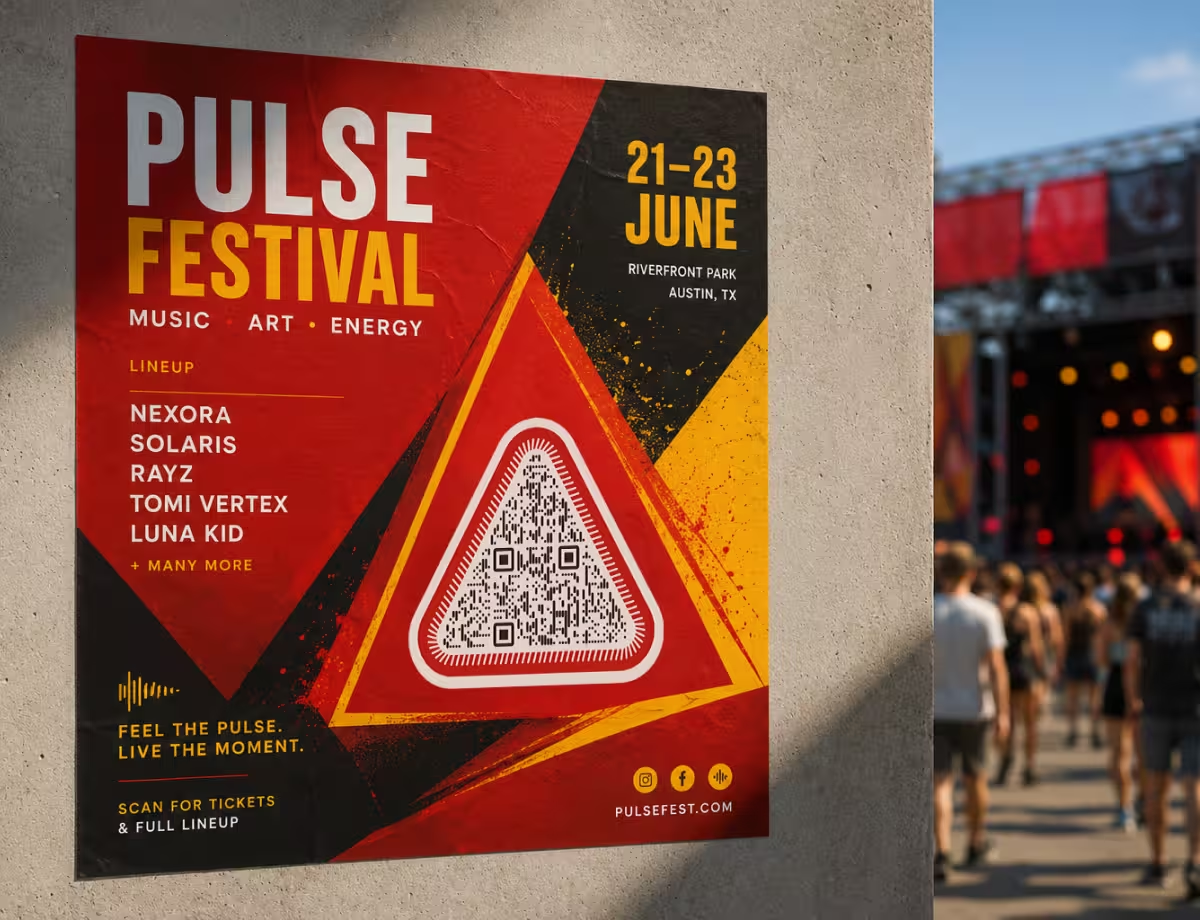
Where Transparent QR Codes Work Best
A transparent QR code suits any layout where the code should sit directly on a light surface without a visible white box around it.
Light Coloured Panels in a Layout
A dark code on a cream, pale grey or pastel panel, with no white square breaking the design. One transparent file serves every panel colour in a brand system, as long as each one is light.
Presentation Slides and Documents
A transparent PNG or SVG drops onto a light slide background without a box. On a dark slide template, put a light rounded panel behind the code first.
Kraft, Cream and Tinted Paper
Printing only the dark modules lets the paper be the background. Kraft paper is darker than it looks, so use the darkest ink available and print a proof.
Packaging With a Spot Colour
A one-colour print job cannot print a white box. A transparent vector code prints as a single ink on the carton's own light surface.
Laser Engraving and Cut Vinyl
Engravers and vinyl cutters need the dark modules alone as vector shapes. A transparent SVG provides exactly that, with no background rectangle to delete.
Merchandise on Light Fabric
A single-colour screen print on a white or pale garment. Fabric texture softens edges, so print the code larger than it would be on paper.
Which Surfaces a Transparent QR Code Scans On
A transparent QR code scans on a surface that is lighter than the modules, even in tone, and still. It fails on surfaces that are dark, patterned, moving or see-through. Each failure has a fix that keeps most of the borderless look.
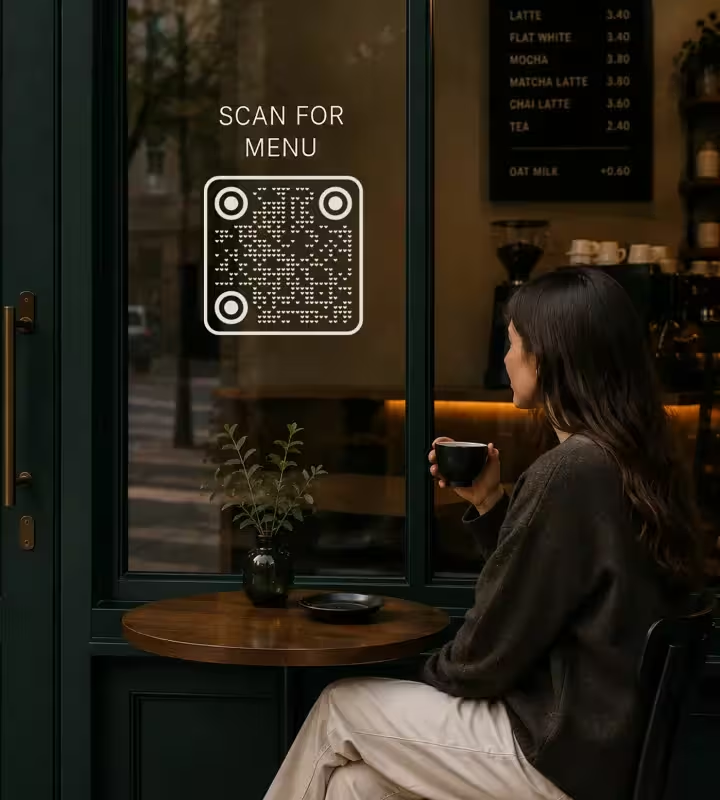
Surfaces That Break a Transparent QR Code
These are the five placements that most often stop a transparent QR code from scanning, with the reason for each.
- Dark Backgrounds - dark modules on a dark surface have no contrast. Recolouring the modules white produces an inverted QR code, which the standard permits but phone scanners decode inconsistently. Place a light panel behind the code instead.
- Photographs - a photo varies in brightness from one module to the next, so some gaps read as light and others as dark. Even a pale photo usually has shadows or detail crossing the code.
- Gradients and Patterns - a gradient that is light at one corner and mid-tone at the other gives the code high contrast on one side and low contrast on the other. A scanner sets one threshold for a whole region, and half the code falls on the wrong side of it.
- Video and Live Streams - a transparent QR code over moving footage has a background that changes every frame. A code that scans during a bright scene stops scanning in a dark one.
- Glass, Windows and Clear Labels - a code printed on clear film has no background at all: the scanner sees the street behind the window or the liquid inside the bottle. A clear label on a dark drink is a dark code on a dark surface.
As a working rule, the surface behind a transparent QR code should give a contrast ratio of at least 4:1 against the modules for screen use and 7:1 for print. Those are the same targets that apply to a QR code with its own background.
How to Fix Each One
Every one of these fixes adds a light, even area directly behind the code. The area can be shaped and coloured to suit the design; it only has to be there.
- Add a Light Plate Behind the Code - a rounded rectangle or circle in white or a pale brand colour, extending at least four modules beyond the code on every side. On a photo or a dark layout this is the whole fix.
- Use a Semi-Opaque Plate Over Video - a white plate at 85 to 100% opacity keeps the background steady while letting the overlay feel light. Below about 85% the footage starts to show through the light modules.
- Print a White Layer on Clear Material - for window stickers and clear labels, ask the printer for a white ink underbase behind the code area. The white layer is printed first and the dark modules on top, so the code carries its own background on glass.
- Pick the Lightest Part of the Layout - where no plate is wanted, move the code to an area that is already light and flat, and check that the quiet zone is clear of text and edges.
- Check the Contrast on the Real Surface - sample the surface colour and the module colour and compare them in the QR code contrast checker. A contrast reading taken against white says nothing about a code placed on beige.
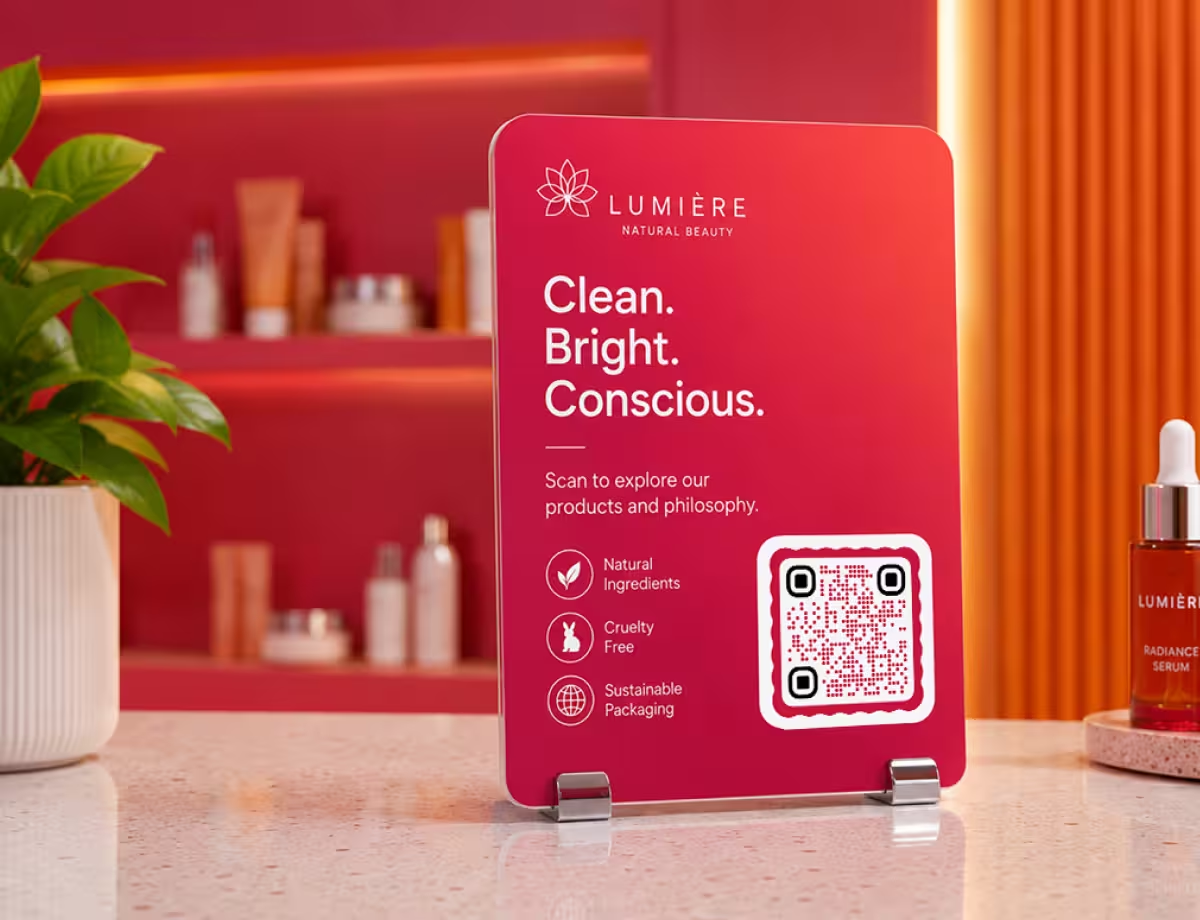
Transparent QR Code Ideas
Four placements where removing the background improves the design, with the detail that keeps each one scannable.
How to Make a Transparent QR Code
A transparent QR code takes about a minute to make. Most of the care goes into where it is placed afterwards.
Generate QR Code- 1
Add Your Content
Paste the link, or choose another type such as Wi-Fi or email, and generate the code.
- 2
Switch On Transparent Background
Open the Colors tab and tick Transparent background. The preview shows a chequerboard behind the code, which marks the see-through area and is not exported.
- 3
Choose a Dark Module Colour
Pick a colour that is dark against the surface the code will sit on. Black, navy, dark green and deep brown all work on light surfaces.
- 4
Export PNG or SVG, Then Test in Place
Download PNG for screens or SVG for print, place the code on its real background, and scan it there with two phones before publishing or printing.
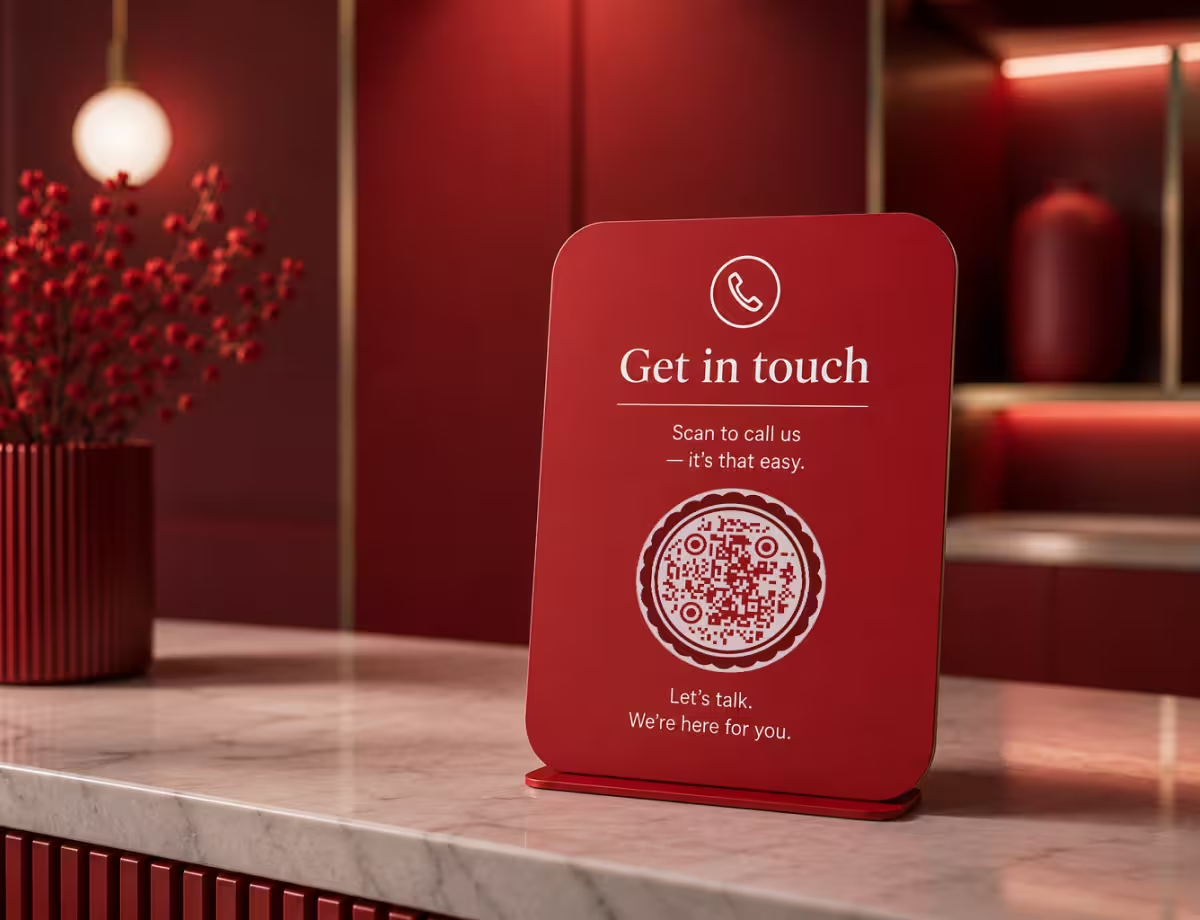
A Code With No Box Around It
KoloQR, a free QR code generator with circular and custom-shaped QR codes, has a Transparent background option in its Colors tab. Tick it and the generator draws only the modules, the finder patterns and any logo, in square, circular, triangular or hexagonal outlines.
KoloQR's contrast reading treats a transparent code as if it sat on white, because the generator cannot know the final surface. Check the real surface colour yourself before printing. KoloQR exports transparent PNG, SVG, PDF and EPS with no account and no watermark, and makes static QR codes only.
Generate QR CodeExport Formats for Transparent QR Codes
Transparency survives only in formats that can store it, and only if the program that opens the file respects it.
PNG
Stores transparency and works in slides, documents, websites, video editors and streaming software. Export at the largest size needed, because a PNG softens when enlarged.
SVG
Transparent by nature: the file contains the module shapes and nothing else. The format for print, vinyl cutting and engraving, sharp at any size.
PDF or EPS
Vector formats for print shops. Both keep the background empty, which lets a printer add a white underbase or a spot colour behind the code as a separate layer.
Questions? Answered
Yes, on a light and even surface. A transparent QR code has no background of its own, so the surface behind it acts as the light modules. On white, cream or a pale colour the code scans like any other. On a dark, patterned or moving background it fails, and needs a light plate behind it.
Not directly. A photograph changes brightness across the area of the code, so some light modules read as dark. Place a white or pale plate behind the code, extending at least four modules past it on every side. The plate can be rounded or tinted to suit the photo.
The file was saved as JPG or opened in a program that does not support transparency. JPG has no transparency, and many programs fill the empty area with black. A dark code on black is invisible. Download the code again as PNG or SVG, and insert the file rather than pasting it from the clipboard.
Regenerate the code with a transparent background if you can; it is cleaner than editing. Removing white from a PNG in an image editor leaves a pale halo of half-transparent pixels around every module, which shows as a fringe on coloured surfaces. If the original data is unknown, decode the code first and generate it again.
Only with a white layer behind it. On clear film, the background of the code is whatever is behind the glass, which changes with the light and is often dark. Ask the printer for a white ink underbase under the code area, or use white vinyl with the code printed on it. For a code engraved into the glass itself, see laser engraving a QR code.
Avoid it where you can. White modules on a dark surface make an inverted QR code, which the QR code standard allows but phone scanners decode inconsistently. A dark code on a light plate placed over the dark background scans on far more devices.
Yes. The quiet zone of four modules on every side still applies; it is simply not drawn in the file. Keep text, images and the edge of the layout out of that margin, and make sure the surface inside it is the same light tone as the surface behind the code.
Yes. The logo sits in the centre as usual, and the area around it is cleared so that it stays legible. On a transparent code that cleared area is also see-through, so check that the logo has enough contrast against the final surface as well as against the modules.
Yes. KoloQR makes transparent QR codes for free, with PNG, SVG, PDF and EPS downloads, no account and no watermark. The codes are static, so they have no scan limit and do not expire.
Keep Exploring
Pages that pick up where this one leaves off - the same setting, the same kind of code, or the next thing worth deciding.
Colored QR Codes
Put your palette on a QR code without breaking it: which color goes on the pattern, and which belongs on the frame.
QR Code Frames
Borders, labels and call-to-action text around a code, plus acrylic stands and sign holders - with the margin and sizing rules that keep a framed code scannable.
Why a QR Code Is Not Scanning, and How to Tell Which Fault You Have
The three ways a QR code fails - never detected, read badly, or read perfectly into a broken destination - and how the symptom tells you which one you have before you measure anything.
Nine Things to Check Before a QR Code Goes to Print
The nine checks between a QR code file and a print run that works, each with the number it has to clear and the page that explains why.
Fifty QR Code Colour Pairs, and Which of Them Survive Print
Fifty QR code colour pairs with the contrast ratio computed for each, grouped by whether they clear the print threshold, the screen one, or neither.
Event Agencies
Codes produced for someone else's event: client redirects, exhibitor spec sheets, badge runs and signage sized for the room.
Why KoloQR?
- Create QR codes for websites, menus, Wi-Fi, PDFs, and business cards
- Customize colors, logos, and unique shapes
- Download high-quality PNG and SVG files
- Built for both print and digital
