How to Use QR Codes in a Retail Store
A QR code in a retail store turns a small printed surface into a full product page: specifications, sizes, stock, care instructions or a review form. This page covers what to link, where to place the code, what size to print it, and what usually goes wrong on glass and shelf labels.
Generate QR Code- Free, no account
- Print-ready SVG and PNG
- Logo and brand colors
Why Retail Stores Use QR Codes
A shelf label holds about twenty words. A product page holds everything else. QR codes in a retail store exist to close that gap at four specific moments in a shopping trip.
More Product Detail Than a Label Can Hold
A shelf-edge label has room for a name, a price and little else. A QR code on that label can lead to full specifications, materials, sizing, allergens, care instructions and customer reviews, so shoppers stop hunting for a staff member to answer a question the packaging never answered.
A Storefront That Works When the Shop Is Closed
A QR code on the shop window is readable at 9 p.m. on a Sunday. Passers-by who stop at a closed store can reach the online catalog, opening hours or a booking page instead of walking on and forgetting the shop by morning.
A Sale That Survives an Empty Shelf
Out-of-stock sizes and colors are the most common reason a customer leaves a retail store empty-handed. A QR code on the shelf label or fitting-room mirror can point to the same product online, where the missing size is often still available for delivery or click-and-collect.
Reviews and Sign-Ups at the Moment of Purchase
Goodwill is highest at the counter, seconds after a purchase. A small QR code at the till leads straight to a Google review form or a loyalty sign-up, which removes the step where the customer has to search for the shop later and never does.
What a Retail QR Code Needs Before You Print It
Two things decide whether a QR code works in a shop: the page it opens, and whether anyone tested the printed code under the store's own lighting. Both are easier to fix before the labels go to print than after.

A Destination That Behaves on a Phone in Your Store
The QR code is never the problem when a scan disappoints someone. The landing page is. Three things matter more than the rest in a retail setting.
- A Mobile Page, Not a PDF Catalog - a PDF opens in a viewer and forces the shopper to pinch and zoom while holding a basket.
- A Short URL - fewer characters mean fewer modules, and larger modules survive small shelf labels and cheap printing.
- A Page That Loads on One Bar of Signal - mobile reception inside shops is often poor, so heavy image galleries and video headers fail exactly where the code is scanned.
One Test Scan on the Printed Label, Under Store Lighting
Test a printed sample, not the file on your monitor. Screens are backlit and perfectly flat, which hides every problem a real label has. Print one label, put it where it will live, and scan it with both an iPhone and an Android phone from the distance a customer will actually stand at. Check it again after closing time, when spotlights and street lights change the reflections on glass and glossy laminate.
Generate QR Code
How to Make a QR Code for a Retail Store
Making the code takes about a minute. Deciding what it points to takes longer, and that is the part worth thinking about.
Generate QR Code- 1
Paste the Link the Shopper Should Land On
Use the product page, category page, stock checker or review form, not the site's home page. A code that lands on a home page pushes the customer to search again, and most give up at that point. If you may want to change the destination later, point the code at a short URL on your own domain and redirect it from there.
- 2
Match the Code to the Store's Branding
Choose a shape, set your colors and drop your logo in the center. Keep the modules dark on a light background and keep the logo small. Circular and custom-shaped QR codes fit retail packaging and window decals better than a plain square, and they scan the same as long as contrast and the quiet zone are respected.
- 3
Download SVG for Print, PNG for Screens
SVG is a vector format, so the same file prints cleanly on a 3 cm shelf label and a 40 cm window decal without soft edges. Use PNG at 300 DPI or higher when a printer or supplier insists on a raster file, and send the file at final size rather than letting someone scale a small PNG up.
Where QR Codes Work in a Retail Store
Each surface in a shop is scanned from a different distance, which changes the size the code has to be printed at. The working rule: a QR code needs roughly 1 cm of width for every 10 cm of scanning distance, and never less than 2 cm.
Shop Window and Entrance Glass
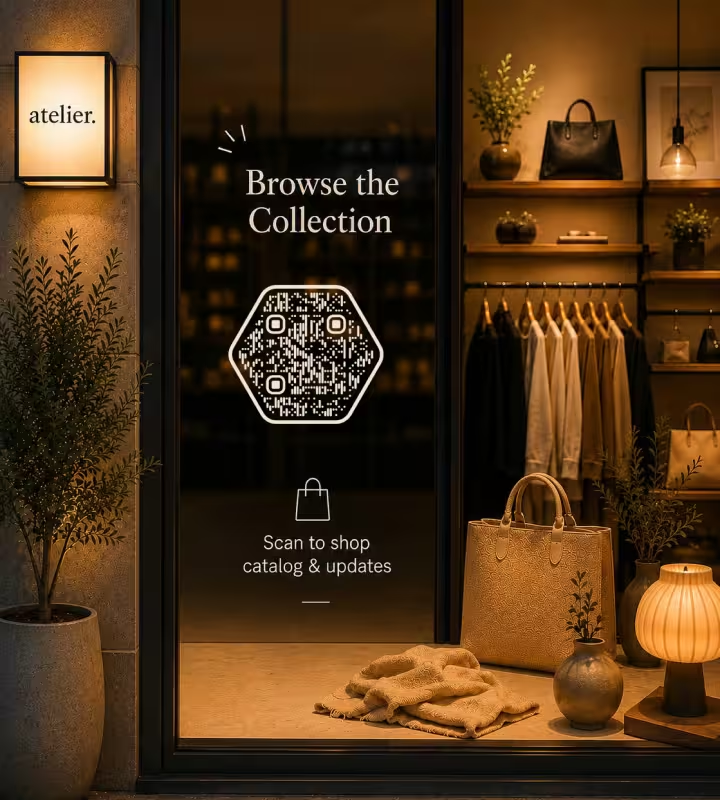
Window codes are scanned from about 1-2 meters away, so print them 15-20 cm wide. Mount the decal on the inside of the glass facing out, at roughly 120-150 cm from the ground, which is where a standing adult's phone naturally points. Matte film beats glossy on glass, because shop spotlights and street lights turn a glossy surface into a mirror after dark.
Shelf-Edge Labels and Price Tags
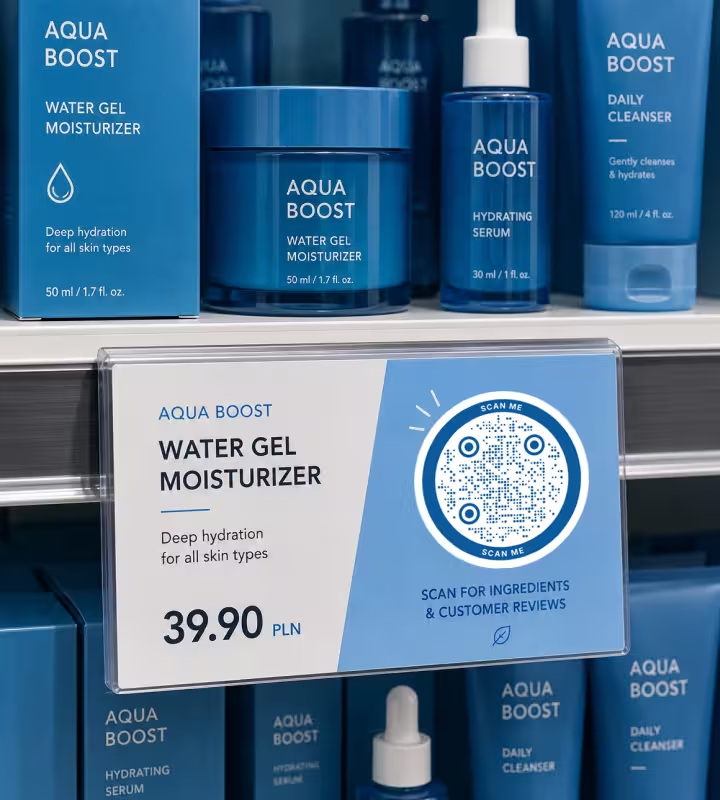
Shelf labels are read from about 30 cm, so a 3 cm code is enough. Keep the URL short at this size: a long link raises the module count, and each module shrinks below the point where a phone camera can resolve it. Leave the empty margin around the code clear of price stickers and the metal shelf rail.
Checkout Counter and Till Signs
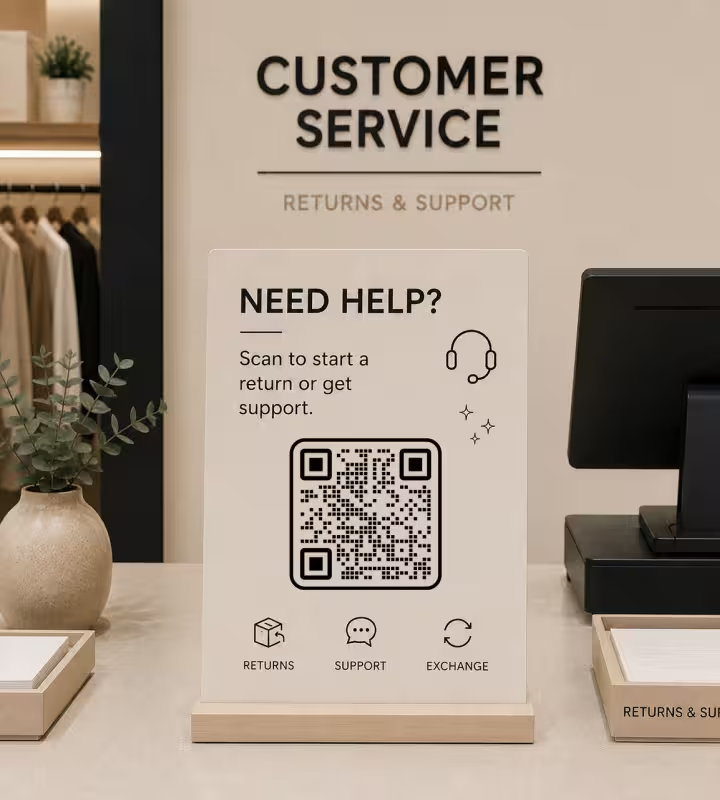
Counter signs are scanned at arm's length, so 5 cm is comfortable. The checkout is the right place for one single ask - a Google review, a loyalty sign-up or a digital receipt - and the wrong place for three. Two codes side by side at a till slow the queue and usually mean neither gets scanned.
Fitting Rooms and Service Points
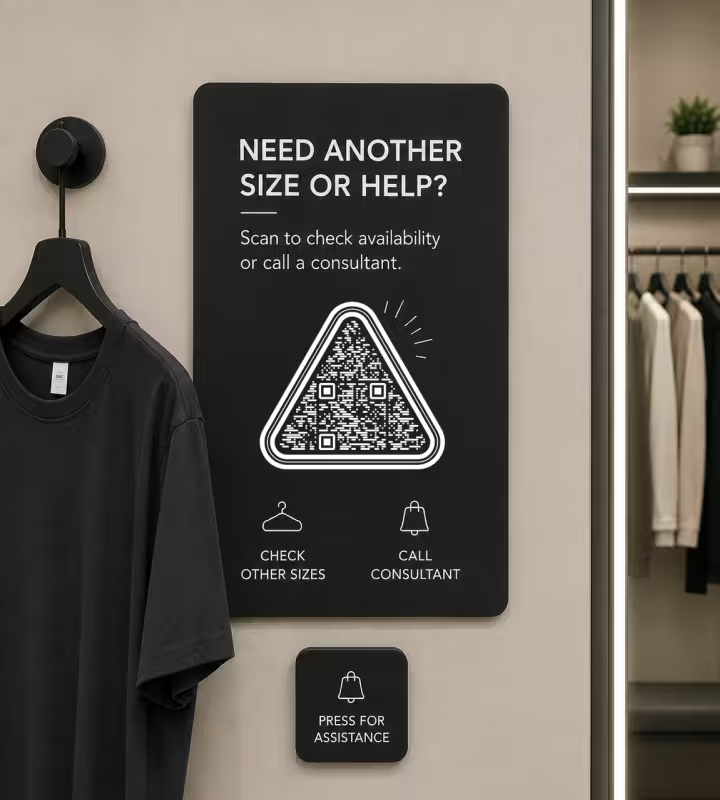
Fitting-room codes answer the questions customers cannot ask from behind a curtain: other sizes, other colors, stock in nearby stores, or a request for staff help. Print them 5-8 cm and mount them beside the mirror rather than on it, where reflections and fingerprints interfere with the camera.
Retail QR Code Best Practices
Most QR codes that fail in shops fail for a handful of repeatable reasons. These rules cover almost all of them.
Keep Dark Modules on a Light Background
Inverted codes - light modules on a dark background - are read reliably by some phones and rejected by others, including older Android cameras. Keep at least a clear light-dark difference, and treat a dark-on-light code as the default for anything printed in a store.
Leave the Quiet Zone Empty
A quiet zone is the blank margin around a QR code that lets a scanner find where the symbol begins and ends. The QR standard specifies four modules of margin. In practice that means no price sticker, shelf rail, border or fold crossing the edge of the code.
Size the Code for the Scanning Distance
Use about 1 cm of code width for every 10 cm of distance, with 2 x 2 cm as the floor for anything scanned up close. A code read from 3 meters across a shop floor needs roughly 30 cm, which is why a poster code shrunk to fit a corner never works.
Choose Matte Over Glossy for Anything Under a Spotlight
Glossy lamination reflects retail spotlights and daylight straight back into the camera, and the phone sees a bright patch instead of a pattern. Matte laminate, matte vinyl and uncoated stock all scan more reliably in shops than gloss, especially on windows and chilled cabinets.
Keep the Logo Small and Centered
Error correction is the redundancy built into a QR code that keeps it readable when part of the symbol is covered or damaged. It tolerates a small central logo, not a large one. Keep a logo well under a quarter of the code area, keep it in the middle, and rescan after adding it.
Write What the Scan Does, Next to the Code
A bare code in a shop is a guess, and shoppers rarely scan a guess. A short line - "Scan for sizes and stock", "Scan to leave a review" - raises scans because the customer knows what they are getting. Keep it to five words or fewer so it fits on a label.
Shorten the URL Before Generating the Code
A short link produces fewer modules, and fewer modules mean each one is physically larger at the same print size. This is the cheapest way to make a small shelf-label code scannable. Trim tracking parameters, or put them behind a short redirect on your own domain.
Use a Different Link for Each Placement
Give the window, the shelf labels and the till their own URL or UTM parameter. This is the only way to learn which surface earns scans, and after two weeks the answer is usually surprising - most stores over-invest in window codes and under-use fitting rooms.
Do Not Print Codes Below Waist Height or on Curved Surfaces
Floor graphics and low plinth codes make people crouch, and few do. Curved surfaces such as bottles and jars distort the module grid enough to break scans at small sizes. Keep codes on flat surfaces between roughly waist and eye height.
Know What a Static QR Code Cannot Do
KoloQR generates static QR codes, which means the destination is fixed at the moment the code is printed. A static code cannot be repointed later and does not count scans by itself. Two honest workarounds: point the code at a short URL on your own domain that you can redirect at any time, and read the scan volume from your own web analytics. If you need per-scan analytics, expiring links or A/B testing built in, a dynamic QR service is the right tool.

Make a QR Code for Your Store
Pick the link, set your colors, drop in your logo and download a print-ready file. No account, no watermark, and the SVG scales from a 3 cm shelf label to a full window decal from one file.
Before the print run, print one label and scan it where it will live, with both an iPhone and an Android phone, from the distance a customer will stand at. That single test catches almost every problem that would otherwise reach a thousand printed labels.
Generate QR CodeQuestions? Answered
Link a retail QR code to the page that answers the question the shopper is holding: the product page for a shelf label, a size guide or stock checker in a fitting room, a review or loyalty form at the till, and the online catalog on the shop window. Avoid linking to the site's home page, because it forces the customer to search again. A payment code is a different case: in Indonesia, the QRIS at the till is issued by a bank or e-wallet rather than made in a generator, and it should stand apart from every other code.
Allow about 1 cm of code width for every 10 cm of scanning distance, with 2 x 2 cm as the minimum. That means roughly 3 cm on a shelf-edge label read from 30 cm, 5 cm on a counter sign, and 15-20 cm on a window scanned from 1-2 meters away from the pavement.
No. The built-in camera apps on current iPhones and Android phones detect QR codes and show a tap-to-open link, so no separate scanner app is needed. A small number of older or budget Android devices still need a scanner app, which is one more reason to keep contrast high and the code large enough.
Not with a static QR code, which is what KoloQR generates: the destination is encoded in the pattern itself. The standard way around this is to encode a short URL on your own domain and redirect it server-side, so the printed code stays the same while the destination changes. Set that redirect up before printing, not after. The same setup keeps a Black Friday QR code useful after the sale, when the redirect moves on to current offers.
Give each printed placement its own URL or UTM parameter and read the traffic in your web analytics. A window code pointing to /window and a shelf code pointing to /shelf tell you exactly which surface works. This measures page visits rather than raw scans, so the numbers run slightly low, but the comparison between placements is reliable. How to track QR code scans walks through both free methods step by step.
Window codes usually fail for one of three reasons: the code is too small for the distance from the pavement, glossy film is reflecting a spotlight or street light straight into the camera, or the decal is mounted too low or too high for a phone held at chest level. Print it 15-20 cm, use matte film, and mount it at 120-150 cm.
Yes. KoloQR, a free QR code generator with circular and custom-shaped QR codes, supports a center logo and custom colors. Keep the modules darker than the background, keep the logo well under a quarter of the code area, and rescan the finished code before printing. Styling does not improve scan performance, so contrast and size still decide whether it works.
Yes, but keep it simple. Thermal receipt printers typically print at about 203 DPI on narrow paper, so a receipt QR code should be at least 2 cm wide and encode a very short URL. Long links produce dense module grids that thermal printing blurs, and faded thermal paper loses contrast within weeks.
Only where the destination genuinely differs. One code per product makes sense for items with real detail behind them - electronics, cosmetics, furniture, wine. For fast-moving basics, one code per category or aisle is cheaper to maintain and rarely scanned less. Every extra code is a label to reprint when the page moves.
Yes. KoloQR is free to use, including for commercial retail printing, and the generated codes carry no watermark and no expiry. The codes are static, so they keep working without a subscription and without depending on KoloQR staying online, because the destination is encoded in the pattern itself rather than stored on a server.
Keep Exploring
Pages that pick up where this one leaves off - the same setting, the same kind of code, or the next thing worth deciding.
Fitness & Gyms
Class booking, machine demo videos and paperless waivers, with label sizes and materials that survive daily disinfectant wipes.
Barbershops
Window bookings, one code per chair for rebooking, reviews and Instagram - with sizes in cm and finishes that survive hairspray and station lights.
Marketing Agencies
Produce campaign codes for client print runs: sized per placement, exported as vector, and pointed at a redirect the client keeps.
URL QR Code
Send anyone straight to a web page, landing page, or link with a single scan.
TikTok QR Code
Send people straight to your TikTok profile, a single video, or a campaign hashtag.
Healthcare
Booking pages, intake forms and aftercare instructions on posters, leaflets, prescription bags and bedside cards.
Why KoloQR?
- Create QR codes for websites, menus, Wi-Fi, PDFs, and business cards
- Customize colors, logos, and unique shapes
- Download high-quality PNG and SVG files
- Built for both print and digital
