Free QR Codes for Barbershops and Barbers
Barbershops use QR codes for four jobs: taking bookings from the window, rebooking a client with the same barber, collecting reviews at the till and showing the portfolio behind the chair. Size follows the read distance - roughly 1 cm of code width for every 10 cm of scanning distance - so a window code read from 2 m needs about 20 cm, not the 5 cm sticker most shops order.
Generate QR Code- Free, no sign-up
- SVG and PNG export
- Logo and custom colors
What Barbershops Actually Use QR Codes For
Four jobs come up in almost every shop: bookings, rebooking, reviews and the portfolio. Each one works best as its own code with its own destination.
Bookings From the Pavement, Including After Closing
A code on the window turns a closed shop into an open booking page. Someone walking past at nine in the evening cannot knock, but they can scan the glass and take tomorrow's ten o'clock slot, which is the appointment a shop otherwise loses to whoever answers the phone first.
Rebooking With the Same Barber
Clients follow a barber, not a shop. A code at each chair or on each barber's mirror can open that barber's own calendar, so the client books their next fade with the person who just cut it instead of landing on a general booking page and taking whatever slot appears.
Reviews While the Cut Is Still Fresh
A code at the till, shown while the client is paying and still happy with the mirror check, asks for a review at the one moment they will actually write one. Point it at the review form itself rather than at a map listing, so nobody has to hunt for the button.
The Portfolio Behind the Chair
Walk-ins want to see fades and beard work before they commit to a chair. A code beside the price list opens the shop's Instagram or a gallery page, which answers the question a printed price list cannot: what does a skin fade look like when this shop does it?
Two Things to Settle Before You Print Anything
A barbershop QR code needs a destination that will still be correct after the next price rise, and one real test scan taken where the client will actually stand.

A Destination That Survives a Reprint
A static QR code stores its data inside the symbol, so a printed code cannot be repointed later. The web address behind the code therefore matters more than the code artwork: point each code at a stable URL you control, and change the content that lives at that URL.
- One Stable URL per Code - for example /book rather than /book-january, so next season's calendar arrives at the same address.
- One Destination per Code - a code at Marco's chair should open Marco's calendar, not the shop's homepage with a booking button somewhere on it.
- A Page That Works Standing Up on the Street - a window scan happens one-handed in the cold, so avoid PDF price lists and booking flows that demand an account before showing a single slot.
Test the Scan From the Chair and From the Pavement
Scan the printed code from the exact position a client occupies - seated at the mirror, standing outside the glass, leaning over the card machine - using one iPhone and one Android phone, under the shop's own lighting. A code that scans perfectly on a monitor can still fail as a window decal at midday or as a small label under a station spotlight, and the only way to find out is the physical test.
Generate QR Code
How to Make a QR Code for Your Barbershop
Three steps, no account. KoloQR, a free QR code generator with circular and custom-shaped QR codes, builds the code as you type.
Generate QR Code- 1
Paste the Destination
Drop in the booking page, a single barber's calendar, the review form, your Instagram profile or the shop Wi-Fi details. Use one link per code rather than one code that lands on a menu of everything.
- 2
Match It to Your Brand
Choose a shape, set your colors and place your logo in the center. Keep the code darker than its background, keep the logo small enough that the surrounding modules stay intact, and leave the margin around the symbol clear.
- 3
Download Print-Ready Files
Export SVG for window decals, A-boards and anything printed larger than an appointment card, and PNG at 300 DPI for the exact final size. Scaling a small PNG up to window size blurs the module edges and is the most common reason a printed code fails.
Where QR Codes Belong in a Barbershop
Each surface in a shop has a different read distance, a different light and a different amount of product landing on it. Size and finish follow the surface, not the design.
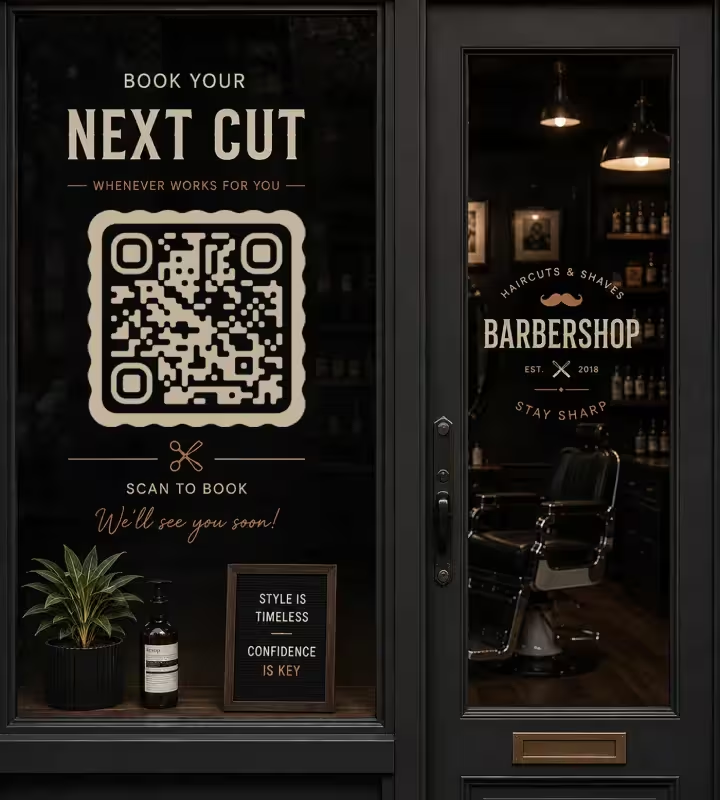
Shop Window and Door
The window code carries bookings, because it is the only code that works when the shop is shut. Read from about 2 m on the pavement, it needs roughly 20 cm of code. A decal applied to the inside of the glass has to be printed reversed so it reads correctly from the street: a mirrored QR code will not decode on most phone cameras.
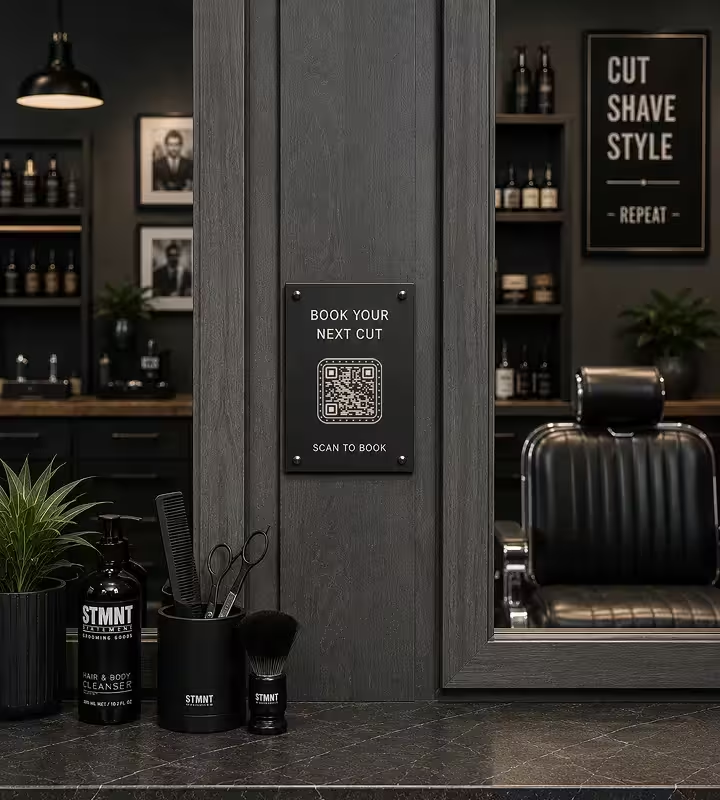
Mirror Stations and Chair Backs
One code per station, pointed at that barber's calendar, sized around 5 cm for a seated client reading from about 50 cm. Mount it on the station frame or a small stand rather than on the mirror glass, where the reflection of the room sits on top of the symbol and ring lights blow out the contrast.
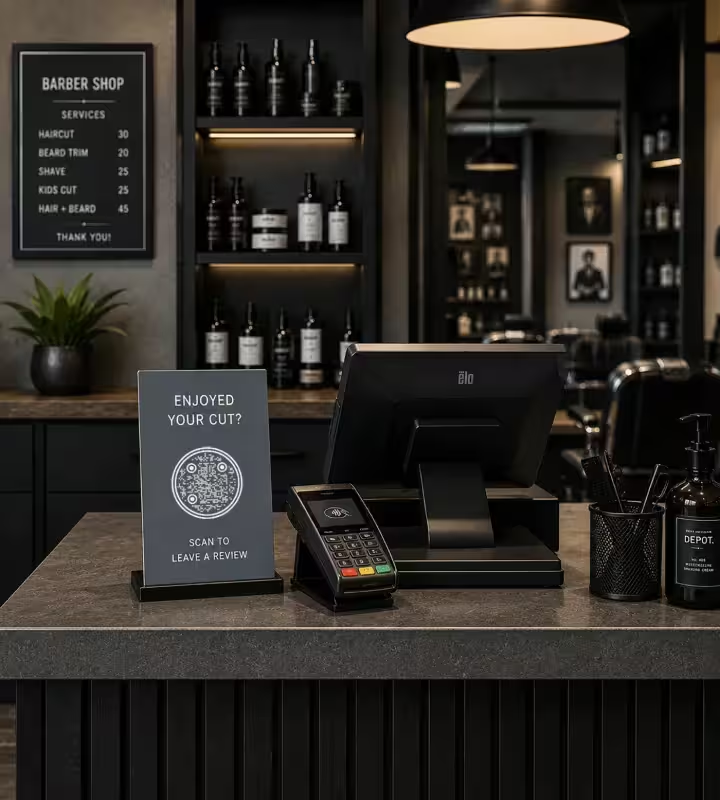
The Till and the Card Machine
The review code belongs where payment happens, at roughly 4 cm for a 40 cm read. Use an upright counter stand rather than a sticker lying flat on the counter: hair clippings, powder and product mist settle on horizontal surfaces, and a client holding a card in one hand cannot angle a phone over a flat label.
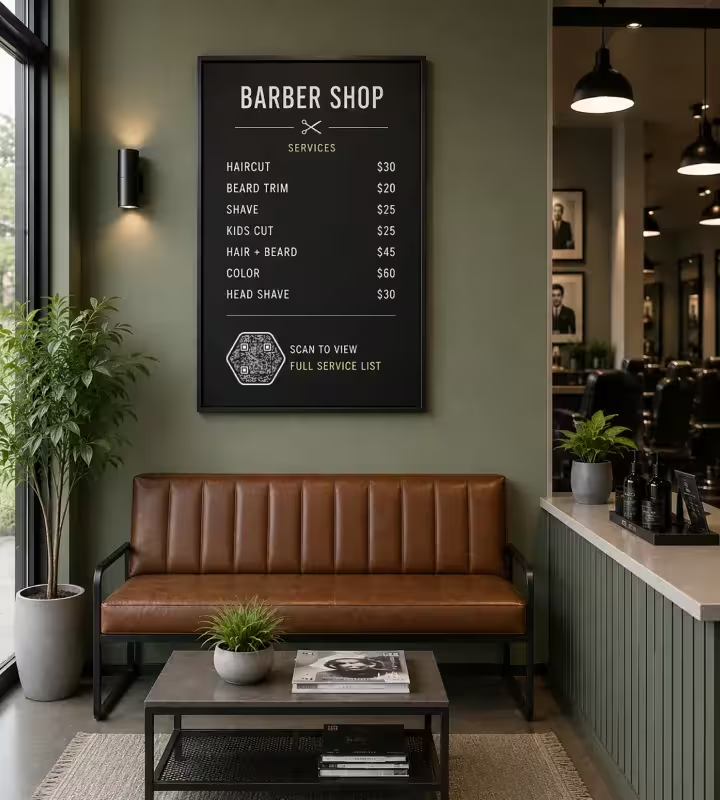
Waiting Bench, Price Board and Wi-Fi Card
The waiting area is where a long destination is acceptable, because the client is sitting down with nothing to do. A code on the price board can open the full service list, and a Wi-Fi code on the bench or the wall saves the question at the door. Read from about 1 m, both need around 10 cm.
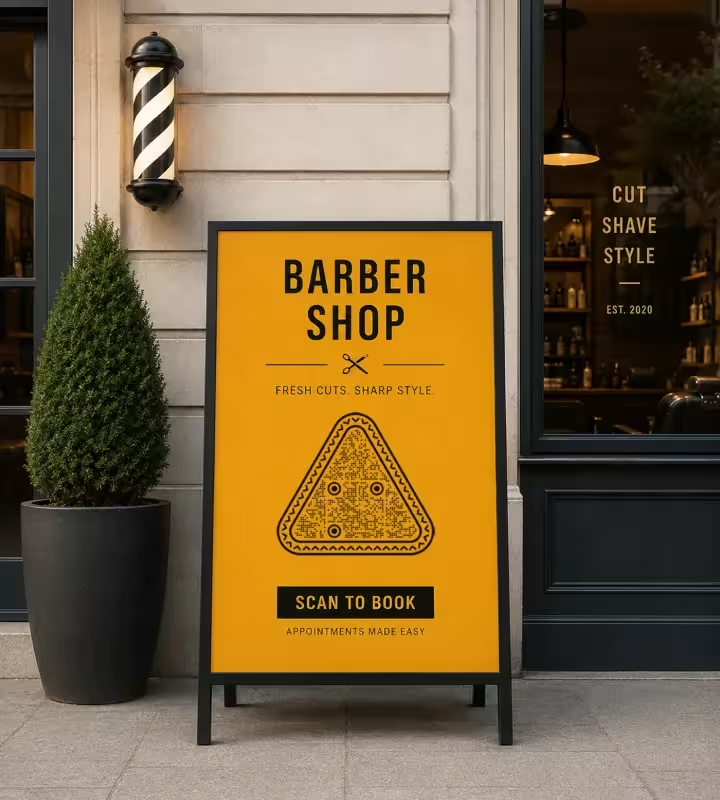
A-Boards, Business Cards and Appointment Cards
A pavement A-board is read from roughly 2.5 m by someone still walking, so it needs about 25 cm of code and one instruction, usually booking. Business and appointment cards work down to about 2 cm, which is the practical floor for any printed code, and the back of an appointment card is the natural home for a rebooking link.
Rules That Keep Barbershop QR Codes Scannable
Most failed shop codes fail for one of ten reasons, and all ten are decided before printing.
Keep the Code Darker Than Its Background
Scanners expect dark modules on a light background. Inverted light-on-dark codes read on many modern phones but fail on some scanner apps, which matters for a barbershop because black-on-black and gold-on-black are exactly the palettes shop signage tends to use.
Size the Code for the Read Distance
Use about 1 cm of code width for every 10 cm of scanning distance, with 2 x 2 cm as the practical floor. A mirror station code read at 50 cm needs roughly 5 cm; a window read from 2 m needs about 20 cm; an A-board read from 2.5 m needs about 25 cm.
Keep the Margin Around the Code Clear
A quiet zone is the blank margin around a QR code that lets a scanner find where the symbol begins. Keep at least four modules of clear space and do not let a price bubble, an opening-hours line or the edge of a decal touch the code.
Print Window Decals the Right Way Round
Decide which face of the glass the decal goes on before you order it. A sticker applied inside the window but scanned from the street must be printed reversed; if it is printed normally, the passer-by sees a mirrored code, and a mirrored QR code fails on most phone cameras.
Choose a Matte Finish That Survives Hairspray
Station codes get a daily film of hairspray, powder and clipper spray, and glossy lamination reflects station lights straight back into the camera. Matte or satin laminated vinyl costs the same as gloss, wipes clean with alcohol, and keeps reading where unlaminated paper hazes over within weeks.
Keep the Center Logo Small and Retest
Error correction is the redundancy built into a QR code that keeps it readable when part of the symbol is covered, and it has a limit. Keep a center logo small relative to the symbol, then scan the printed piece again - a logo that works on screen can fail on a 2 cm appointment card.
Say What the Scan Does
Label every code with its outcome: "Scan to book with Marco", "Scan to leave a review", "Scan for the price list". A bare code beside a shop logo gets ignored, because nobody scans when they cannot tell what they will get.
One Code, One Job
Split destinations instead of routing everything through one code and a landing menu. A client in the chair wants their barber's calendar; a stranger on the pavement wants the next free slot; a client at the till wants the review form.
Be Honest About Static Versus Dynamic
KoloQR generates static QR codes: the data sits in the symbol, so a printed code cannot be repointed and cannot count scans. If you need to change destinations after printing, or to know whether the window or the A-board brings in more bookings, use a dynamic QR service - or point each static code at a different URL you control and read the difference in your own analytics.
Re-Scan After Every Reprint
Test the physical item, not the file. Print scaling, upscaled PNGs and cheap sticker printing all lose module edges, and that damage only shows up on the decal in your hand.

Create Your Barbershop's QR Codes
Paste the destination, style the code, download SVG and PNG. Free, no account, unlimited codes.
A practical order of work: make the window booking code first, because it earns money while the shop is closed, then the till code for reviews, then one code per chair for rebooking. Print a single test decal, scan it from the pavement and from a seated position, and only then order the full set.
Generate QR CodeQuestions? Answered
Paste the link you want clients to open - your booking page, one barber's calendar, the review form or your Instagram profile - into a QR code generator, style the code, and download it as SVG or PNG. KoloQR, a free QR code generator with circular and custom-shaped QR codes, needs no account. Print at the size the read distance requires, then scan the printed copy before ordering more.
Yes. Generating static QR codes on KoloQR is free, with no account, no limit on how many you create, and both SVG and PNG exports included. Costs only appear if you choose a dynamic QR service, which hosts a redirect so you can change the destination after printing and count scans per code.
About 20 cm for a code read from the pavement at 2 m. The working rule is 1 cm of code width for every 10 cm of scanning distance, so a 5 cm window sticker only reads from about half a metre - close enough that the client is already at the door. Keep 2 x 2 cm as the absolute floor for any printed code.
On the window for bookings, at each mirror station for rebooking with that barber, at the till for reviews, and on the price board for the full service list. A Wi-Fi QR code belongs on the waiting bench or the wall beside it. Keep codes off the floor, the mirror glass and any curved bottle or pole, because a code bent around a tube stops decoding.
Usually because it is mirrored. A decal applied to the inside of the glass has to be printed reversed so the pattern reads correctly from outside, and most phone cameras will not decode a mirrored QR code. The other two causes are size - 5 cm cannot be read from 2 m - and direct sunlight on a glossy laminate.
Yes, and it is the single most useful thing a shop can do with codes. Give each chair a code pointing at that barber's own booking link, so the client rebooks with the person who just cut their hair. Static codes cost nothing, so one per barber, plus one general shop code, is normal rather than extravagant.
Point the code at the review form itself, not at your map listing or website. Put it where payment happens, on an upright card at the till, and label it with what it does. Ask while the client is checking the mirror and paying, because a review written in the chair is one you will not get by email two days later.
Yes, as long as the code points at a stable URL you control. Point it at an address like yourshop.com/prices and edit that page - the printed code never changes. What a static QR code cannot do is point somewhere else after printing; changing the address itself requires a dynamic QR service.
Usually the surface rather than the code. Hairspray, talc and clipper spray leave a film that hazes unlaminated paper, and alcohol wipes then lift the ink with it. Print station codes on matte laminated vinyl, keep them off the mirror glass and off horizontal counters where clippings settle, and replace them on a schedule instead of waiting for a client to mention it.
Yes. KoloQR supports a center logo, custom colors and circular or custom-shaped modules. Two limits are worth knowing: the code must stay darker than its background, which rules out the black-on-black look shop signage often uses, and the logo must stay small enough that the surrounding modules remain intact. Styling never improves scan performance, so test the printed version at its final size.
Static codes suit anything pointed at a URL you control: booking pages, barber calendars, price lists, Wi-Fi, Instagram. Dynamic codes are worth paying for when you need to know whether the window or the A-board brought the booking, or when you print codes on flyers whose destination changes. Most single-site shops never need more than static codes.
Keep Exploring
Pages that pick up where this one leaves off - the same setting, the same kind of code, or the next thing worth deciding.
Marketing Agencies
Produce campaign codes for client print runs: sized per placement, exported as vector, and pointed at a redirect the client keeps.
Black Friday
Sale signs, flyers, parcel inserts and queue codes for the Black Friday weekend - and what each code should do once the sale is over.
Event QR Codes
One scan connects guests to tickets, schedules, directions and RSVPs - on invites, posters and signage.
URL QR Code
Send anyone straight to a web page, landing page, or link with a single scan.
Google Review QR Code
Open your business's Google review form in one scan, with the stars ready to tap.
Photographers
Client galleries, print reorders, portfolio links and guest photo uploads, on cards, albums, prints and event signs.
Why KoloQR?
- Create QR codes for websites, menus, Wi-Fi, PDFs, and business cards
- Customize colors, logos, and unique shapes
- Download high-quality PNG and SVG files
- Built for both print and digital
