How Agencies Produce Campaign QR Codes That Survive the Print Run
An agency generating a QR code is doing it on someone else's behalf, which changes what matters. The code has to be sized for each placement in the media plan, exported in a format the client's printer accepts, styled inside brand guidelines without losing contrast, and pointed at a redirect the client still controls after the retainer ends. This page covers each of those decisions, the sizes for the formats agencies actually buy, and the placements where a QR code should not be sold at all.
Generate QR Code- Vector export for the printer
- Sized by read distance
- Free, no account
Why Agencies Put QR Codes on Client Campaigns
A QR code is the only measurable link between a printed placement and a landing page. For an agency that has to report on print, that is most of the reason it is there.
Print Becomes Attributable
A printed ad usually reports nothing. Give the bus shelter, the press insert and the direct mail pack each their own URL or UTM parameter, and web analytics separates them for the whole flight. Static QR codes carry no analytics of their own, so per-placement URLs are the only way to tell a client which half of the print budget worked.
One Landing Page Instead of a Typed Search
A campaign line and a domain sends the reader to a homepage; a QR code sends them to the campaign page itself. Every step between the poster and the offer loses people, and the QR code removes all of them, including the ones lost to typos in a URL with a campaign path in it.
The Same Code Across Every Placement
A campaign usually runs across six or seven printed formats at once, each read from a different distance. One generated code, exported at several sizes from a single vector file, keeps the artwork identical across the set while each placement still gets the physical size it needs to scan.
The Client Keeps Something That Still Works
A static QR code has its destination encoded in the pattern and depends on no account, subscription or vendor. Pointed at a redirect on the client's own domain, it keeps resolving after the campaign ends, after the retainer ends, and after the agency's own tooling is switched off - which is not true of a code created inside a dynamic platform the agency pays for.
What to Settle Before You Generate the First Code
Two agency-specific decisions cause almost every campaign code that fails later: who owns the address the code points at, and what file the printer receives. Neither can be fixed after the print run. Both are cheaper than a reprint.

A Redirect on the Client's Domain, Not Yours
Encode a short URL on the client's own domain - client.com/go/spring - and redirect it server-side to the campaign page. That keeps the printed code editable in the only sense that matters: the pattern never changes while the destination can. Encoding an agency short link instead ties the client's printed material to a domain the agency renews, and campaigns have outlived agency relationships often enough that this is worth a line in the statement of work. Set the redirect live before the artwork goes to print, because it cannot be added to a code retroactively.
A Vector File and a Scan on the Printer's Proof
Send the printer a vector file - SVG, PDF or EPS - so the code holds its edges at any size, and hand over the URL in plain text alongside it so anyone rebuilding the artwork does not retype it. Then scan the printer's physical proof, not the PDF on your screen, on one iPhone and one Android phone. A proof catches what a screen cannot: ink spread closing the gaps between modules, a varnish reflecting the light back into the camera, and a quiet zone the layout artist trimmed to fit.
Generate QR Code
How to Make a QR Code for a Client Campaign
Generating the code takes under a minute. The decisions worth the time are the destination, the contrast and the export format.
Generate QR Code- 1
Paste the Redirect URL, Not the Full Campaign URL
Paste the short redirect on the client's domain into KoloQR, a free QR code generator with circular and custom-shaped QR codes, and keep the UTM parameters on the redirect's far side rather than inside the code. Fewer characters means fewer modules, and fewer modules means larger, more forgiving squares at the same printed size - which is what lets a code work on a flyer as well as a poster.
- 2
Apply the Brand, Then Check the Contrast
Set the client's colors, add the logo in the center and choose a module shape that suits the artwork - square, round, or a fully circular code. Keep the modules clearly darker than the background and the logo well under a quarter of the code area. Styling changes how a code looks, never how well it scans, so contrast and size still decide whether it reads.
- 3
Export EPS or PDF for Print, PNG for the Deck
Download EPS or PDF for the printer and SVG for the design file; all three are vector and scale from a 2 cm flyer corner to a 30 cm exhibition panel without softening. Download PNG for the client presentation and the digital placements. KoloQR also copies a code straight into Figma, which is usually where the artwork already is.
Sizes for the Formats a Media Plan Actually Buys
Read distance sets the size, not the size of the placement. As a working rule, a QR code needs about 1 cm of width for every 10 cm of scanning distance, with 2 x 2 cm as the practical floor for any printed code.
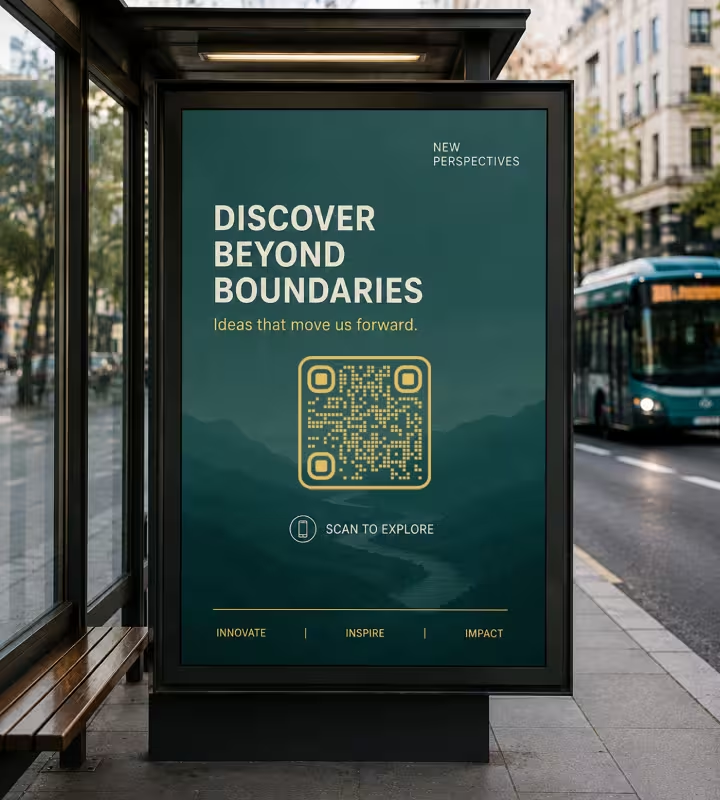
Bus Shelter and Standee, 15-20 cm
A six-sheet in a bus shelter is read from 1-2 m by someone who is standing still with nothing to do, which makes it the best-performing outdoor format for a QR code. Print the code 15-20 cm wide and place it between roughly 120 cm and 150 cm from the ground, so a phone held at chest height sits square to it rather than at an angle across the panel.

Press and Magazine Ad, 3-4 cm
A full-page press ad is held at 30-40 cm, so a 3-4 cm code is enough. Keep it at least 10 mm inside the trim edge and at least 1 cm clear of the gutter: a code that crosses the spine of a saddle-stitched magazine bends away from the camera at exactly the moment the reader tries to scan it, and a code trimmed into on press loses its quiet zone.
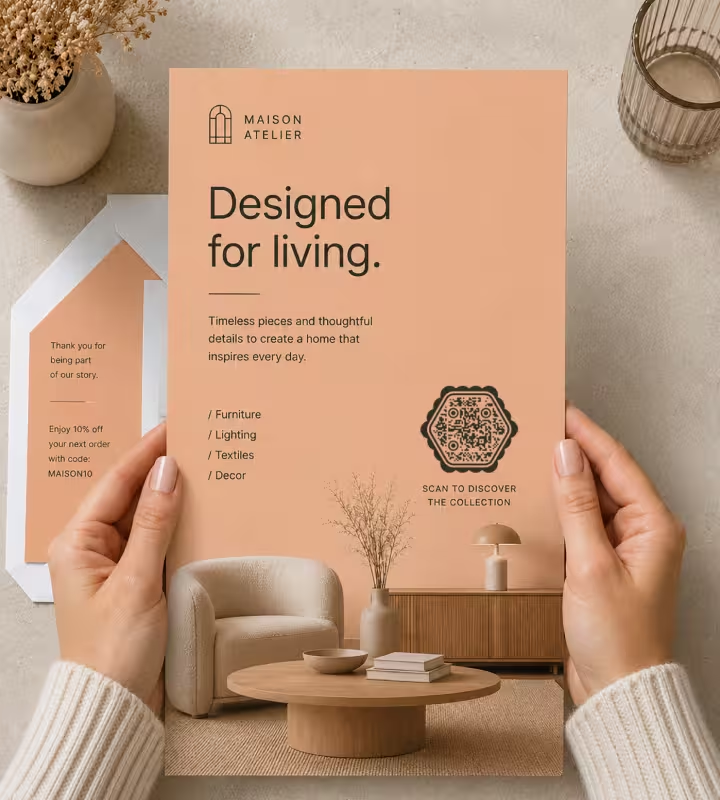
Direct Mail and Flyers, 2.5-3 cm
A DL flyer or mail pack is held at 20-25 cm, so print the code 2.5-3 cm wide. Keep it 1 cm away from every fold line, because a crease through a code breaks the module grid the scanner is measuring. On a reply device or a coupon, keep the code away from the perforation for the same reason.

Product Packaging and Labels, 2-3 cm
Print the code 2-3 cm on a pack read at arm's length, and put it on the flattest panel available. Curvature is the constraint nobody budgets for: on a bottle or a can, keep the code inside roughly a third of the visible curve so the modules at its edges are not turned away from the lens. Substrate matters too - a code printed on kraft or uncoated stock spreads, so add a little size rather than relying on the artwork proof.
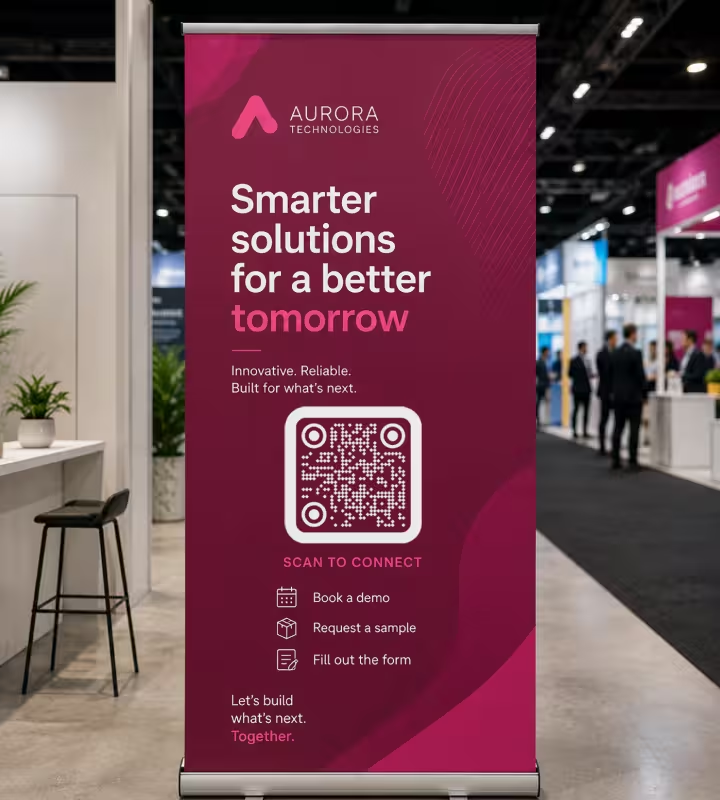
Exhibition Stands and Event Graphics, 20-30 cm
A stand graphic or pull-up banner is read from 2-3 m across an aisle, so print the code 20-30 cm wide and keep it above waist height where bodies and furniture do not block it. Point an event code at something the visitor can complete on the spot - a demo booking, a sample request, a follow-up form - rather than at a corporate homepage they will not read while standing up.
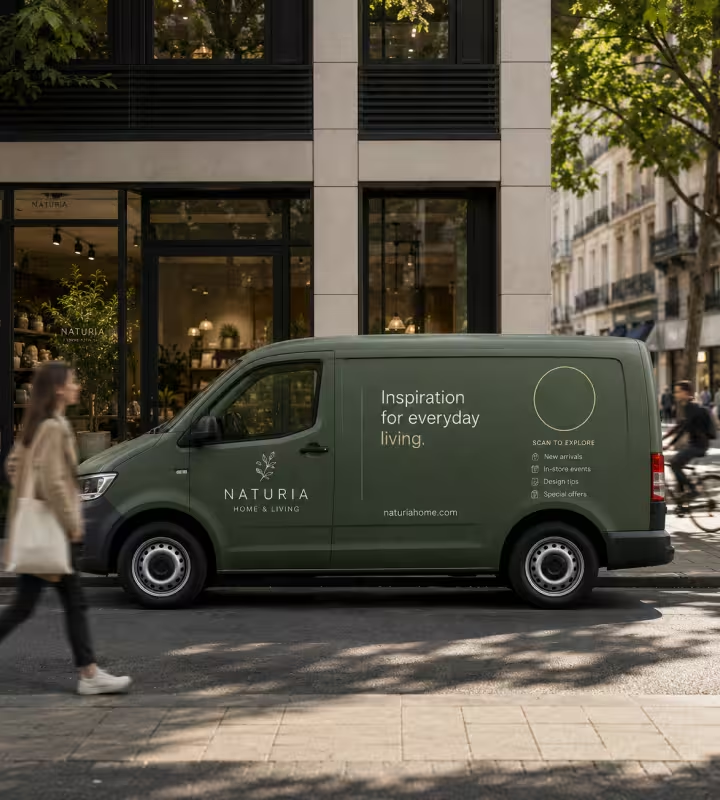
Vehicle Livery and Window Vinyl, 20 cm Minimum
A code on a parked van or a shop window is read from 1-2 m, so print it 15-20 cm and use matte vinyl. A code on a moving vehicle cannot be scanned at all and should not be sold as if it can. Behind glass, matte film also stops the street lighting and the phone's own screen reflecting back into the camera, which is the usual reason a large window code refuses to read.
Rules That Keep a Campaign QR Code Scanning
A campaign code fails for a small number of repeated reasons, and almost all of them are decided in the studio rather than at the printer.
Give Every Placement Its Own URL
Static QR codes report nothing on their own, so attribution has to be built into the destination. Point each placement at its own redirect or UTM parameter - src=shelter, src=press, src=mail - and web analytics separates them for the whole flight. The figures run slightly below true scan counts because they measure page views rather than camera reads, but the comparison between placements is reliable.
Own the Redirect on the Client's Domain
A short URL on the client's domain, redirected server-side, is the only way a static printed code stays editable. It also survives the end of the engagement. An agency-owned short domain, or a dynamic code on the agency's subscription, makes the client's printed material dependent on a bill the agency keeps paying.
Build the Dark Modules as 100% K
In CMYK print, build the code's dark modules from black alone rather than as a four-color rich black. A rich black needs all four plates to register perfectly, and any misregistration softens every module edge in the symbol at once. Pure K also keeps the code sharp on presses and substrates where the other plates spread.
Do Not Let a Brand Palette Set the Contrast
Native camera apps on iOS and Android expect dark modules on a light background, and a code printed light-on-dark fails on a noticeable share of phones. Brand guidelines regularly specify a mid-tone on a mid-tone, which is legible to a designer and invisible to a scanner. When the palette will not give enough separation, put the code in a light panel inside the layout rather than recoloring it.
Protect the Quiet Zone From the Layout
A quiet zone is the empty margin around a QR code that lets a scanner detect where the symbol begins and ends, and it must be at least 4 modules wide. On campaign artwork it is usually the first thing lost - to a strapline crowding the corner, a legal line, a bleed edge or a partner logo lockup. Lock the code and its margin as one object in the artwork so nothing can be nudged into it.
Do Not Sell a Code Where It Cannot Be Scanned
A roadside 48-sheet read at 25 m would need a code roughly 2.5 m wide, and a driver cannot hold a camera steady anyway. The same applies to a moving vehicle, a code on screen for four seconds, and anything above the second floor of a building. Recommending against those placements is cheaper than reporting on them afterwards.
Raise Error Correction Only When Something Covers the Code
Error correction is the redundancy built into a QR code that lets it still read when part of the symbol is damaged or covered, at four levels - L, M, Q and H - recovering roughly 7%, 15%, 25% and 30%. Level H is worth the extra modules when a logo sits in the middle or the code goes on packaging that scuffs. Everywhere else it makes the pattern denser, which is the opposite of what a small printed code needs.
Send Vector, and Never a Screenshot
Hand the printer SVG, PDF or EPS. A PNG dropped into a large-format layout is resampled up and the module edges go soft, which is the single most common way a well-designed code arrives at print already broken. If a raster file is unavoidable, export it at final print size at 300 dpi rather than scaling a screen-sized file.
Test on the Proof, Not on the Screen
Scan the printed proof at final size, from the distance the audience will stand at, on one iPhone and one Android handset. A code that reads on a monitor can fail on paper because of ink spread, varnish gloss, substrate texture or a laminate the studio never saw. Build the scan test into the approval step so it happens before the plate, not after the delivery.
Label the Code and Print the URL Beside It
A code with a one-line label - Scan for the full range, Scan to book a demo - is scanned far more often than a bare square, because it tells the reader what they are agreeing to open. Printing the short URL in text next to it costs one line and keeps the placement working for readers who will not scan a code and for phones that cannot.
Keep the Landing Page Alive After the Flight
Printed material outlives a campaign by months: mail packs sit in drawers, magazines sit in waiting rooms, packaging sits in cupboards. When the campaign page comes down, redirect it to the nearest evergreen page rather than deleting it. A late scan that lands on a product page is a visit; one that lands on a 404 is a complaint about the agency.
Name the Files by Placement, Not by Version
A campaign ships six or seven codes that look identical and point somewhere different, and qr-final-v3.svg is how the shelter code ends up on the mail pack. Name each export for the placement and the parameter it carries - spring-shelter-src-shelter.eps - so the wrong file is obvious in the artwork folder rather than at press.

Generate the Codes for Your Next Client Campaign
Paste the client's redirect URL, apply their colors and logo, and export EPS or PDF for the printer, SVG for the design file and PNG for the deck. KoloQR is free, needs no account, and adds no watermark or expiry - including on commercial client work.
The codes are static, so the destination lives in the printed pattern rather than on a server. Pointed at a redirect on the client's own domain, that is a feature rather than a limitation: nothing to renew, nothing to expire, and no platform between the printed placement and the page it opens.
Generate QR CodeQuestions? Answered
Give each placement its own URL or UTM parameter and read them in the client's web analytics, because a static QR code reports nothing itself. A shelter code pointing at /go/spring?src=shelter and a mail code pointing at /go/spring?src=mail appear as separate sources. The counts sit slightly below real scans, since they measure page visits rather than camera reads.
The client's. A printed code cannot be edited, so whoever owns the domain in the pattern controls whether the campaign still resolves in two years. An agency short domain ties the client's print run to a registration and a redirect service the agency maintains. Put the redirect on the client's domain and hand over the mapping with the artwork.
Size it to the read distance, not the poster: roughly 1 cm of code width per 10 cm of distance. A bus shelter six-sheet read at 1.5 m needs about 15 cm; an exhibition banner read at 2.5 m needs about 25 cm. A roadside 48-sheet read at 25 m would need a 2.5 m code, which is why QR codes do not belong on them.
Send vector - EPS, PDF or SVG - so the code stays sharp at any size, and build the dark modules as 100% K rather than a rich black. Avoid PNG in large-format artwork: scaling a raster code up softens the module edges and is the most common reason a well-designed code fails on press. KoloQR exports all three vector formats and also copies a code straight into Figma, which is usually where the layout already lives.
Yes, within one hard constraint: the modules have to stay clearly darker than the background. KoloQR supports custom colors, a center logo and square, round, hexagonal or fully circular codes, so most guidelines can be honoured. Where the palette gives too little separation, place the code in a light panel rather than recoloring it lighter.
Only if you need scan analytics from the code itself, or need to change the destination without touching the redirect. For everything else, a static code pointed at a redirect on the client's domain gives the same editability with no subscription and no vendor that can take the campaign offline. Dynamic platforms are the right answer when per-code dashboards are contracted deliverables.
Yes, including commercial print runs and work you bill for. KoloQR is free, applies no watermark, sets no expiry and imposes no licence fee on the codes it generates. The codes are static, so a printed placement keeps working without a subscription and without depending on KoloQR staying online.
Print introduces four variables a screen does not: ink spread closing the gaps between modules, gloss varnish or laminate reflecting light into the camera, substrate texture on uncoated or kraft stock, and misregistration softening a rich black. Check all four on a physical proof at final size, and rebuild the dark modules as 100% K if they were not already.
One per placement you want to measure separately, not one per campaign. Six placements with six redirects cost nothing extra to generate and turn print into six reportable lines. The codes can look identical if the artwork requires it - the difference lives in the URL, so name the export files by placement to stop the wrong one reaching the wrong layout.
Redirect the campaign page to the nearest evergreen page instead of deleting it, and leave the redirect in place. Mail packs, magazines and packaging keep being scanned for months after a flight ends. A late scan that lands on a live product page is a free visit for the client; one that lands on a 404 is a support ticket with the agency's name on it. Seasonal retail campaigns are the sharpest case, and QR codes for Black Friday lays out a redirect plan from early access to the weeks after the sale.
Keep Exploring
Pages that pick up where this one leaves off - the same setting, the same kind of code, or the next thing worth deciding.
Beauty Salons
Rebooking at the chair, per-service aftercare and a portfolio per stylist, with codes that survive acetone, colour and hairspray.
Barbershops
Window bookings, one code per chair for rebooking, reviews and Instagram - with sizes in cm and finishes that survive hairspray and station lights.
Black Friday
Sale signs, flyers, parcel inserts and queue codes for the Black Friday weekend - and what each code should do once the sale is over.
Amazon QR Code
Take a scan straight to a product page, a storefront, or a wish list.
Shopify QR Code
Open a product, a collection, or a pre-filled basket in a single scan.
Nonprofits
Donation codes for appeal letters, collection tins, event banners and charity shop windows, with sizes in cm and the trust rules that keep them safe.
Why KoloQR?
- Create QR codes for websites, menus, Wi-Fi, PDFs, and business cards
- Customize colors, logos, and unique shapes
- Download high-quality PNG and SVG files
- Built for both print and digital
