QR Codes for Event Agencies: Client Redirects, Signage Sizes and Badge Runs
An agency prints QR codes for events it does not own, on deadlines set by a print run rather than by the client's website. That changes two things: every code should point at a redirect on a domain the client will still control after the contract ends, and every code should be proofed at final size on the actual substrate before the artwork is released. This page covers the handover question, the sizes for banners, badges, exhibitor stands and A-boards, and the spec sheet worth sending to anyone printing on your behalf.
Generate QR Code- Sized by read distance
- Print-ready SVG & PNG
- Free, no account
Why Event Agencies Standardize Their QR Codes
An agency runs several events at once, each with its own client, brand kit, print supplier and deadline. A QR code that is generated ad hoc for one deliverable becomes a support call at the venue; a code produced to a written standard does not.
One Standard Survives Five Print Suppliers
A single event can involve a large-format printer for banners, a litho printer for programs, a badge bureau and an exhibitor doing their own stand graphics. Writing down one specification - minimum size, quiet zone, contrast, file format - and sending it with the artwork is what stops four of those five producing a code that scans and one producing a code that does not.
Codes Outlive the Engagement
Printed material stays in circulation after the event and after the contract. A code pointing at an agency-owned short link goes dark when that domain lapses or the client moves agency, while a code pointing at a redirect on the client's own domain keeps working and keeps the scan data with the client.
Attendees Arrive Without Your App
Delegates, sponsors, contractors and press turn up with the phone they already own. Every current iPhone and Android phone reads QR codes from the built-in camera, so a printed code reaches all of them with nothing to install - which is why check-in, floor plans and session feedback are worth putting behind one.
The Same Artwork Runs Again Next Year
Reusable hardware - pull-up banners, A-boards, crew signage, table numbers - is stored and brought back for the next edition. If those codes point at a redirect the agency can repoint, the second edition needs new content, not new print, which is a real line saved on a repeat client's budget.
Two Decisions to Make Before the First Code Is Generated
Almost every failed agency QR code traces back to one of two things: the link was chosen by whoever was fastest, or the code went to print without anyone scanning it on the material it would be printed on.

Decide Whose Domain the Redirect Lives On
Point every event code at a redirect on a domain the client controls, not at a deep link into a ticketing platform and not at an agency short-link domain. A static QR code encodes a fixed address, so the redirect is the only part you can change after printing - and whoever owns that domain owns the printed material for the rest of its life. Agree the domain in writing at kick-off, before any artwork is signed off.
- Client Domain, Agency Access - a path such as the client's own site with a short redirect on it, which you are given access to manage for the duration of the event.
- One Path per Deliverable - separate redirects for check-in, the program, the floor plan and the feedback form, so any one of them can be repointed without touching the others.
- No Session IDs or Tokens - addresses copied out of a logged-in ticketing or CRM system expire, often before the print run is even delivered.
Write the destination URLs into the job sheet alongside the artwork files. An event code is checked months later by someone who was not in the kick-off meeting, and the encoded address is not readable from the printed sheet.
Proof the Code at Final Size on the Real Substrate
Print one physical proof at the exact final size, on the exact material, and scan it on one iPhone and one Android phone from the distance an attendee will actually stand. Vinyl, foamex, fabric and thermal badge stock all reproduce a QR code differently, and a PDF proof shows none of that. Fabric is the one that catches agencies out: a tension-fabric backdrop or a table throw has a weave and a slack surface, and both blur module edges enough to break a code that scans perfectly on paper.
Build the proof into the schedule rather than the sign-off email. Large-format signage typically goes to print two to three weeks before doors open, which means the landing page has to exist and be final before that date - not on the morning of the event.

How to Produce an Event QR Code Set for a Client
Generating each code takes about a minute. The naming, sizing and proofing around it are what keep a set of thirty codes straight.
Generate QR Code- 1
Paste the Client Redirect
Paste the redirect URL agreed with the client - one per deliverable, on their domain. Use the https:// version and open it on a phone before you encode it, because a QR code cannot fix a destination that is broken on mobile or that has not been built yet.
- 2
Apply the Client's Brand Kit
Set the client's brand color on the dark modules, keep the background white or a very light tint, and add their logo in the center. Choose a square or circular symbol to match the event identity, and keep the same treatment across the whole deliverable set so the codes read as one campaign.
- 3
Export SVG for Print, PNG for Screens
Download SVG for anything going to a printer, since a vector file is placed at 2.5 cm on a badge or 30 cm on a stand fascia from the same file. Download PNG for holding slides, digital signage and social assets, exported at least three times the pixel size it will be displayed at. Name each file after the deliverable and the destination, not after the client.
Where Event Codes Go, and What Size Each One Needs
Size follows read distance. The working rule of thumb is roughly 1 cm of code width for every 10 cm of scanning distance, with 2 cm as the practical minimum for any printed code. Every size below is that rule applied to a real event deliverable.
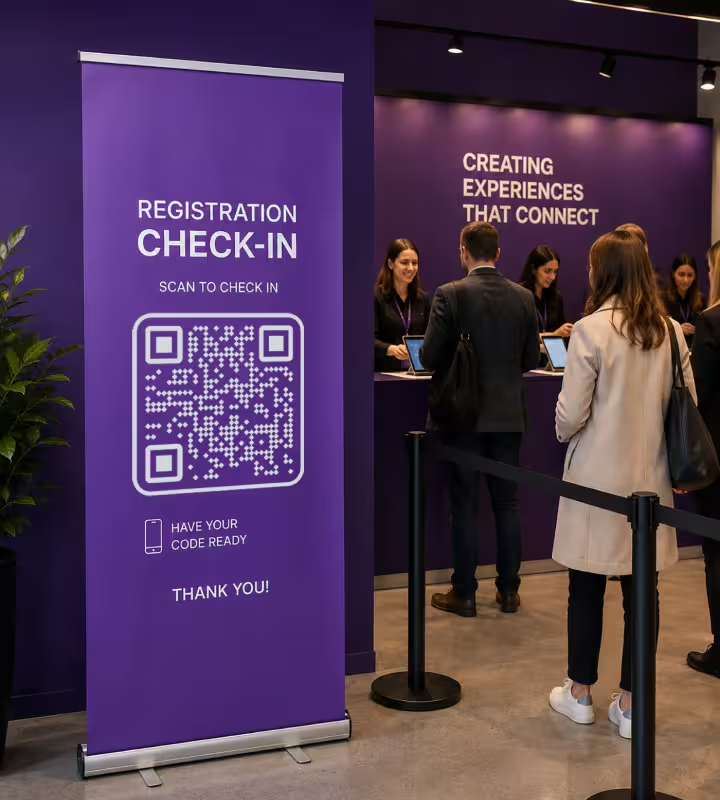
Registration and Check-In Signage
A code read from about 1.5 m in a queue needs to be around 15 cm wide, mounted between 120 and 160 cm from the floor so it is square to a held phone and reachable from a wheelchair. Put it on rigid board rather than a fabric banner, and keep it out of the doorway glare that entrance halls almost always have.
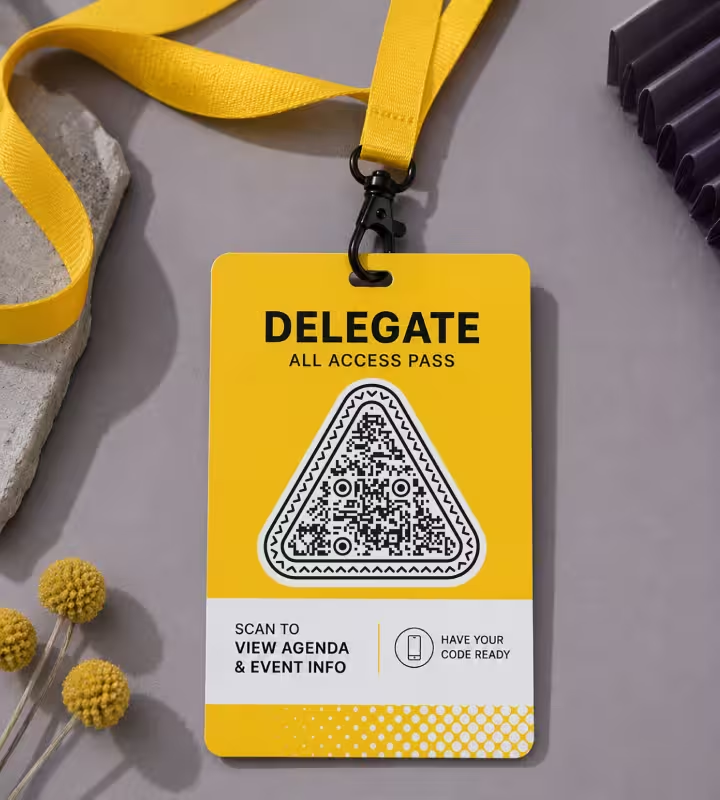
Delegate Badges and Lanyards
Print badge codes 2.5-3 cm wide with the quiet zone inside the badge area, not running off the die-cut. On a 300 dpi thermal badge printer, keep each module at four printer dots or more, and test a live badge from the on-site printer rather than a proof from the studio - direct-thermal stock and studio laser output are not the same surface.

Exhibitor and Sponsor Stands
A fascia code read from about 3 m across an aisle needs roughly 30 cm. Exhibitors usually print their own graphics, so send the specification with the stand pack: minimum size for their read distance, dark on light, four modules of quiet zone, and SVG supplied by you rather than a screenshot of your code.

Programs, Table Cards and Session Boards
A 2-3 cm code is enough on anything held or read at arm's length: printed programs, table numbers, seat drops, session boards outside a room. Give each its own destination - the agenda, the speaker bio, the session feedback form - rather than sending everything to one hub page and asking the reader to navigate.

Pull-Up Banners and A-Boards
On a pull-up banner or an A-board read from 2 m, use a 20 cm code and place it in the upper half of a pull-up, since the bottom 40 cm of an 85 x 200 cm banner is behind the crowd all day. These are the deliverables most likely to be stored and reused, so point them at a redirect you can repoint for the next edition.

Stage Backdrops and Auditorium Screens
Do not put the scannable code on the stage backdrop. An audience sits 5-15 m from it, which by the sizing rule needs a code 50-150 cm wide, and the room is dark. Put the code on a holding slide on the auditorium screen instead, leave it up for at least 20 seconds, and repeat it on the lectern and the session board outside the door.
Agency Rules Worth Writing Into the Job Sheet
These are the checks that catch a failing code while it is still a file. After the print run they cost a reprint, and at an event there is no reprint.
Keep the Code Dark on a Light Background
Print dark modules on white or a very light tint, and do not invert a code to light-on-dark because the event identity is dark. Phone cameras are built to expect a dark symbol on a light field, and inverted codes are read inconsistently across devices even when a single test scan succeeds. If the brand is dark, put the code in a light panel inside the design.
Keep Four Modules of Blank Margin
A quiet zone is the blank margin around a QR code that lets a scanner detect where the symbol begins and ends, and the QR standard specifies four modules of clear space. On event artwork the usual culprits are a sponsor logo strip, a bleed line and a badge die-cut, so check the margin against the trimmed size rather than the artboard.
Print the URL in Text Beside Every Code
A printed URL next to the code serves the delegate whose camera will not focus, whose battery is flat, or who is using a screen reader - a QR code is an image and carries no accessible text. Keep the visible URL short enough to type by hand, which is one more reason to use a redirect on a short path rather than a deep platform link.
Size to the Distance, Then Round Up
Apply roughly 1 cm of code width per 10 cm of read distance, then round up rather than down. Rounding up costs a little artwork space; rounding down means a delegate steps closer, casts a shadow on the code in a hall lit from above, and gives up after two attempts.
Specify Matte for Anything Under a Downlight
Matte lamination scatters light, gloss lamination reflects it straight back into the camera. Registration desks, exhibition halls and hotel foyers are all lit from above at close range, so specify matte for any laminated code and avoid mounting one behind glass or acrylic.
Keep the Client Logo Under About 30% of the Code
Error correction is the redundancy built into a QR code that lets it stay scannable when part of the symbol is covered or damaged, and level H recovers roughly 30% of the data. A client logo centered on a level-H code is normally fine at that size; a logo covering half the symbol is not, whatever one successful test scan suggests.
Give Every Deliverable Its Own Destination
Check-in, the agenda, the floor plan, the exhibitor list and the feedback form are five different moments, and a single hub code makes every one of them a two-step task. Separate redirects also mean the post-event report can say which deliverable was scanned, instead of reporting one number for the whole event.
Never Encode Personal Data in a Badge Code
A QR code is not encrypted - anyone can decode its contents with a phone, and badges are photographed and posted publicly all day. Never encode a delegate's email address, phone number or ticket token in the symbol. Encode an opaque reference or a link to an authenticated page, and let the check-in system resolve the identity.
Version the Code Set for Each Edition
Never reprint last year's artwork with last year's code and assume the redirect was updated. Keep a job sheet listing every code, its deliverable, its destination and the date it was last verified, and re-scan the stored hardware during load-in for the next edition before it goes on the floor.
Scan the Delivered Print, Not the Proof PDF
Check the physical delivery from each supplier on arrival, at the distance it will be read from, on two phones. Ink spread on uncoated stock, a downscaled raster placed instead of the vector, and a banner printed at 90% to fit a frame all break codes that were correct in the artwork - and all of them only show on the finished item.

Generate the QR Code Set for Your Next Event
Paste the client redirect, apply their brand color and logo, and download SVG for the print supplier and PNG for the screens. KoloQR, a free QR code generator with circular and custom-shaped QR codes, requires no account and adds no watermark.
KoloQR generates static QR codes, which encode the URL directly and never expire. Static codes carry no built-in scan analytics and no dashboard for repointing a printed code, so an agency contracted to report per-code scan counts to a client will need either a redirect it can measure or a dynamic QR service. In practice a short redirect on the client's domain covers both needs: it can be repointed between editions, and the scans land in the client's own web analytics rather than in a third-party account that stops working when a subscription lapses.
Generate QR CodeQuestions? Answered
The client should own the domain the code points at, with the agency given access to manage the redirect during the event. Printed material outlasts the contract, and a code pointing at an agency-owned short link stops working when that domain lapses or the client moves agency. Agree this at kick-off, before artwork sign-off.
About 20 cm wide for a banner read from 2 m, placed in the upper half so the crowd does not stand in front of it. The underlying rule is roughly 1 cm of code width for every 10 cm of read distance, and the minimum size for print is 2 cm regardless of distance.
Not as the scannable one. An audience sits 5-15 m from the backdrop, which needs a code 50-150 cm wide by the sizing rule, and auditoriums are dark. Show the code on a holding slide on the screen for at least 20 seconds instead, and repeat it on the lectern and the board outside the room.
Send a one-page specification with the stand pack and supply the SVG yourself. State the minimum code width for their read distance, dark modules on a light background, four modules of quiet zone, and no screenshots or resized rasters. Ask for a photo of the printed graphic during build so a failure is caught at load-in.
2.5-3 cm wide, with the quiet zone inside the badge area rather than running off the die-cut. On a 300 dpi thermal badge printer, keep each module at four printer dots or more, and test a badge produced by the on-site printer on its actual stock - studio laser proofs do not predict direct-thermal output.
It can if it points at a hub page, but it makes every task two steps and reduces the post-event report to a single number. Separate codes for check-in, the agenda, the floor plan and feedback are clearer for attendees and tell you which deliverable actually earned its scans.
Yes, if the code points at a redirect you can repoint. Update the destination for the new edition, then scan every stored item during load-in before it goes on the floor. Never assume a stored banner's redirect was updated - re-scanning the physical item is the only check that proves it.
Tension fabric has a weave and a slack surface, and both blur module edges enough to break a code that scans on paper. Print the scannable code on rigid board, foamex or vinyl beside the fabric instead. If it must sit on fabric, print it substantially larger than the sizing rule requires and proof the finished panel.
Not necessarily. A static code pointing at a redirect on the client's domain gives scan counts in the client's own web analytics and can be repointed between editions. A dynamic service is worth it when the client wants a per-code dashboard they log into themselves, or when no one can manage a redirect for them.
Yes. Use the brand color on the dark modules only, keep the background light, and center the logo at under roughly 30% of the code area with error correction at level H. A code printed in two mid-tone brand colors is the most common branding failure - a phone camera cannot resolve the contrast.
Keep Exploring
Pages that pick up where this one leaves off - the same setting, the same kind of code, or the next thing worth deciding.
Banners
Roll-ups, exhibition and outdoor banners - the size the distance demands, the height that works, and why mesh and wind break scans.
Event QR Codes
One scan connects guests to tickets, schedules, directions and RSVPs - on invites, posters and signage.
Photographers
Client galleries, print reorders, portfolio links and guest photo uploads, on cards, albums, prints and event signs.
Marketing Agencies
Produce campaign codes for client print runs: sized per placement, exported as vector, and pointed at a redirect the client keeps.
Colored QR Codes
Put your palette on a QR code without breaking it: which color goes on the pattern, and which belongs on the frame.
Transparent QR Codes
Codes with no background of their own - which surfaces they scan on, which ones break them, and how to place one on photos, video, glass and clear labels.
Why KoloQR?
- Create QR codes for websites, menus, Wi-Fi, PDFs, and business cards
- Customize colors, logos, and unique shapes
- Download high-quality PNG and SVG files
- Built for both print and digital
