Make a Pinterest QR Code That Opens the Right Board
Enter your username or paste a board link, style the code to match your printed work, and download one that opens Pinterest in the app or the browser on any phone.
Opens in Google Maps. Coordinates work too - "37.4224, -122.0841".
The code opens your business's "Write a review" form. Paste the Place ID, or a Google Maps link that carries one.
A UPI link carries no checksum, so a mistyped ID produces a code that scans perfectly and pays somebody else. Paste the ID from your payment app rather than typing it, and send yourself one rupee before printing.
Paste it exactly as copied. KoloQR does not assemble the payload - it encodes the one your bank issued, and checks it before you print it.
SVG, PNG, JPG • Max 2 MB
First month free
then $9/month
Dynamic QR Codes Are Coming
Change your link anytime, even after printing. See who scans, when and where.
- Edit without reprinting
- Scan analytics
- Bulk & custom domains
You're on the List
We'll email you once, when dynamic codes with scan analytics launch.
What Is a Pinterest QR Code?
A Pinterest QR code is a QR code that stores the web address of a Pinterest profile, board, or Pin. Scanning it opens that page in the Pinterest app if it is installed, or in a mobile browser if it isn't. The address lives in the pattern, so the printed code needs no account and no service behind it.

Pincodes Are Gone, Ordinary QR Codes Are Not
Pinterest used to have a code of its own, called a Pincode - a circular pattern of dots read only by Pinterest's in-app camera. It was retired, and the gap it left is worth understanding:
- What a Pincode Was - a proprietary pattern, scannable only from inside the Pinterest app, which meant the person scanning already had to be a Pinterest user.
- Why It Was Withdrawn - the same reason most in-app codes fade: phone cameras learned to read standard QR codes, and a code that needs a specific app installed reaches a fraction of the people who see it.
- What Replaces It - an ordinary QR code holding the pinterest.com address. Any camera reads it, the app opens it if installed, and the browser opens it if not.
So there is nothing to migrate and nothing to compare against: if you want a scannable Pinterest link today, a standard QR code is the only option, and it is also the better one. Spotify Codes are the best-known format that did survive, and they carry exactly the limitation Pincodes did - they scan only from inside Spotify's own app. It can be drawn in your own colours and shapes - see branded QR codes - and exported as vector for print, neither of which a Pincode could do.
Point at a Board, Not a Profile
Pinterest is the one social network where the profile is rarely the right destination. People do not follow accounts on Pinterest the way they follow them elsewhere; they save from collections, and a board is what a collection looks like. A code that opens pinterest.com/yourname lands someone on a wall of unrelated boards and asks them to work out which one they wanted. A code that opens pinterest.com/yourname/kitchen-renovations lands them exactly where the printed thing in their hand was talking about. Boards are also more durable than individual Pins. A Pin is a link to a source page, and source pages move, expire, and get redesigned - a printed code pointing at one Pin can end up opening an image whose link goes nowhere. A board absorbs that: individual Pins inside it may rot, but the board keeps its name, its address, and everything else in it. For a printed catalogue, a sample card, or a shop shelf, the board is the destination that is still right in two years.
Generate QR Code
Where Pinterest QR Codes Are Used
Pinterest's audience is planning something, usually something physical, which is why print and Pinterest fit together better than the pairing sounds:

Interior and Paint Sample Cards
The sample answers “what colour”; the board answers “what does a whole room in it look like”, which is the actual question.
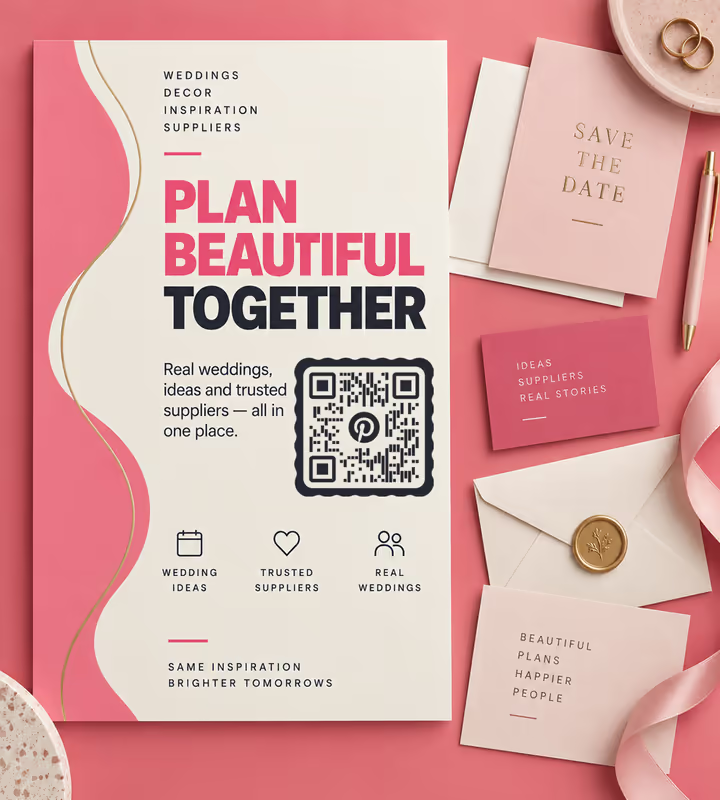
Wedding Stationery and Supplier Brochures
Planning a wedding happens on Pinterest. A florist's board is a portfolio the couple can save into their own.
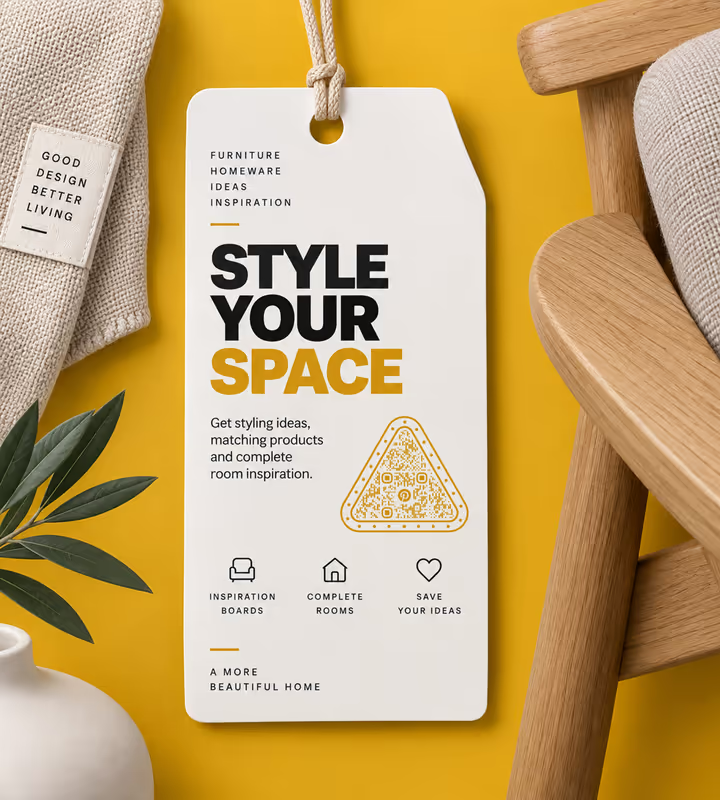
Furniture and Homeware Tags
A swing tag with a styling board on it turns one purchase into three, and Pinterest is where people assemble the rest of the room.
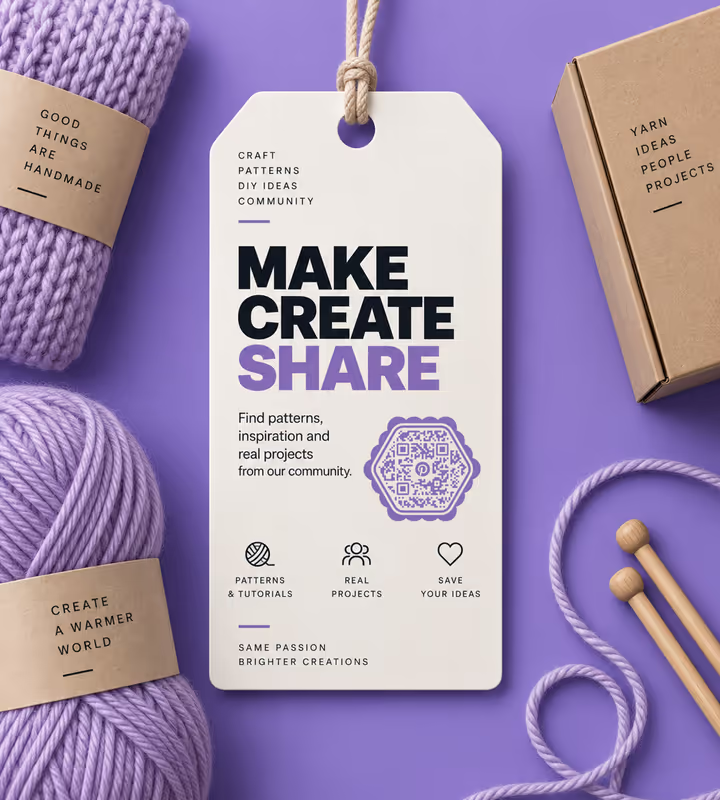
Craft and Yarn Packaging
The board is where the patterns and finished projects live, which is what a ball of yarn cannot show on its own.
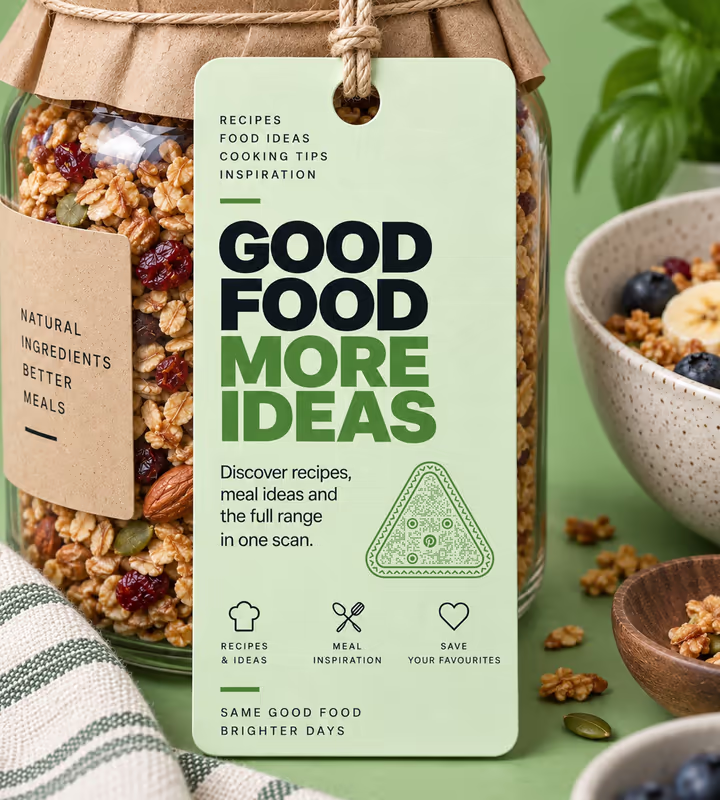
Recipe Cards and Food Packaging
Recipes are saved on Pinterest more than anywhere else, and a board keeps the whole range one scan from the pack.

Trade Show Stands for Design Brands
A visitor who saves your board has taken your catalogue home in a form they will actually open again.
- 1
Pick the Board You Want People to Land On
Open it on Pinterest and copy the URL - pinterest.com/yourname/board-name. Tidy the board first: it is a landing page now, not a scrapbook.
- 2
Choose Pinterest and Paste the Link
Paste the full board URL. For a profile code, type just the username and KoloQR adds pinterest.com/ in front.
- 3
Customize the Design
Choose a shape, set the colors, add a logo. Pinterest red is dark enough to carry the modules on white, so this is one brand colour you can put in the pattern itself.
- 4
Test and Export
Scan on a phone without Pinterest installed as well as one with it - the logged-out web view is the journey most new visitors get. Then export SVG or PDF for print.

Which File Format Should You Download?
KoloQR exports your Pinterest QR code in three formats. Pick by where it will be seen:
- PNG for websites, newsletters, and social posts, where the code appears at one fixed size.
- SVG for swing tags, sample cards, and brochures - anything a printer will scale without softening the edges.
- PDF for handing to a print shop or dropping into a packaging artwork file at print-ready quality.
Board URLs are longer than profile URLs - a username plus a slugged board name can run past 45 characters - so a board code carries more modules than a profile one. On a small swing tag that is the difference that decides whether it reads, which is an argument for short board names as much as for vector export.
Generate QR CodeBest Practices for Pinterest QR Codes
Pinterest rewards a specific destination and punishes a vague one, and its URL structure has one trap in it:
Send People to a Board, Not the Profile
A board is a themed collection someone can save from immediately. A profile is a wall of boards that asks them to choose, and most will not.
Keep Board Names Short Before You Encode Them
The board name becomes the URL slug. “Kitchens” makes a much sparser pattern than “Kitchen Renovation Ideas and Inspiration”, and renaming is free until it is printed.
Avoid Pointing at a Single Pin
A Pin is a link to a source page, and source pages move. The Pin stays but its destination rots, and a printed code cannot be repointed.
Tidy the Board Before It Becomes a Landing Page
The first two rows are what a scanner sees. Reorder so the strongest images are at the top and remove anything off-theme.
Say What Board It Opens
“Scan for 40 kitchens in this colour” earns scans that “Follow us on Pinterest” does not. Name the collection, not the network.
Pinterest Red Can Carry the Pattern
It is dark enough against white to hold the modules, unlike most social brand colours. Scan the exported file to confirm before a print run.
Check the Logged-Out View
Pinterest prompts signed-out visitors to register, and how hard it pushes varies. Open your board in a private browser window to see what a first-time scanner actually gets.
Protect the Quiet Zone
Four modules of clear margin on every side. On a swing tag or a sample card, that margin is the first thing a tight layout gives up.
Size It for the Distance
Roughly a tenth of the reading distance, plus a little for the longer URL: about 2.5 cm on a swing tag, 20-30 cm on a stand graphic read from 2-3 metres.
Don't Rename the Board After Printing
Renaming a board changes its URL slug, and Pinterest does not redirect the old one. Every printed code pointing at it stops working.
Why Your Pinterest QR Code Isn't Working
Pinterest codes usually scan fine and disappoint at the destination. These four cover nearly every case.
The Scan Opens a Sign-Up Prompt
- Cause
- Pinterest is interrupting a logged-out visitor before showing the content. It does this more aggressively on some surfaces and in some regions than others.
- Fix
- Check your board in a private browser window and see how far a stranger gets. Where the wall is hard, point the code at a page on your own site that shows the images and links Pinterest from there.
The Board Link Now Returns Nothing
- Cause
- The board was renamed or merged. The URL slug is built from the board's name, and Pinterest does not redirect the old slug to the new one.
- Fix
- Rename it back if you can, or reprint. For anything long-lived, encode a short URL on your own domain that redirects to the board, so a rename costs you one edit rather than a print run.
A Pin Opens but Its Link Goes Nowhere
- Cause
- The Pin points at a source page that has moved or been taken down. The Pin itself survives; what it links to did not.
- Fix
- Point printed codes at a board rather than a Pin. A board absorbs individual link rot; a code pointing at one Pin inherits it entirely.
The Code Is Too Dense for a Swing Tag
- Cause
- A long board name makes a long URL slug. Forty-five characters or more pushes the symbol to a higher version, which means smaller modules in a space that was already small.
- Fix
- Shorten the board name before printing, which shortens the slug, or move the code to a larger surface. On tags below about 2 cm, a profile URL may be the only thing that fits.
Still not sure whether the fault is the file or the print? Drop the exported image into the QR code scanner - if it decodes on a desktop and not on paper, the fault entered after the file.
Questions? Answered
A Pinterest QR code stores the web address of a Pinterest profile, board, or Pin. Scanning it with a phone camera opens that page in the Pinterest app if it's installed, or in the browser if it isn't.
Pinterest retired them. Pincodes were a proprietary circular pattern readable only inside the Pinterest app, and phone cameras now read standard QR codes natively - which reach everyone rather than only Pinterest users.
Copy the board's URL from Pinterest, choose the Social type in KoloQR, pick Pinterest, and paste it in. Style the shape, colors, and logo if you like, then download PNG or SVG.
A board, almost always. Pinterest users save from themed collections rather than following accounts, so a board gives them something to do immediately. A profile asks them to pick, and most won't.
Yes, but it's the most fragile choice. A Pin links to a source page, and source pages move or disappear - leaving a printed code that opens an image whose link is dead. A board absorbs that risk.
The URL slug changes and the old address stops working, with no redirect. Every printed code pointing at it breaks. Settle the board name before printing, or point the code at a redirect you control.
Not to look, though Pinterest prompts signed-out visitors to register and how hard it pushes varies. To save anything from your board, yes. Check the logged-out view in a private browser window first.
Usually yes - it's dark enough to carry the pattern on a white background, unlike most social brand colours. Scan the exported file to confirm before committing to a print run.
Because the URL is longer. A board address adds a slugged board name to the username, which can push it past 45 characters and up a symbol version. Short board names make sparser codes.
Not on its own - a static code has no server in the middle to count anything. Point it at a link you control with tracking on it, then redirect that to the board.
Keep Exploring
Pages that pick up where this one leaves off - the same setting, the same kind of code, or the next thing worth deciding.
X (Twitter) QR Code
Send people straight to your X profile, a single post, or a one-tap follow prompt.
TikTok QR Code
Send people straight to your TikTok profile, a single video, or a campaign hashtag.
Instagram QR Code
Send people straight to your Instagram profile, a single post, or a reel.
Beauty Salons
Rebooking at the chair, per-service aftercare and a portfolio per stylist, with codes that survive acetone, colour and hairspray.
Photographers
Client galleries, print reorders, portfolio links and guest photo uploads, on cards, albums, prints and event signs.
Reddit QR Code
Open a subreddit, a profile, or a single post with one scan.
Why KoloQR?
- Create QR codes for websites, menus, Wi-Fi, PDFs, and business cards
- Customize colors, logos, and unique shapes
- Download high-quality PNG and SVG files
- Built for both print and digital
