Make a Spotify QR Code Any Phone Camera Can Read
Paste a playlist, album, or artist link, style the code to match your artwork, and download one that opens Spotify from any camera - not only from inside the Spotify app.
Opens in Google Maps. Coordinates work too - "37.4224, -122.0841".
The code opens your business's "Write a review" form. Paste the Place ID, or a Google Maps link that carries one.
A UPI link carries no checksum, so a mistyped ID produces a code that scans perfectly and pays somebody else. Paste the ID from your payment app rather than typing it, and send yourself one rupee before printing.
Paste it exactly as copied. KoloQR does not assemble the payload - it encodes the one your bank issued, and checks it before you print it.
SVG, PNG, JPG • Max 2 MB
First month free
then $9/month
Dynamic QR Codes Are Coming
Change your link anytime, even after printing. See who scans, when and where.
- Edit without reprinting
- Scan analytics
- Bulk & custom domains
You're on the List
We'll email you once, when dynamic codes with scan analytics launch.
What Is a Spotify QR Code?
A Spotify QR code is a QR code that stores an open.spotify.com link to a playlist, album, artist, or track. Scanning it opens that page in the Spotify app if it is installed, or in a mobile browser if it isn't. The link lives in the pattern, so any phone camera reads it without Spotify installed.

Spotify Codes Only Scan Inside Spotify
Spotify has a code of its own - the small bar-chart pattern under the share menu - and the difference is not quality, it is reach:
- Where a Spotify Code Works - inside the Spotify app, through the camera icon in the search bar. The person scanning must already have Spotify installed and know where that scanner lives.
- Where It Doesn't - the phone camera. Point iOS or Android at a Spotify Code and nothing happens; it is not a QR code and the camera has no idea what it is looking at.
- What a QR Code Does Instead - holds the ordinary open.spotify.com web address, which every camera reads, every browser opens, and the Spotify app claims when it is installed.
So a Spotify Code is right for a screenshot shared between two people who both use Spotify. A QR code is right for anything printed, because the person who picks up a poster, a wedding order of service, or a record sleeve is using their camera and may not have Spotify at all. It also exports as vector and can be drawn in your own colours, which a Spotify Code cannot.
What Plays Depends on Who Scanned It
A Spotify link does not guarantee the same experience to everyone who scans it, and the differences are worth designing around rather than discovering at an event. Someone with Spotify Premium gets exactly what you intended: the playlist opens and plays in order, on demand. Someone on the free tier gets a version constrained by Spotify's rules for their country and device - on mobile, free listeners are often limited to shuffled playback with skip limits, so the carefully sequenced first three songs of a wedding playlist arrive in the wrong order or not at all. Someone with no Spotify account gets a web preview: artwork, a track list, thirty-second samples, and a prompt to sign up. Someone in a country where the content is not licensed gets a greyed-out track list. None of that is a fault in the code, and none of it can be fixed by the code - but it does decide what you should promise beside it. “Scan for the playlist” is honest for all four audiences; “scan to hear the album” is only true for one of them.
Generate QR Code
Where Spotify QR Codes Are Used
Music attaches to objects and moments, and a code is what carries the attachment from the object to the phone:

Vinyl Sleeves and Cassette Inserts
A physical release with a code inside gives the buyer the digital version without a download card that gets lost.
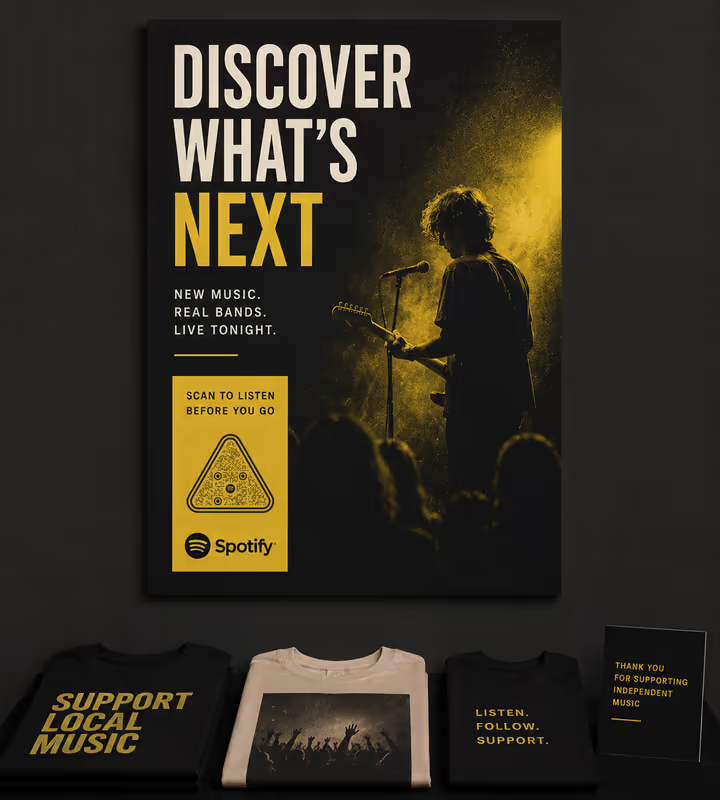
Gig Posters and Merch Tables
The support band nobody has heard of is one scan from being heard, at the exact moment someone is curious.
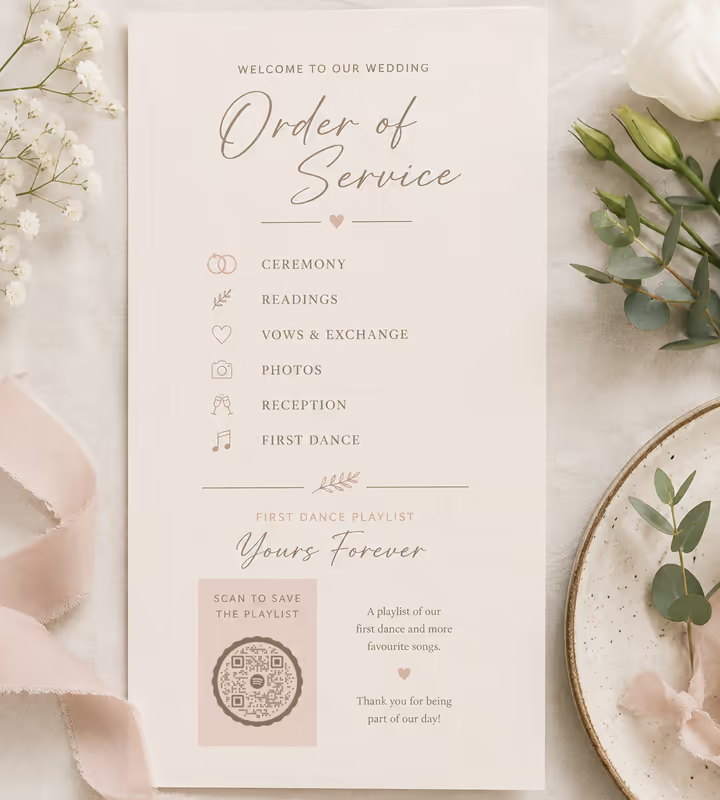
Wedding Orders of Service
The first-dance playlist, saved by guests who want it afterwards - name the playlist rather than promising it plays in order.
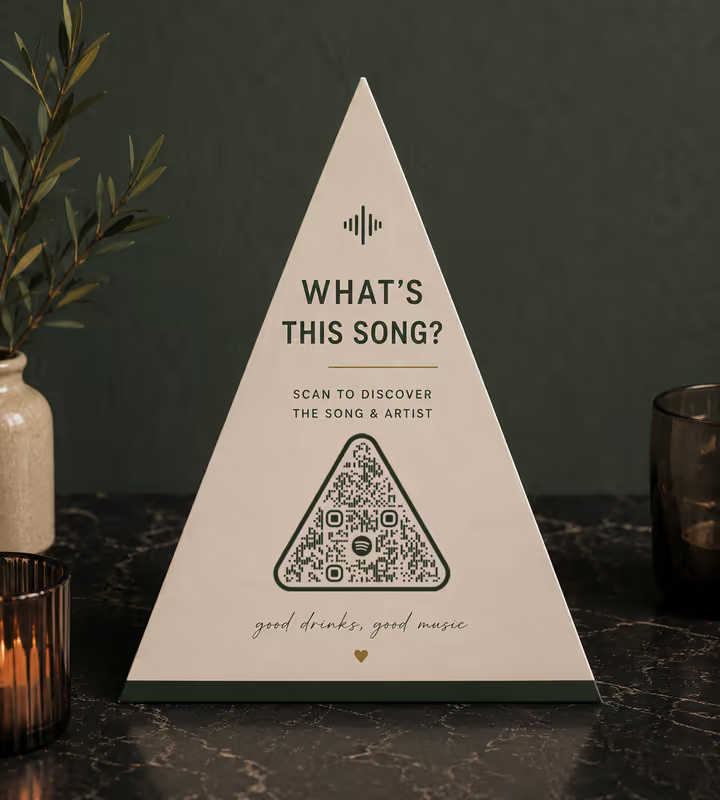
Cafe and Bar Table Cards
“What is this song” is asked in every bar with a good playlist, and a code answers it without anyone flagging down staff.
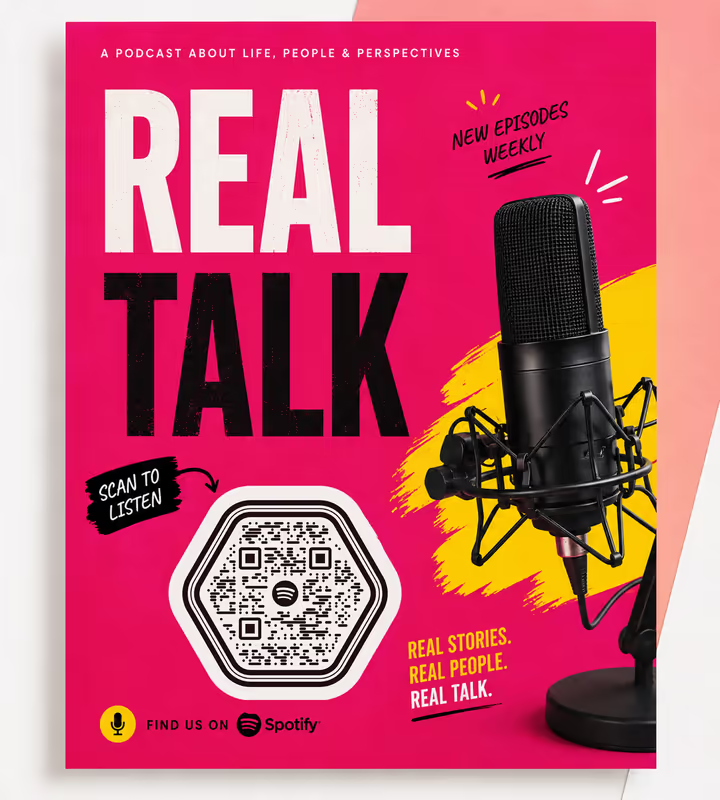
Podcast Flyers and Book Inserts
A show's Spotify page is easier to reach from a printed square than from a name people half-remember.
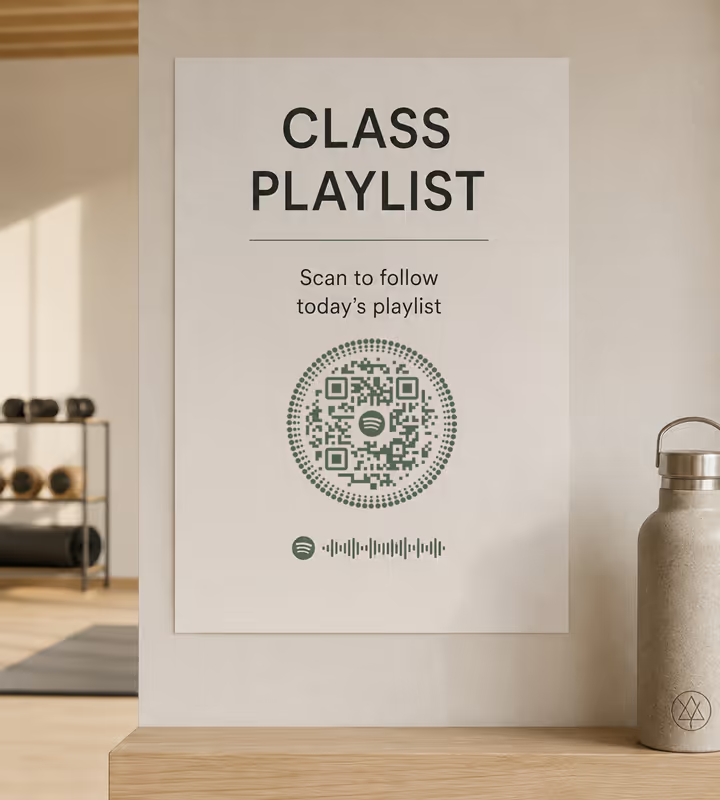
Gym and Studio Class Boards
The class playlist is a real reason people ask at the desk, and a board code turns it into a follow.
- 1
Copy the Link, Not the Spotify Code
In Spotify, open the share menu and choose Copy Link. That gives you an open.spotify.com URL. The Spotify Code image beside it is the thing that will not work from a camera.
- 2
Choose Spotify and Paste the Link
Paste the full URL. Everything after the question mark is a share tracking parameter Spotify appended - deleting it shortens the payload without changing where the link goes.
- 3
Customize the Design
Choose a shape, set the colors, add a logo. Spotify green is a mid tone and unreliable as a pattern colour on white - keep it in the artwork around the code.
- 4
Test the Whole Journey
Scan on a phone with Spotify, one without, and if you can, one on a free account. Those are three different arrivals. Then export SVG or PDF for print.

Which File Format Should You Download?
KoloQR exports your Spotify QR code in three formats. Pick by where it will be seen:
- PNG for websites, social posts, and slides, where the code appears at one fixed size.
- SVG for record sleeves, posters, and table cards - anything a printer scales without softening the edges.
- PDF for handing to a print shop or dropping into a sleeve artwork file at print-ready quality.
Record sleeves are where the vector export earns its keep. Print runs are small, stocks are heavy and often uncoated, and ink spreads into the fibres - so a code cut from vector at 25 mm or more, with the tracking parameter stripped off the URL to keep the pattern sparse, is what survives the press.
Generate QR CodeBest Practices for Spotify QR Codes
Spotify links carry baggage and Spotify playback varies by listener. These habits deal with both:
Strip the ?si= Parameter From the Link
Spotify appends a share identifier that can run to 20 or more characters. The link works without it, and removing it can drop the code a whole symbol version.
Never Print a Spotify Code and Call It a QR Code
Spotify Codes only scan from inside the Spotify app's search bar. On a poster or a sleeve, most people will point a camera at it and get nothing.
Point at a Playlist You Control
Albums and tracks can be pulled from Spotify by rights holders. A playlist you own survives that - the track disappears from it, the playlist and its address do not.
Don't Promise Playback Order
Free-tier listeners on mobile are often limited to shuffle. Name the playlist rather than describing what plays first, and the code stays honest for everyone.
Give the Playlist a Real Cover and Description
The scan lands on a page, and that page is your first impression. A default grey cover and no description reads as abandoned.
Say What the Scan Opens
“Scan for the playlist” is worth the four words, and it warns the people who would rather not be handed a music app.
Spotify Green Is Too Light for the Modules
It doesn't hold enough contrast against white at pattern size. Use it around the code and keep the modules dark - the code has to be readable before it's on brand.
Protect the Quiet Zone
Four modules of clear margin on every side. On a sleeve or a table card, artwork tends to crowd the code, and that margin is what a scanner uses to find it.
Size It for the Distance
Roughly a tenth of the reading distance: 2.5 cm on a sleeve insert or table card, 25-30 cm on a gig poster read from 2-3 metres.
Test on a Phone With No Spotify Account
That's the web preview - artwork, track list, thirty-second samples, a signup prompt. Decide whether that's a good enough arrival before you print thousands of them.
Why Your Spotify QR Code Isn't Working
Most Spotify code complaints are about what happened after the scan. These four cover nearly every case.
The Phone Camera Doesn't React to It at All
- Cause
- It is a Spotify Code, not a QR code. Spotify Codes are a proprietary pattern read only by the camera icon inside Spotify's search bar, and a phone camera has nothing to recognise.
- Fix
- Copy the share link from Spotify instead and generate a QR code from that. Any camera reads it, and the Spotify app still claims it when installed.
The Playlist Plays in the Wrong Order
- Cause
- The listener is on Spotify's free tier, where mobile playback of playlists is often restricted to shuffle with a skip limit. The link and the code are both correct.
- Fix
- Nothing on your side changes it. Word the printed label so it does not promise a sequence - and if the order genuinely matters, say so and let people know Premium plays it in order.
The Scan Shows Greyed-Out Tracks
- Cause
- The content is not licensed in the scanner's country, or the album has been withdrawn in that market. Spotify shows the page with the unavailable tracks dimmed.
- Fix
- Point at a playlist you own rather than an album, so a withdrawn track removes itself and leaves the rest playable. For international print runs, check the link from a VPN in a target market.
The Code Is Denser Than It Needs to Be
- Cause
- The URL still carries Spotify's ?si= share parameter, which adds 20 or more characters of random identifier that does nothing for the destination.
- Fix
- Delete everything from the question mark onward before generating. The link still resolves, and the pattern often drops a symbol version - which matters on a sleeve or a table card.
Still not sure whether the fault is the file or the print? Drop the exported image into the QR code scanner - if it decodes on a desktop and not on paper, the fault entered after the file.
Questions? Answered
A Spotify QR code stores an open.spotify.com link to a playlist, album, artist, or track. Scanning it with a phone camera opens that page in the Spotify app if installed, or in the browser if not.
A Spotify Code is a proprietary pattern that only scans from inside the Spotify app's search bar. A QR code holds the web link, so any phone camera reads it - which is what a printed surface needs.
Use Copy Link in Spotify's share menu, then choose the Social type in KoloQR, pick Spotify, and paste it. Delete the ?si= parameter, style the code, and download PNG or SVG.
Because the listener is on the free tier, where mobile playlist playback is often shuffle-only with limited skips. Premium plays in order. Nothing about the QR code changes this, so don't promise a sequence.
No, but what they get differs. No account means a web preview with artwork, a track list, thirty-second samples, and a signup prompt. Test that view before printing - it's what many first-time scanners see.
Yes. It's a share identifier Spotify appends, worth 20 or more characters, and the link resolves fine without it. Removing it can drop the code a whole symbol version, which matters at small print sizes.
A playlist you own, for anything printed. Albums and individual tracks can be withdrawn by rights holders, taking your destination with them; a playlist survives - the track leaves it, the playlist stays. For video instead of audio, see how to make a QR code for a YouTube video.
No. The brand green is too light to carry a pattern reliably on white. Use it in the artwork around the code and keep the modules dark - readability first, brand second.
At least 25 mm, printed from SVG or PDF. Sleeve stock is often heavy and uncoated, so ink spreads into the fibres and thickens the modules - which small codes cannot absorb.
Not on its own - a static code has no server in the middle. Point it at a link you control with tracking on it, then redirect to Spotify. Spotify for Artists shows listener numbers but not scan counts.
Keep Exploring
Pages that pick up where this one leaves off - the same setting, the same kind of code, or the next thing worth deciding.
Vimeo QR Code
Play a video, a showcase, or a portfolio from anything printed.
X (Twitter) QR Code
Send people straight to your X profile, a single post, or a one-tap follow prompt.
Twitch QR Code
Open your Twitch channel from a stream overlay, a convention stand, or a merch insert.
Event QR Codes
One scan connects guests to tickets, schedules, directions and RSVPs - on invites, posters and signage.
Photographers
Client galleries, print reorders, portfolio links and guest photo uploads, on cards, albums, prints and event signs.
LINE QR Code
Add a LINE official account or a personal contact with a single scan.
Why KoloQR?
- Create QR codes for websites, menus, Wi-Fi, PDFs, and business cards
- Customize colors, logos, and unique shapes
- Download high-quality PNG and SVG files
- Built for both print and digital
