QR Code vs Barcode: How They Differ and When to Use Each
by KoloQR TeamBasics
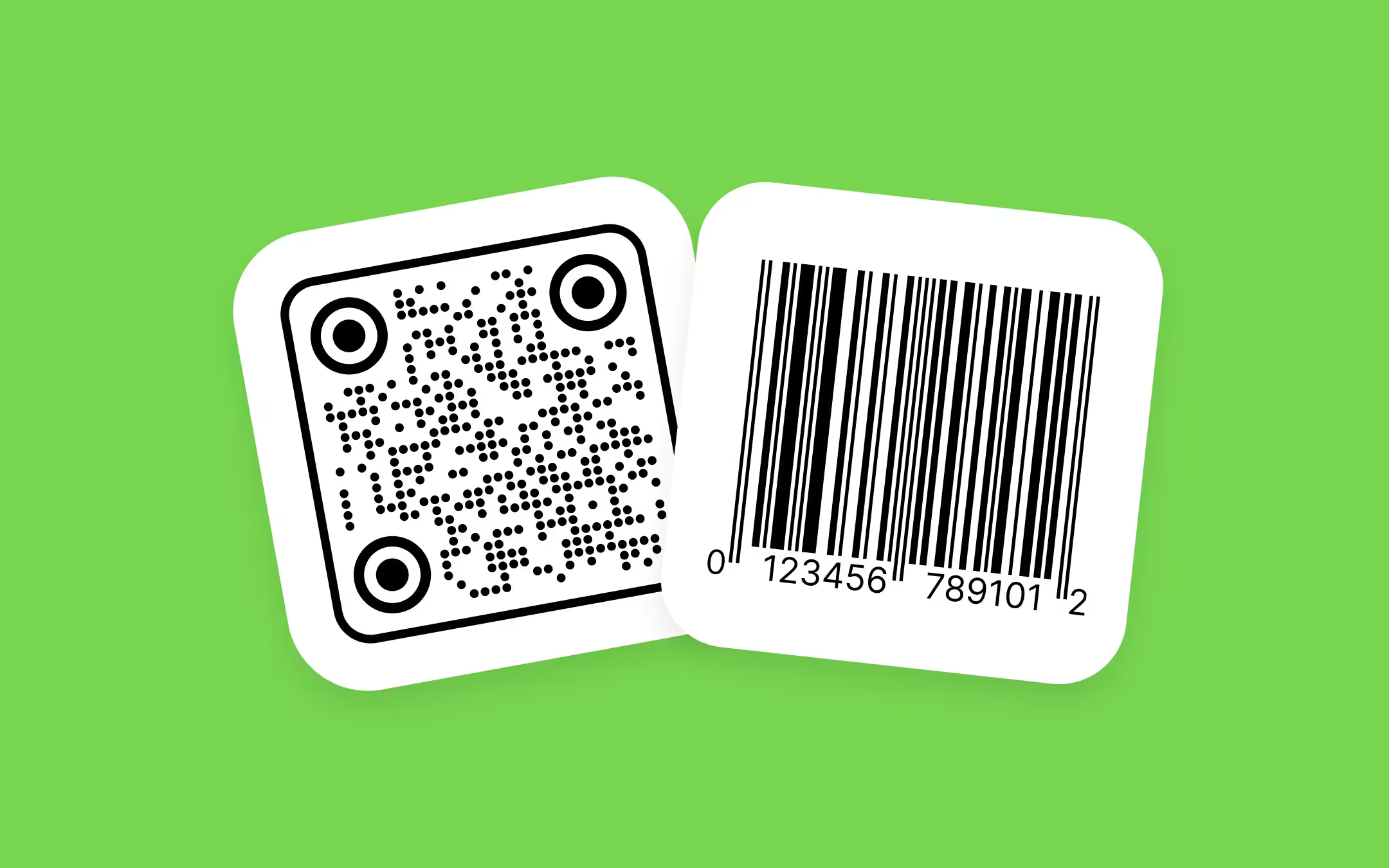
A linear barcode stores data in one direction and holds about 12–20 characters. A QR code stores data in two directions and holds up to 4,296 alphanumeric characters in the same footprint. A QR code is technically a barcode too - a two-dimensional one - so the real question is 1D versus 2D, not "barcode versus QR".
Key points
- A linear barcode encodes data along one axis; a QR code encodes data along two, which is why a QR code of the same width holds hundreds of times more information.
- A UPC-A barcode stores 12 digits. A QR code stores up to 7,089 digits or 4,296 alphanumeric characters at its largest symbol size and lowest error correction level.
- QR codes are free to generate and require no registration; a UPC or EAN barcode requires a paid GS1 company prefix, because the number itself must be globally unique.
- A QR code stays readable with roughly 30% of its area damaged at error correction level H. A linear barcode has no error correction, only a check digit, so a scratch across the bars usually makes it unreadable.
- Phone cameras detect QR codes natively; reading a UPC barcode normally requires a dedicated scanning app or a retail scanner.
What is the difference between a QR code and a barcode?
A linear barcode is a machine-readable symbol that encodes data as parallel bars and spaces of varying width, read along a single horizontal axis. Common formats are UPC-A and EAN-13 on retail packaging, and Code 128 in logistics.
A QR code is a two-dimensional matrix symbol, defined by ISO/IEC 18004, that encodes data as light and dark squares called modules, read in both directions at once. QR stands for Quick Response.
A module is one square cell of a QR code, and the smallest unit a scanner has to resolve. Module size, not overall size, is what decides whether a printed QR code scans.
Side-by-side comparison
| Criterion | Linear barcode (UPC-A, EAN-13, Code 128) | QR code |
|---|---|---|
| Dimensions | One - data read across the width | Two - data read across width and height |
| Typical capacity | 12–13 digits (UPC-A, EAN-13); variable for Code 128 | Up to 7,089 digits or 4,296 alphanumeric characters |
| Data types | Digits, or ASCII with Code 128 | Digits, alphanumeric, raw bytes, Kanji |
| Error correction | None - a single check digit only | Four levels: L, M, Q, H, recovering roughly 7%, 15%, 25% and 30% of the symbol |
| Orientation | Must be aligned with the scan line, or scanned by an omnidirectional imager | Any rotation - three finder patterns locate the symbol |
| Reading hardware | Laser scanners and camera imagers | Camera imagers only, including phone cameras |
| Registration | UPC and EAN require a paid GS1 company prefix | None - anyone can generate one |
| Editable after printing | No | No, if the code is static; only dynamic codes with a redirect service can be edited |
| Minimum practical print size | UPC-A at 80% magnification, about 30 × 21 mm | About 20 × 20 mm for close-range scanning |
| Quiet zone | 9 modules each side for UPC-A; 11 left and 7 right for EAN-13 | 4 modules on all four sides |
| Best at | Fast, repeated scanning of one fixed identifier | Carrying a URL, Wi-Fi credentials, contact data or a batch record |
How much data can a QR code store compared with a barcode?
A UPC-A barcode stores exactly 12 digits and nothing else. A QR code at its largest symbol version, with the lowest error correction, stores up to 7,089 numeric characters, 4,296 alphanumeric characters, or 2,953 raw bytes. In practice, most QR codes on printed material carry a URL of 30–80 characters.
Capacity in a QR code drops as error correction rises, because the redundancy occupies the same modules that would otherwise carry data. A QR code holding the same URL at level H is visibly denser than the same code at level L, and each module is smaller at the same print size.
The practical limit on a QR code is not the specification but the print. A long URL forces a higher symbol version with more, smaller modules, and small modules are what fail on uncoated paper, textured card and low-resolution printing. Shortening the URL is usually more effective than enlarging the code.
Which one should you use?
Use this decision rule:
- If the code identifies a product for sale in shops, use a linear barcode - a UPC or EAN carrying your GTIN, obtained from GS1. No other format is accepted at most checkouts today.
- If the code takes a person to a web page, use a QR code. Menus, posters, business cards, packaging inserts, event badges and Wi-Fi sharing all fall here.
- If the code is scanned by staff on a handheld laser scanner in a warehouse, use a linear barcode - Code 128 or GS1-128. Laser scanners cannot read QR codes at all.
- If the code must survive damage - abrasion, folding, partial coverage - use a QR code at error correction level Q or H.
- If the code must fit on a very small part or component, use Data Matrix, not a QR code. Data Matrix carries the same kind of data in a smaller footprint and is the standard choice in electronics and healthcare.
- If you need both consumer engagement and checkout scanning today, print both. GS1 recommends this dual-marking approach during the current transition period, and a code on product packaging has to keep clear of the linear barcode either way.
Can a phone scan a barcode as well as a QR code?
Phone cameras detect QR codes natively - pointing the camera app at a QR code surfaces the link without any extra software. Reading a UPC or EAN barcode is less reliable: it usually requires a dedicated app such as a shopping, library or inventory app, and results vary by device and operating system version.
This asymmetry is the single most practical difference for anyone printing a code for the public. A linear barcode on a poster asks the reader to install something first. A QR code on the same poster works with the camera the reader already has open.
The reverse holds in retail operations. A fixed laser scanner at a supermarket checkout reads a linear barcode in a fraction of a second at any angle across the belt, and cannot read a QR code at all unless the scanner is a camera-based imager.
Do you need to register a QR code the way you register a UPC?
No. A QR code requires no registration, no licence and no central authority, because a QR code is only a container - it encodes whatever text you put into it. A UPC or EAN barcode requires a GS1 company prefix, which is a paid subscription, because the number encoded must be unique across every product in global trade.
This is a difference in what the two symbols mean, not just in cost. A UPC is meaningful because a retailer's database recognises the number. A QR code is meaningful because it points at a destination you control.
Creating a QR code is free with KoloQR, a free QR code generator with circular and custom-shaped QR codes, which exports PNG and SVG without an account. Obtaining a GTIN for a linear retail barcode is a separate process handled through your national GS1 member organisation.
Print size and quiet zone requirements for each
A QR code needs about 1 cm of width for every 10 cm of scanning distance, with a practical minimum of 20 × 20 mm for close scanning. A UPC-A barcode has a nominal size of roughly 37 × 26 mm including quiet zones, and GS1 permits magnification between 80% and 200% of that.
A quiet zone is the empty margin around a barcode that lets a scanner detect where the symbol begins and ends. A QR code requires 4 modules of clear space on all four sides. A UPC-A barcode requires 9 modules of clear space to the left and right; EAN-13 requires 11 modules on the left and 7 on the right.
Bar height matters for linear barcodes and does not exist as a concept for QR codes. Shortening a UPC below its nominal 25.9 mm height - often done to save packaging space - reduces the angles at which a laser scanner can cross all the bars, and is the most common cause of repeated failed scans at checkout.
For print, export vector rather than raster wherever the workflow allows. An SVG scales to any size without softening module edges; a PNG sized up in a layout application produces blurred edges that cost scan reliability at small module sizes. This applies equally to both symbol types.
What happens when the code gets damaged
A QR code survives partial damage; a linear barcode does not. QR codes carry Reed–Solomon error correction at four levels - L, M, Q and H - recovering roughly 7%, 15%, 25% and 30% of the symbol respectively. Linear barcodes carry only a check digit, which detects an error but cannot reconstruct the missing data.
This is why logos can sit on QR codes and not on barcodes. A logo covering the centre of a QR code at level H removes modules the error correction can rebuild. Anything covering bars in a UPC removes data with no way to recover it, which is why retail barcodes are always printed clean.
The 30% figure is a ceiling, not a budget to spend fully. Keep a logo under about 25% of the QR code area and never over a finder pattern - the three large squares in the corners - because those patterns are how the scanner locates the symbol in the first place and are not protected by error correction.
Will QR codes replace barcodes on packaging?
Not entirely, and not immediately. GS1 has set an industry goal, known as Sunrise 2027 in the US and 2D migration elsewhere, for retail point-of-sale systems to be capable of reading 2D barcodes carrying GS1 standards by the end of 2027. UPC and EAN barcodes are expected to continue being accepted after that date.
The mechanism is GS1 Digital Link, a URI syntax that lets a QR code carry a GTIN and a web address at the same time. One symbol then serves both the checkout and the shopper's phone. Until enough point-of-sale scanners are upgraded, GS1 guidance is to print both a linear barcode and a 2D code on the pack.
For a small business today, the practical reading is straightforward: a QR code you generate yourself will not scan at a supermarket checkout. It is a marketing and information carrier, not a product identifier, unless it is built to GS1 Digital Link syntax with a GTIN you own.
Other 2D codes worth knowing
Data Matrix is a 2D matrix code that packs the same kind of data into a smaller area than a QR code, and is the standard for marking small components, electronics and pharmaceutical packaging. Choose it when space is the binding constraint and the reader is a dedicated scanner rather than a phone.
PDF417 is a stacked linear code used on driving licences, boarding passes and shipping labels. It holds more than a linear barcode but is read with the same scan-line logic, and it is wider than it is tall.
Aztec is a 2D code used heavily in transport ticketing, and needs no quiet zone - useful when a ticket is printed edge to edge or shown on a phone screen.
Micro QR codes and rMQR are smaller relatives of the QR code with a single finder pattern and a two-module quiet zone, built for circuit boards, components and cable labels. Like Data Matrix, they are read by industrial scanners rather than phone cameras.
For anything aimed at the general public, QR remains the right default among 2D codes, because it is the only one phone cameras detect without an app.
Common mistakes when choosing between the two
- Printing a QR code and expecting it to scan at checkout. A self-generated QR code contains no GTIN and is not registered with any retailer. Use a UPC or EAN for point of sale.
- Removing the quiet zone. Placing either symbol flush against a border, a fold or a colour block is the most frequent cause of a code that scans on screen and fails in print.
- Inverting the colours. Light modules on a dark background break many scanners, which expect dark data on a light background. Keep the dark elements dark, and keep contrast high.
- Shortening the bar height on a linear barcode to fit a layout, which reduces the scan angles available to a laser scanner.
- Enlarging a small PNG for print. Export SVG for anything going to press; a raster file scaled up softens module edges and lowers the scan success rate.
- Raising QR error correction instead of shortening the URL. Higher error correction adds modules, making each one smaller at the same print size - which can make a marginal code worse rather than better.
- Skipping the physical test. Print the code at final size, on the final material, and scan it with an ordinary phone under the lighting where it will actually be used.
Make Your QR Code
Free, with no account and no watermark. Choose a shape, add a logo, check the contrast, and export SVG, PDF, EPS or PNG - a static code with no subscription behind it.
Generate QR CodeQuestions? Answered
Yes. A QR code is a two-dimensional barcode. The word "barcode" in everyday use usually means the linear, one-dimensional kind found on retail packaging, but both are machine-readable symbols defined by ISO standards. The accurate distinction is 1D versus 2D.
Neither is better in general - they solve different problems. Use a linear barcode when a scanner needs to read one fixed product number quickly and repeatedly. Use a QR code when a person needs to reach a web page, a Wi-Fi network or contact details using a phone camera.
Yes, through GS1 Digital Link, which encodes a GTIN inside a web URI so a single QR code serves both a checkout scanner and a shopper's phone. A QR code you generate yourself with a plain URL does not contain a GTIN and will not work at point of sale.
Usually not today. Most point-of-sale scanners still read only linear barcodes, and those that read 2D codes expect GS1 syntax. GS1's stated goal is for point-of-sale systems to accept 2D barcodes by the end of 2027, with linear barcodes still accepted afterwards.
No. A linear barcode has no error correction, so covering any part of the bars destroys data that cannot be reconstructed. Logos work on QR codes because error correction levels Q and H rebuild the covered modules - up to a limit of roughly 25% of the code area.
The usual cause is module size. A long URL forces more, smaller modules into the same physical square, and small modules blur on absorbent or textured stock. Shorten the URL, enlarge the code, or print from SVG rather than a scaled PNG.
Static QR codes do not expire - the data is inside the symbol and works permanently. Dynamic QR codes point to a redirect owned by a service provider and stop working if that subscription lapses. KoloQR generates static QR codes, so the destination cannot be changed after printing.
Sometimes, but not always. A QR code carrying only a short URL can sit within roughly 20 × 20 mm. A longer payload needs a higher symbol version with smaller modules, which raises the minimum printable size. Data Matrix is the better choice where space is genuinely tight.
For a fixed laser scanner reading one number thousands of times a day, a linear barcode is faster and cheaper to support. Camera-based imagers read both, but retrofitting an existing laser-scanner fleet costs more than the extra data usually justifies.
Keep Exploring
Pages that pick up where this one leaves off - the same setting, the same kind of code, or the next thing worth deciding.
Beauty Salons
Rebooking at the chair, per-service aftercare and a portfolio per stylist, with codes that survive acetone, colour and hairspray.
Marketing Agencies
Produce campaign codes for client print runs: sized per placement, exported as vector, and pointed at a redirect the client keeps.
Amazon QR Code
Take a scan straight to a product page, a storefront, or a wish list.
Shopify QR Code
Open a product, a collection, or a pre-filled basket in a single scan.
Product Packaging
What a code on a carton, pouch, label or bottle has to survive - sizes, finishes that kill a scan, and what the scan should open.
QR Code Error Correction: How L, M, Q and H Actually Work
What each error correction level recovers, how much data it costs, how large a logo it allows, and why raising the level can make a printed code harder to scan.
Why KoloQR?
- Create QR codes for websites, menus, Wi-Fi, PDFs, and business cards
- Customize colors, logos, and unique shapes
- Download high-quality PNG and SVG files
- Built for both print and digital
