Make a QR Code That Opens Your Facebook Page
Enter your Page username, style the code to match your signage, and download one that opens Facebook in the app or the browser - no typing, no searching for the right account.
Opens in Google Maps. Coordinates work too - "37.4224, -122.0841".
The code opens your business's "Write a review" form. Paste the Place ID, or a Google Maps link that carries one.
A UPI link carries no checksum, so a mistyped ID produces a code that scans perfectly and pays somebody else. Paste the ID from your payment app rather than typing it, and send yourself one rupee before printing.
Paste it exactly as copied. KoloQR does not assemble the payload - it encodes the one your bank issued, and checks it before you print it.
SVG, PNG, JPG • Max 2 MB
First month free
then $9/month
Dynamic QR Codes Are Coming
Change your link anytime, even after printing. See who scans, when and where.
- Edit without reprinting
- Scan analytics
- Bulk & custom domains
You're on the List
We'll email you once, when dynamic codes with scan analytics launch.
What Is a Facebook QR Code?
A Facebook QR code is a QR code that stores the web address of a Facebook Page, profile, group, or Messenger conversation. Scanning it opens that destination in the Facebook app if it is installed, or in a mobile browser if it isn't. The address is encoded in the pattern, so the printed code needs no account behind it to keep working.

Claim a Username Before You Make the Code
Facebook gives a new Page two possible addresses, and only one of them belongs in print:
- facebook.com/profile.php?id=100094... - the default, a fifteen-digit numeric id. It is about 45 characters, it looks broken to anyone who reads it, and the question mark and equals sign push the symbol into a denser encoding mode.
- facebook.com/yourbusiness - the username address, available free from the Page's settings once the Page meets Facebook's basic requirements. Around 25 characters, and readable.
- Why the Difference Shows - fewer characters means a lower symbol version, which means larger modules in the same printed square. The username code scans from noticeably further away.
So the first step of making a Facebook QR code happens on Facebook, not in a generator: set the username, confirm the short address loads, and encode that. It is the same argument as keeping any URL QR code short, with the difference that here the long version is what you get by default.
Page, Profile, Group or Messenger
Facebook is four destinations wearing one logo, and they behave differently enough that printing the wrong one is a real mistake. A Page is public, needs no login to read, and is the only one of the four that suits a code on a shop door - anyone can scan it, see the opening hours, and leave. A personal profile is not a business address: scanning it asks a stranger to send a friend request, and most of what they see until they do is nothing. A group can be public, private, or hidden; a private group's link shows a join request screen, which is right for a members' noticeboard and wrong for a poster. Messenger is the fourth, addressed as m.me followed by the Page username, and it opens a chat with the business rather than a page about it - the better choice wherever the point is a question rather than a browse, on a service counter or a for-sale board. Decide which of the four the person scanning actually needs before you decide anything about the design.
Generate QR Code
Where Facebook QR Codes Are Used
Facebook's strength in print is local and community - the audiences that still organise there, and the ones a shop front reaches:
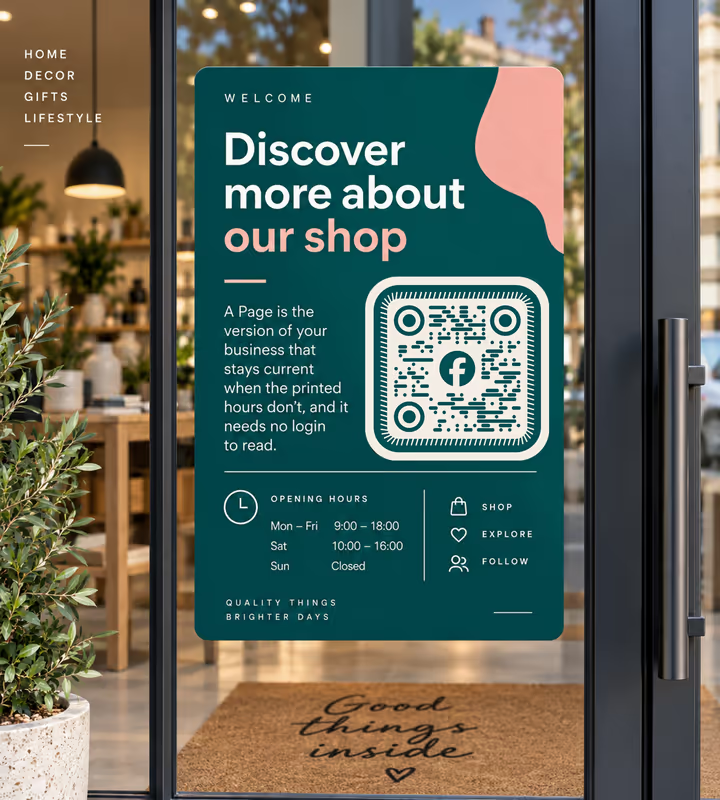
Shop Doors and Opening-Hours Signs
A Page is the version of your business that stays current when the printed hours don't, and it needs no login to read.
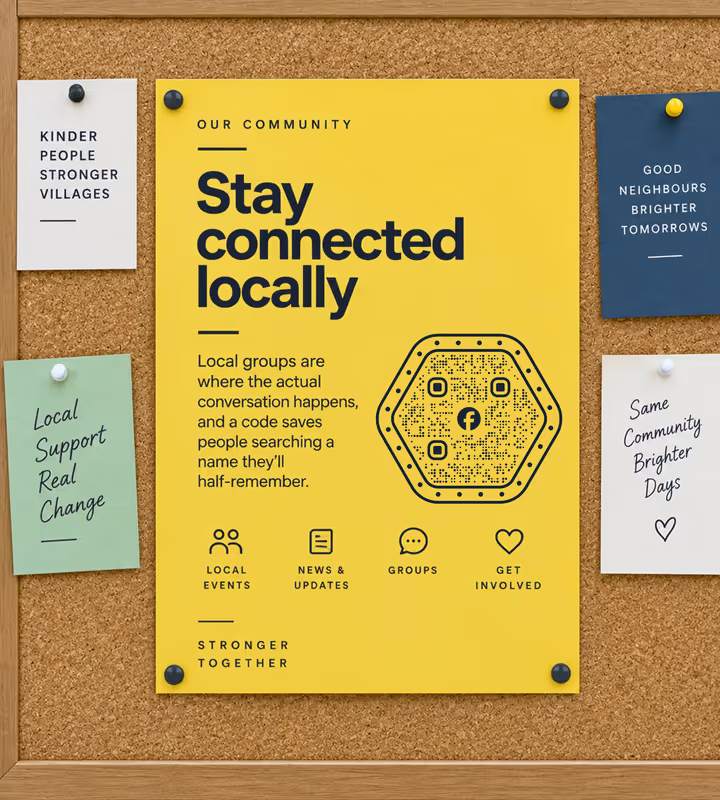
Community and Village Noticeboards
Local groups are where the actual conversation happens, and a code saves people searching a name they'll half-remember.
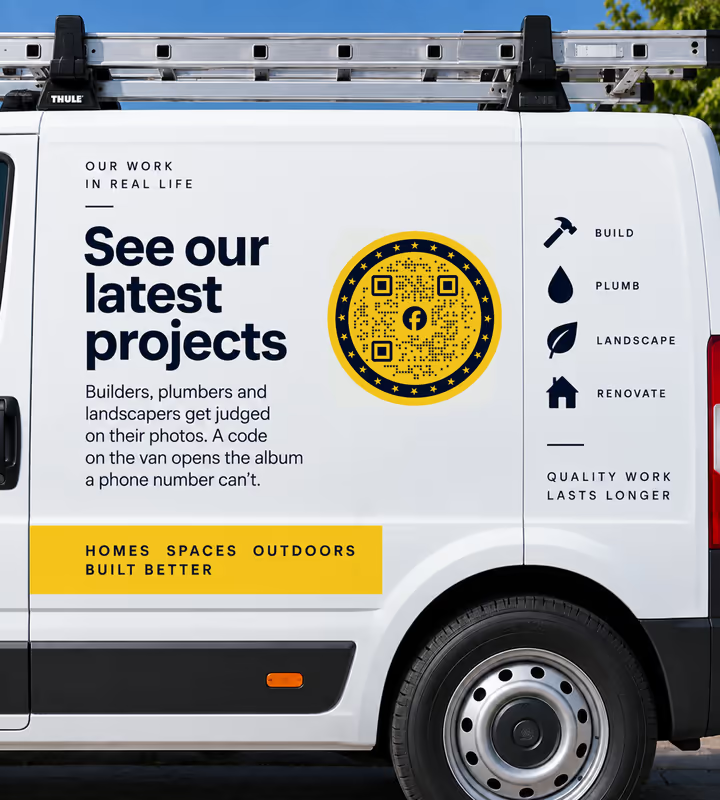
Trades Vans and Site Boards
Builders, plumbers and landscapers get judged on their photos. A code on the van opens the album a phone number can't.
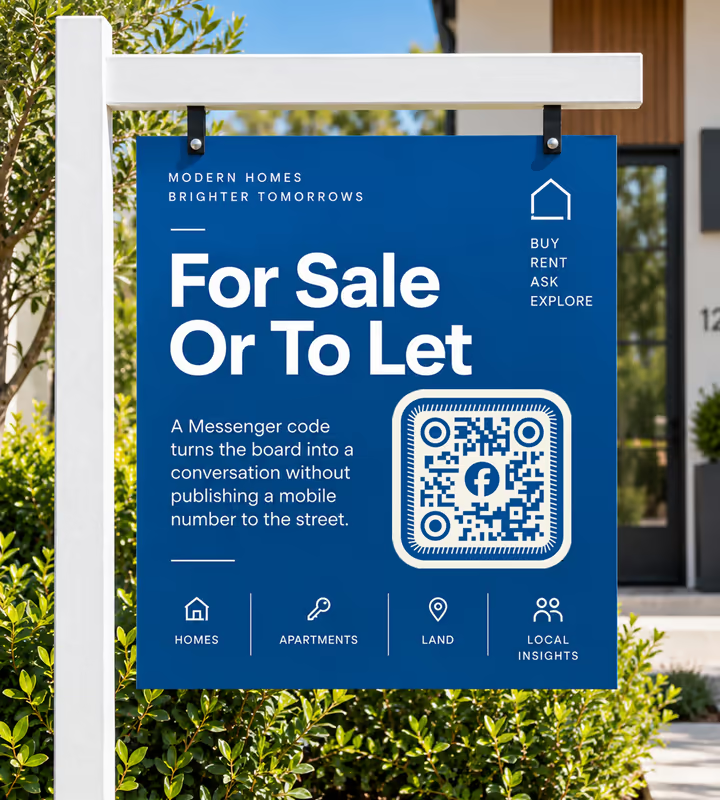
For-Sale and To-Let Boards
A Messenger code turns the board into a conversation without publishing a mobile number to the street.
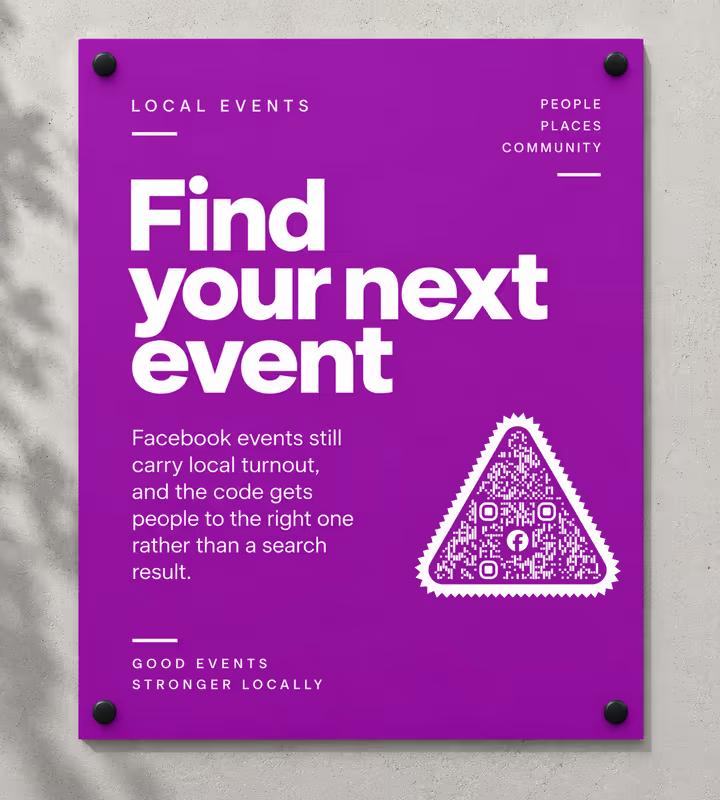
Event Posters and Club Notices
Facebook events still carry local turnout, and the code gets people to the right one rather than a search result.
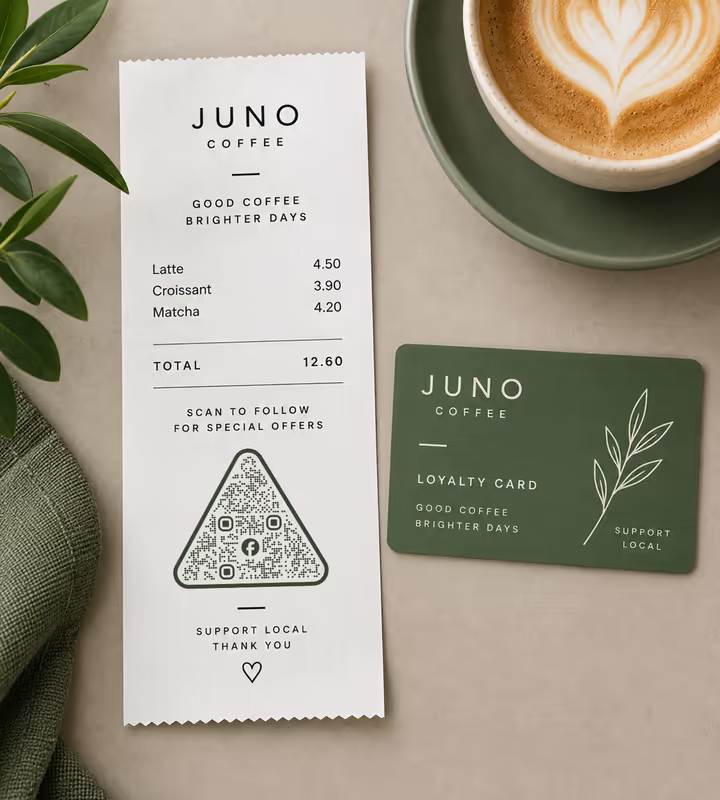
Receipts and Loyalty Cards
The moment after a purchase is the one moment someone will follow a local business without being asked twice.
- 1
Set a Username on Your Page First
In the Page's settings, claim a username so the address becomes facebook.com/yourbusiness instead of a fifteen-digit profile.php link. This is what keeps the pattern sparse.
- 2
Pick Facebook and Enter the Username
Type the username and KoloQR adds facebook.com/ in front. For a group, an event, or a Messenger chat, paste the full URL instead.
- 3
Customize the Design
Choose a shape, set the colors, add a logo. Facebook blue is dark enough to carry modules on white, which is unusual among the social brand palettes - so here you can use it.
- 4
Test and Export
Scan on a phone that is not logged in to Facebook as well as one that is, since that is what a passer-by has. Then export PNG for screens, SVG or PDF for print.

Which File Format Should You Download?
KoloQR exports your Facebook QR code in three formats. Pick by where it will be seen:
- PNG for websites, email footers, and posts, where the code appears at a single fixed size.
- SVG for door decals, van livery, and site boards - anything a printer scales up without softening the edges.
- PDF for handing to a sign shop or a print shop at print-ready quality.
Vehicle livery is where this matters most. A code on a van door is read from two or three metres by someone who has a few seconds, so it needs to be large, high-contrast, and cut from vector - and it needs the short username URL behind it rather than the numeric one.
Generate QR CodeBest Practices for Facebook QR Codes
Facebook's own URL structure causes most of these, and its privacy model causes the rest:
Never Print a profile.php Link
The numeric address is long, contains characters that force a denser encoding, and tells anyone who reads it that nobody set the Page up properly. Claim the username instead.
Point at a Page, Not a Personal Profile
A profile asks strangers for a friend request and shows them almost nothing until they send one. A Page is public and readable by anyone who scans.
Check What a Logged-Out Visitor Sees
Facebook shows non-members a login prompt on many surfaces. Open the destination in a private browser window before you print anything that will be scanned by passers-by.
Use m.me for Anything That Wants a Reply
m.me/yourbusiness opens a Messenger chat rather than a page. On a service counter or a for-sale board, a conversation converts where a browse does not.
Say Which Destination It Is
“Scan to message us” and “scan for opening hours” set different expectations, and people abandon a scan that lands somewhere they didn't expect.
Facebook Blue Can Carry the Modules
Unlike most social palettes, Facebook's blue is dark enough to hold a pattern on a white background. Test the exported file rather than trusting it, but this is one brand colour you can usually use.
Watch Group Privacy Before Printing
A private group's link shows a request-to-join screen. That is fine on a members' noticeboard and wrong on a public poster, where it reads as a dead end.
Protect the Quiet Zone
Four modules of clear margin on every side. On van livery and window decals this is the first space a layout borrows.
Size It for the Distance
Roughly a tenth of the reading distance: about 2 cm on a receipt, 20-30 cm on a van read from 2-3 metres.
Test on Both Phones and Both States
App installed and not, logged in and not - four combinations, and Facebook behaves differently in each. The one that matters most is the phone with no app and no session.
Why Your Facebook QR Code Isn't Working
A Facebook code that scans cleanly can still fail at the destination. These four cover nearly every case.
The Scan Shows a Login Wall Instead of the Page
- Cause
- Facebook is prompting a logged-out visitor to sign in. It does this on several surfaces, and more aggressively for groups, events, and personal profiles than for public Pages.
- Fix
- Point the code at a public Page, and check the destination in a private browser window first. For information a passer-by must be able to read, put it on your own site and link that.
The Code Is Dense and Won't Scan From a Distance
- Cause
- It encodes a profile.php?id= address. Fifteen digits plus the query string is roughly twice the length of a username URL, and the punctuation forces a denser encoding mode.
- Fix
- Claim a username in the Page's settings, confirm facebook.com/yourname loads, and regenerate the code from that. The pattern drops a version or two immediately.
People Say It Asks Them to Add You as a Friend
- Cause
- The code points at a personal profile rather than a Page. Facebook treats profiles as people, so a stranger's only available action is a friend request.
- Fix
- Create a Page for the business and point the code there. A Page also gives you the username, the public visibility, and the Messenger address a profile does not.
A Group Code Lands on a Request-to-Join Screen
- Cause
- The group is private. Its link is valid, but Facebook shows non-members a join request rather than the content, which reads as a dead end to someone who scanned a poster.
- Fix
- Either make the group public, or label the code honestly - “scan to request to join” sets the right expectation and stops the scan reading as broken.
Still not sure whether the fault is the file or the print? Drop the exported image into the QR code scanner - if it decodes on a desktop and not on paper, the fault entered after the file.
Questions? Answered
A Facebook QR code stores the web address of a Facebook Page, profile, group, event, or Messenger chat. Scanning it opens that destination in the Facebook app if installed, or in the browser if not.
Claim a username in your Page settings first, then choose the Social type in KoloQR, pick Facebook, and enter that username. Style it if you like, then download PNG or SVG - no account, no watermark.
It's about twice as long as a username URL and its punctuation forces a denser encoding, so the code carries more, smaller modules and scans from a shorter distance. Claiming a username is free and fixes both.
Yes. Paste m.me/yourpageusername as the destination and the scan opens a Messenger chat with your Page rather than the Page itself. It's the better choice wherever the point is a question, not a browse.
Your Page. A personal profile shows strangers almost nothing until they send a friend request, and it has no username address or Messenger link. A Page is public, readable without login, and built for this.
Yes, by pasting the group URL. Check the privacy setting first: a private group shows non-members a request-to-join screen, which is fine on a members' noticeboard and confusing on a public poster.
No. Without the app the link opens the mobile web version. Facebook does prompt logged-out visitors to sign in on several surfaces, so test that path before printing.
Usually yes - it's dark enough to carry the pattern on a white background, which is unusual among social brand colours. Scan the exported file to confirm before a print run rather than assuming it.
Not on its own - a static code has no server in the middle. To measure scans, point the code at a link you control with tracking on it, then redirect that to Facebook.
Every printed code pointing at the old address stops working. Facebook limits how often a username can change, but the safer pattern for long-lived print is a redirect on your own domain that you control.
Keep Exploring
Pages that pick up where this one leaves off - the same setting, the same kind of code, or the next thing worth deciding.
WhatsApp QR Code
Open a WhatsApp chat with your number in one scan, without anyone saving your contact first.
TikTok QR Code
Send people straight to your TikTok profile, a single video, or a campaign hashtag.
Instagram QR Code
Send people straight to your Instagram profile, a single post, or a reel.
How to Scan a QR Code With a Phone, a Screenshot, or a Second Device
The camera does it on both platforms, but the awkward cases - a screenshot, a code on the phone you are holding, a login code - each need a different move.
How to Scan a QR Code on an iPhone, From the Camera or From a Photo
Every built-in way an iPhone reads a QR code - the Camera app, the Code Scanner control, a saved photo, a code inside Safari - and the one setting that switches it off.
Twitch QR Code
Open your Twitch channel from a stream overlay, a convention stand, or a merch insert.
Why KoloQR?
- Create QR codes for websites, menus, Wi-Fi, PDFs, and business cards
- Customize colors, logos, and unique shapes
- Download high-quality PNG and SVG files
- Built for both print and digital
