QR Codes for the Front of House in an Independent Clinic
A small practice has four surfaces worth a code and they are all within a few metres of the front door: the desk a patient checks in at, the waiting room they sit in, the window they walk past when you are shut, and the sheet they carry home. This page is about those four - how to mount a code so it does not sit in its own shadow, what the waiting room Wi-Fi code should point at, and how to keep printed signage working when the booking software changes.
Generate QR Code- Booking and intake links
- Print-ready SVG export
- No patient data encoded
Why an Independent Practice Prints QR Codes
Four gains, all of them measured in minutes of reception time and none of them requiring a new system to be bought.
The Phone Line Freed for Calls That Need a Person
A booking code on the desk face, the entrance door and the appointment card moves routine scheduling to self-service. In a practice with one or two people on the desk, that is the difference between answering the phone on the second ring and letting it go to a machine at 9 a.m. on a Monday.
Self Check-In Without a Kiosk
A dedicated check-in terminal is a capital purchase, a service contract and a device to disinfect. A code on the front of the desk does the same job on hardware the patient brought with them, and it costs the price of an acrylic stand.
Waiting Room Wi-Fi Nobody Has to Ask For
Handing out a network password across the desk is one of the most repeated interactions in a small practice. A Wi-Fi code on the waiting room wall connects a patient in one tap, and it is reliably the most-scanned code in the building because waiting time is scanning time.
A Storefront That Works When You Are Closed
Most people walk past a practice outside opening hours. A window code linking to booking, registration or the price list catches the person standing on the pavement at 8 p.m., who would otherwise have to remember the name of the clinic in the morning.
What to Settle Before the Signage Is Ordered
One web address the practice genuinely owns, and one scan taken standing where the patient will stand.

An Address on Your Own Domain, Not the Vendor's
This is the decision that outlives everything else on the page. Booking systems get replaced every few years, and a code encoding a vendor's URL becomes a printed dead end the day the contract ends. A code pointing at clinic.com/book keeps working, because you change the redirect rather than the signage.
- A Short, Typeable Path - clinic.com/book beats a forty-character scheduling link, both in module count and for the patient who types it instead.
- A Page, Not a PDF - an intake form published as an ordinary mobile page can be completed one-handed; a PDF has to be pinched, zoomed and usually printed.
- A Redirect You Can Edit - keep the target of that short path under your own control so a change of booking provider is a config change, not a reprint.
Check for Glare Before You Check Anything Else
Reception areas are lit from directly above, and the single most common failure in a small practice is a laminated desk sign reflecting a downlight into the camera. Stand where the patient stands, at the height they hold a phone, and look at the sign before you even scan it: if you can see the ceiling light in it, the code is already failing. Then scan with an iPhone and an Android phone from the same spot.
Generate QR Code
How to Create a QR Code for Your Clinic
Three steps, no account required, no watermark on the export.
Generate QR Code- 1
Paste the Booking or Form Link
Open KoloQR, a free QR code generator with circular and custom-shaped QR codes, and paste the short path on your own domain that redirects to the booking system, the intake form or the price list.
- 2
Set It in the Clinic's Colors
Choose an outer shape, set the modules to the practice's brand color on a light background, and place the logo in the center. A code on a desk sign is read at a metre or less, so it can carry more styling than a poster and still scan first time.
- 3
Export SVG for Signage, PNG for the Website
SVG is a vector format, so one file covers a 3 cm appointment card and a 20 cm window decal with no soft edges. Use PNG for the practice website, patient emails and the check-in display.
The Four Surfaces Worth a Code in a Small Practice
All four are within sight of the front door, and each one is scanned by a patient doing something different: arriving, waiting, leaving, or walking past.
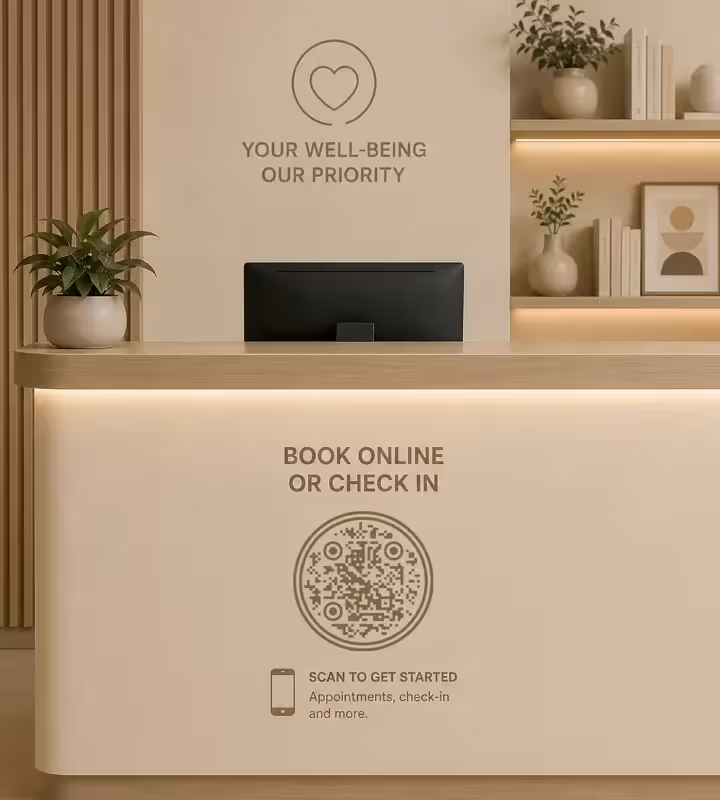
The Front Face of the Reception Desk
Mount it upright on the vertical face of the desk at about 120 cm, not flat on the counter. A code lying on a countertop puts the patient's own head between it and the ceiling light, and the shadow they cast is enough to break the scan. Upright at chest height, roughly 5 cm wide, is where booking and self check-in belong.
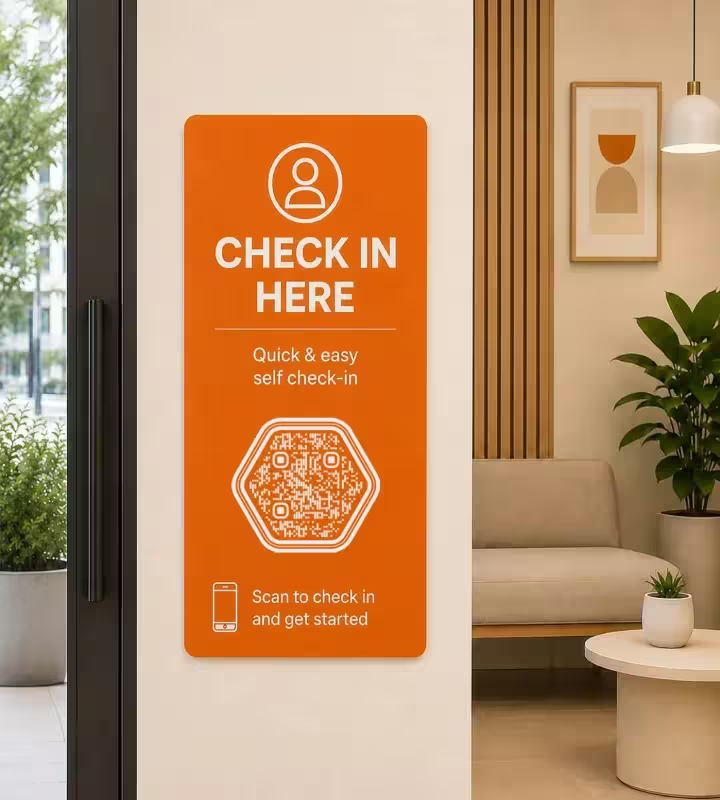
The Self Check-In Sign Beside the Door
A separate check-in code just inside the entrance intercepts patients before they queue at the desk at all. Print it 10-15 cm for a 1 metre read, label it with the action rather than the clinic name, and keep it at a different height from the booking code so the two are not mistaken for each other.
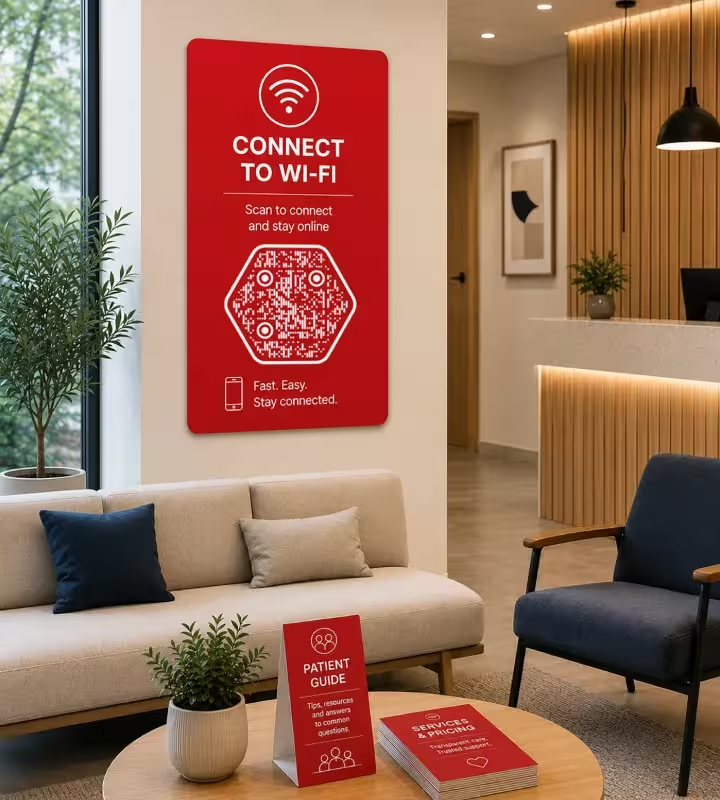
The Waiting Room Wall and Table Tents
This is where the Wi-Fi code goes, and where a table tent linking to the price list or patient information earns its place, because a seated patient has nothing else to do. Keep wall codes off the wall facing the window: daylight across a laminated poster washes out the symbol for most of the day.
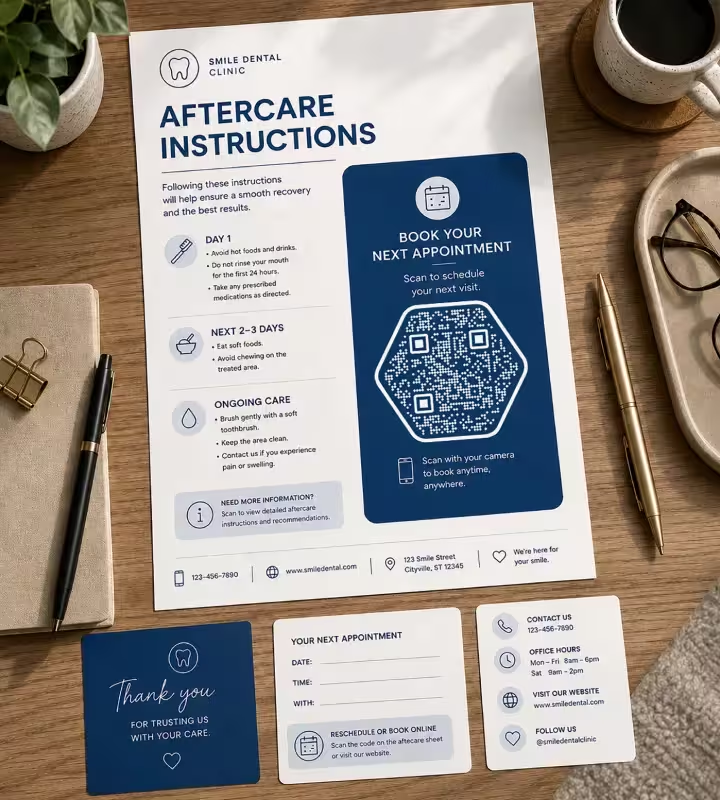
Aftercare Sheets and Appointment Cards
The paper a patient carries home takes the follow-up booking code and the aftercare link. Print it at 2 cm or wider: handout codes fail more often than any other kind, almost always because the designer shrank the code to make room in a crowded layout rather than because anything was wrong with the code.
Front-of-House Rules for Clinic QR Codes
The rules below are the ones a small practice gets wrong, in the order they cost you scans.
Mount It Upright, Never Flat on a Counter
A flat code makes the patient lean over it, and their own head blocks the ceiling light the camera needs. Every horizontal counter code in a practice should be in an angled or upright stand instead, which also makes it visible from further back in the queue.
Put the Action Above the Code, Not the Clinic Name
Patients already know whose building they are in. The line above the code should be the verb: Book your next appointment, Check in for today, Connect to guest Wi-Fi. A code captioned with the practice name and a logo tells a patient nothing about what will happen if they scan.
Use the Guest Network for the Wi-Fi Code
A Wi-Fi QR code contains the network name and password as readable text, so anyone who photographs the sign has the credentials permanently. That is acceptable for a guest network with no route to clinical systems, and it is never acceptable for the staff network the practice management software runs on.
Give the Window Code a Pavement Distance
A window code is read from 1-2 metres away through glass, which puts it at 15-20 cm - far bigger than anything else in the practice. Apply the decal to the inside of the glass but have it printed for that face, because a decal made for the outside and applied inside comes out mirrored, and phone cameras will not read a mirrored code.
Keep Any Personal Detail Out of the Address
A QR code is plain readable text, so a name, date of birth or record number must never appear in the URL it carries. Encode a public page and let the patient identify themselves there. If your practice sits inside a larger provider with formal information governance, the healthcare use case covers that approval process.
Print the Short Path and the Phone Number Beside It
Some patients cannot scan: no smartphone, low vision, a tremor, or an unfamiliar handset. A typed clinic.com/book and the practice number beside every code keeps the same service reachable without a camera, and costs a line of type.
Specify Matte on Anything Under a Downlight
Matte laminate is the default answer for a reception area, because it resists both the ceiling light and the alcohol wipe. Unlaminated paper at a desk greys and softens within weeks of handling, and gloss reflects a downlight straight back into the lens.
Send One Code to One Landing Page With Two Buttons
When the desk needs to offer both booking and check-in, do not print two near-identical squares side by side - patients scan neither. Print one labelled code pointing at a small page with two buttons. The options on that page can be renamed or reordered later without touching the sign.
Re-Test the First Printed Copy
Check the first piece off the run at the real distance and angle, on both an iPhone and an Android phone. Ink spread on uncoated stock and last-minute scaling in the layout are the two failures that never appear on a monitor.
Know the Static Trade-Off Before Printing
KoloQR generates static QR codes: the destination lives in the symbol permanently and cannot be edited after printing. Pointing the code at a short path on your own domain gives you the redirect back, which is why that decision comes first. If the practice needs per-code scan counts or the ability to repoint already-installed signage, a dynamic QR subscription fits that requirement better.

Create Your Clinic's QR Code
Paste a booking link, an intake form or the guest Wi-Fi details, style the code to match the clinic, and download print-ready SVG. No account, no watermark, no expiry date.
A sensible order for a small practice: set up the short paths on your own domain first, then print the desk code, then the waiting room Wi-Fi sign, and leave the window decal until last because it is the only piece that has to be ordered at a size you cannot proof on an office printer.
Generate QR CodeQuestions? Answered
Set up a short path on the practice domain first - something like clinic.com/book - and point it at your booking system. Then paste that short path into a QR code generator, style it, and download SVG for print. With KoloQR this takes under a minute and needs no account. Doing it in that order is what lets you change booking provider later without reprinting a single sign.
Yes, and it will almost certainly be the most-scanned code in the building, because waiting time is scanning time. A Wi-Fi QR code encodes the network name, security type and password, so a patient connects in one tap without asking at the desk. Encode the guest network only: those credentials are readable by anyone who photographs the sign, so they must not belong to the network your clinical systems sit on.
On the vertical front face of the desk, at roughly chest height, in an upright stand. Flat on the counter is the common mistake: the patient leans over the code and their own shadow breaks the scan under a ceiling light. A wall behind the desk works too, provided the code is sized for the extra distance and is not facing a window.
One code carries one destination, so make that destination a small landing page with two clearly labelled buttons. A single well-labelled code is easier for a patient than a row of near-identical squares, and you can rename or reorder the options on that page at any time without reprinting the sign.
15-20 cm. A window code is read from 1-2 metres away on the pavement, and the working rule is about 1 cm of code width for every 10 cm of scanning distance. Mount it at 120-150 cm from the ground, use matte film so street lighting does not turn the glass into a mirror, and check that the decal is printed for the face of the glass it is applied to.
Nothing, if the codes encode a path on your own domain and you simply repoint the redirect. Everything, if they encode the vendor's URL: those become printed dead ends the day the contract ends, and every sign, card and leaflet has to be reprinted. This is the single most expensive mistake a small practice makes with QR codes, and it costs nothing to avoid up front.
Yes, if the sites have different booking calendars, different phone numbers or different opening hours, because a patient scanning at the branch they are standing in should not land on the other branch's page. It also gives you free measurement: separate paths per site show which building the scans come from, without any analytics product.
No. A PDF opens in a viewer, needs pinching and zooming on a phone, and usually cannot be completed without printing it. Publish the intake or consent form as an ordinary mobile web page instead. The same applies to price lists and aftercare instructions: a page can be corrected in a minute, while a PDF tends to be replaced once a year at best.
You can, but it is usually worth two codes with two short paths, because the desk sign and the take-home sheet answer different questions and the difference in scan volume tells you something. If you do reuse one code, export it once as SVG and send that same file everywhere - regenerating it for each piece is how practices end up with codes pointing at three slightly different URLs.
Yes. KoloQR supports a centered logo, custom module and background colors, and outer shapes including circular, triangular and hexagonal. Keep the modules dark on a light background and the logo small, because every covered module spends error correction. Styling never improves scanning, so test the branded version on a real phone before it goes to the printer.
Keep Exploring
Pages that pick up where this one leaves off - the same setting, the same kind of code, or the next thing worth deciding.
Healthcare
Booking pages, intake forms and aftercare instructions on posters, leaflets, prescription bags and bedside cards.
Fitness & Gyms
Class booking, machine demo videos and paperless waivers, with label sizes and materials that survive daily disinfectant wipes.
Booking QR Code
Take an appointment, table, or room booking straight from a printed sign.
Event QR Codes
One scan connects guests to tickets, schedules, directions and RSVPs - on invites, posters and signage.
URL QR Code
Send anyone straight to a web page, landing page, or link with a single scan.
Posters
A3 to A0 - how big the code has to be for the distance people can actually stand at, and how high off the floor it belongs.
Why KoloQR?
- Create QR codes for websites, menus, Wi-Fi, PDFs, and business cards
- Customize colors, logos, and unique shapes
- Download high-quality PNG and SVG files
- Built for both print and digital
