A QR Code in a Video Ad Needs a Third of the Screen. It Gets a Corner
by KoloQR TeamResearch
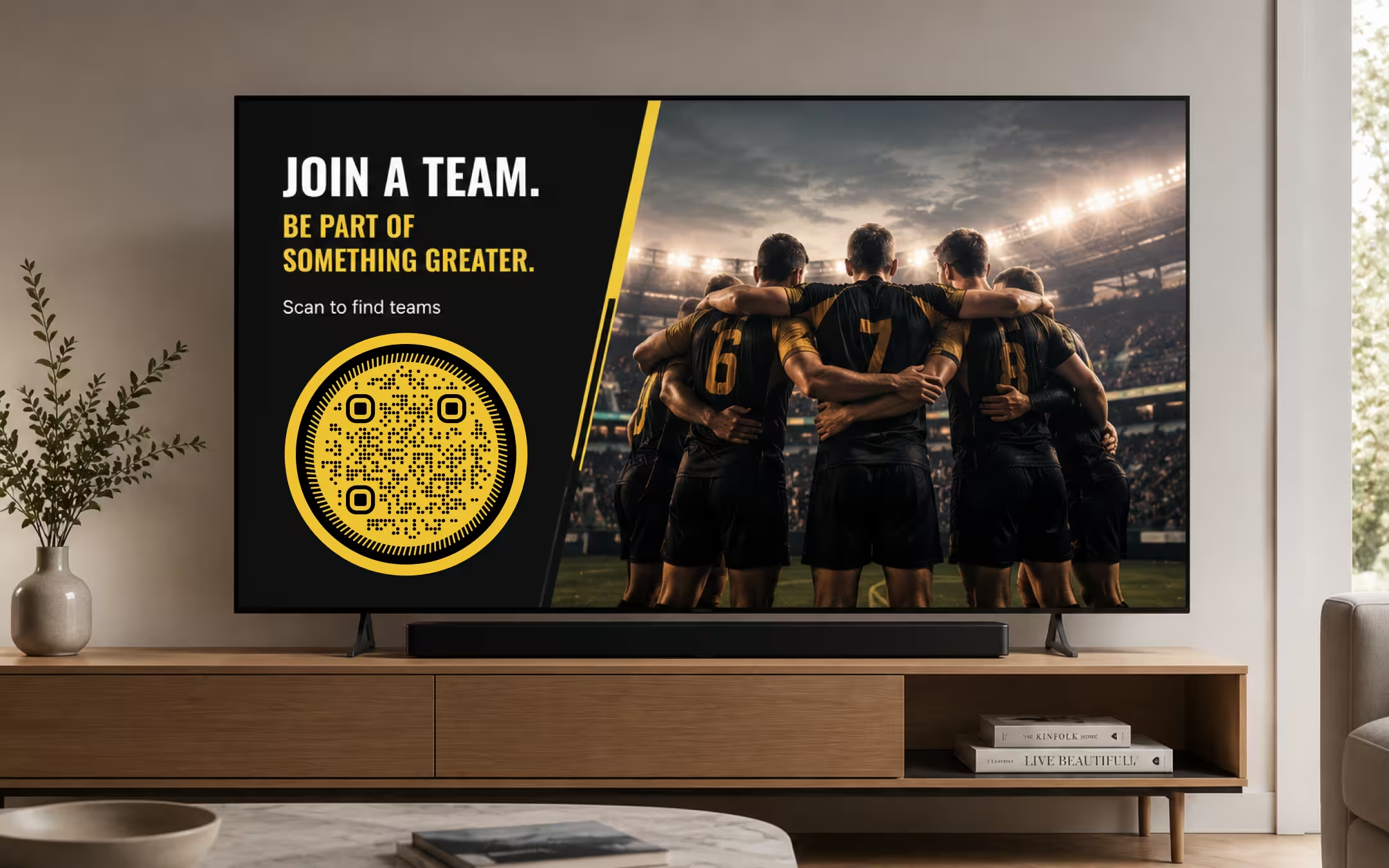
A phone reading a QR code off a television is not looking at your artwork. It is looking at a few dozen pixels of a camera frame, and how many it gets is decided by one thing: the angle the code subtends from the sofa. We built a rig that runs the whole chain - 1080p master, compression, an off-square handheld camera at a real viewing distance, motion smear - and measured where the decode rate falls off a cliff. At a normal living-room distance a code occupying a fifth of the screen height decoded in 6% of attempts. A quarter of the screen height decoded in 95%. The corner placement every video ad uses measured zero, and no amount of dwell time, error correction or creative fixes it, because the failure happens before the first frame is read.
Key Points
- We measured a decode floor of 2.5 pixels per module for a still, compressed, off-square image, with the first sporadic successes at 2.0 and a majority of them by 2.25. Google's own ML Kit barcode documentation asks for at least 2 pixels per module, so the rig and the vendor agree to within a quarter of a pixel.
- Screen size cancels out. Because people sit further from bigger televisions, the answer is a fraction of the screen height rather than a number of centimetres, and it is the same fraction on a 43-inch set, a 77-inch set and a laptop.
- At a normal living-room distance - a 55-inch set about 2.7 m away - a code at 20% of screen height decoded 6% of the time, 25% decoded 95% of the time, and 30% decoded every time. Below 15% nothing decoded at any distance we tested.
- Compression barely matters and motion matters enormously. Squeezing the master to JPEG quality 40 changed the decode rate by a point or two; a smear of half a camera pixel during one exposure took a code that decoded 99% of the time to zero.
- The two things ads do to their own codes without noticing are appending UTM tags and raising error correction. Both add modules at the same physical size. A tracking string took a code from 100% to 48%; error correction level H took the same code from 99% to 74%.
The Corner Code Fails Before Anybody Reaches for a Phone
The standard placement is the bottom-right corner of the end card, sized to sit politely beside the logo and the legal line - eight to twelve per cent of the screen height, on screen for the three to five seconds the end card lasts. This is treated as a layout decision, argued about in terms of clutter and brand hierarchy, and signed off by people who have all successfully scanned it on the monitor in the edit suite.
It is not a layout decision. It is a resolution decision, and the arithmetic behind it is settled before anyone in the room has an opinion. A phone photographing a television captures the whole room; the television is a fraction of that frame, the code is a fraction of the television, and the code's grid is then divided into anything from 25 to 53 squares across. What survives at the far end is a handful of pixels per square, and below a certain handful nothing decodes at all - not slowly, not sometimes, not with a better app.
The reason this keeps getting missed is that every check performed during production is performed at the wrong distance. A code is scanned off the edit suite monitor at arm's length, off the review link on a laptop at 60 cm, and off a phone held 30 cm from another phone. All three of those are geometrically nothing like a sofa, and all three pass. The one condition the ad will actually be watched in is the one nobody tests, because testing it means standing in a living room.
So this piece does the arithmetic and then measures it. The question is not whether QR codes belong in video advertising - that is a matter of taste, and the answer probably depends on the brand. The question is what size a code has to be before the argument about taste is worth having at all.
What We Measured, and What It Cannot Tell You
The rig runs the full chain in software. A code is rendered at 12 pixels per module with the four-module quiet zone ISO/IEC 18004 specifies, resized into a 1080p master at the size it would occupy in the finished ad, compressed, padded, rotated off square, resampled to the number of pixels a phone camera would collect from it at a stated viewing distance, smeared to simulate movement during the exposure, and handed to a decoder. Every figure below is the share of attempts that decoded.
Each cell is 216 attempts: twelve different payloads, six angles between one and eleven degrees off square, and three one-pixel jitters of the captured size. That count exists because of a mistake worth admitting. The first version of the rig fed the decoder a perfectly square, grid-aligned image, and it happily decoded a code at one pixel per module - a result that is real arithmetic and complete nonsense, because it measures a sampling coincidence that a hand holding a phone will never reproduce. Rotation is what puts every module at an arbitrary subpixel phase, and it moved the floor by more than a factor of two.
The Decoder Is the Weak One, on Purpose
The decoder is jsQR, the JavaScript port of ZXing's core algorithm - the same decoder family whose binarizer we read the source of for the contrast measurements. Apple's Vision framework and Google's ML Kit are what actually read most codes, both are closed, and a number produced from either is a number no reader can check. jsQR is also, almost certainly, the less capable of the three: it has no machine-learning stage, no multi-frame accumulation and no super-resolution.
That makes one calibration worth stating. Our clean floor came out at 2.5 pixels per module, and Google's ML Kit barcode documentation asks for a barcode whose "smallest meaningful unit" is "at least 2 pixels wide, and for 2-dimensional codes, 2 pixels tall". A weaker decoder landing a quarter of a pixel above the vendor's published minimum is about the best agreement this kind of construction can hope for, and it is the reason the size table further down should be read as roughly right rather than as pessimistic by a factor.
What the Rig Leaves Out
- Real phones. No iPhone or Android device was pointed at a television for this. Optical stabilisation, multi-frame fusion and the two closed decoders all work in the reader's favour, and none of them are modelled.
- Inter-frame video coding. Compression here is JPEG on a single frame, which stands in for an intra-coded frame. A code that sits still over a still shot costs a real encoder almost nothing after the first frame; a code composited over moving footage is re-coded constantly. Since compression turned out to be nearly irrelevant either way, this matters less than it looks.
- The panel and the sensor beating against each other. A camera photographing a display can produce moiré, and a 24p master pulled down onto a 60 Hz panel and sampled by a rolling shutter can band. Both are real, both hurt, and neither is simulated.
- Glare, room light and off-axis viewing. All three subtract, and all three are the subject of the contrast work rather than this one.
- People. How long someone takes to notice a code, find their phone and aim it is not something a rig can measure. That section below is labelled as an estimate.
Every one of those omissions runs in the same direction except the first: the rig is harder on the code than a still photograph would be, and easier than a living room. The honest summary is that these numbers locate the cliff, and the ten-minute protocol at the end of this post is how you find where your own campaign sits relative to it.
The Floor Is Two and a Half Pixels per Module
Pixels per module is the number of camera pixels that land on one square of a QR code's grid, and it is the quantity every other variable in a scan is spent from. Contrast, blur, compression, print spread and camera noise all reduce the same thing in the end: the confidence with which a decoder can say which side of the black-white boundary one square fell on. Below a certain sampling density there is no confidence left to spend.
| Pixels per module | Clean | Compressed (JPEG q40) |
|---|---|---|
| 1.50 | 0% | 0% |
| 1.75 | 0% | 0% |
| 2.00 | 8% | 7% |
| 2.25 | 69% | 68% |
| 2.50 | 99% | 100% |
| 2.75 | 100% | 100% |
| 3.00 | 100% | 100% |
Two things in that table are worth more than the floor itself. The first is how narrow the transition is. There is no long tail of marginal codes that scan for patient users - between 2.0 and 2.5 pixels per module the decode rate goes from 8% to 99%, which means a code either has the sampling density or it does not, and the difference between those two states is a quarter of a pixel per module.
The second is the second column. Compressing the master to JPEG quality 40 - visibly lossy, well below anything a broadcaster or a platform would deliver - changed the result by a point or two in either direction and never moved the cliff. This is worth saying plainly because "video compression eats QR codes" is the standard explanation for why they fail on television, and in this measurement it is simply not true. Compression is not what is killing these codes. Sampling is.
The corollary is that the whole problem reduces to one question: how many camera pixels does the code get? That is not a property of the artwork, the file format or the encoder. It is a property of the angle the code subtends at the viewer's eye, which is geometry, and geometry has the decency to be predictable.
Screen Size Cancels Out and Only the Angle Survives
A phone's camera is a rectilinear projection, which means a transverse distance at a known range maps to pixels by a single constant. For a 70-degree horizontal field of view - a 26 mm-equivalent lens is 69.4 degrees, and phone main cameras have shipped within a degree of that for years - the constant is 1,371 pixels per radian on a 1920-pixel-wide frame. So the whole chain collapses into one line of arithmetic:
pixels per module = 1371 × f ÷ (k × N), where f is the code's height as a fraction of the screen height, k is the viewing distance expressed in screen heights, and N is the number of modules across the code including its four-module quiet zone.
The interesting thing about that expression is what is missing from it. There is no screen size in it and no distance in metres - only their ratio. That is not a simplification, it is the actual physics: a 77-inch television subtends the same angle from the back of a big room as a 43-inch set does from a small one, and the camera does not know or care which it is looking at. The answer to "how big does the code have to be" is therefore a percentage of the screen, and the same percentage works everywhere.
It also means k can be pinned down from published viewing-angle recommendations rather than guessed. THX recommends a horizontal viewing angle of about 40 degrees, which for a 16:9 screen works out to a distance of 2.4 screen heights. The SMPTE recommendation of 30 degrees works out to 3.3 screen heights. Both are recommendations for people who care about picture quality; ordinary living rooms sit further back than either, which is why the tables below run out to four screen heights - a 55-inch set about 2.7 m away.
The 1920 in that constant deserves a caveat of its own, because it is the favourable assumption. The analysis stream is the reduced-resolution video buffer a phone's barcode detector actually runs on, which is not the full-resolution photograph the camera is capable of taking. Google's ML Kit documentation recommends feeding it "1280x720 or 1920x1080", and notes that going lower is viable only by "requiring that the barcode make up the majority of the input image". Everything below assumes the better of those two. At 1280 x 720 every figure in the next table gets a third worse.
How Big the Code Actually Has to Be
With the arithmetic settled, the measurement. Each row is a code height as a percentage of the screen height; each pair of columns is a viewing distance in screen heights, with the resulting sampling density and the decode rate that came out of the rig. The payload is a 25-character URL at error correction M, which is version 3 - 29 modules, or 37 across with the quiet zone. Everything is still, compressed, and one to eleven degrees off square.
| Code height (% of screen) | In the 1080p master | k = 2 px/module | k = 2 rate | k = 3 px/module | k = 3 rate | k = 4 px/module | k = 4 rate |
|---|---|---|---|---|---|---|---|
| 8% | 86 px | 1.49 | 0% | 1.00 | 0% | 0.73 | 0% |
| 10% | 108 px | 1.86 | 2% | 1.24 | 0% | 0.92 | 0% |
| 12.5% | 135 px | 2.32 | 82% | 1.54 | 0% | 1.16 | 0% |
| 15% | 162 px | 2.78 | 100% | 1.86 | 4% | 1.38 | 0% |
| 17.5% | 189 px | 3.24 | 100% | 2.16 | 70% | 1.62 | 0% |
| 20% | 216 px | 3.70 | 100% | 2.46 | 91% | 1.86 | 6% |
| 25% | 270 px | 4.62 | 100% | 3.08 | 99% | 2.32 | 95% |
| 30% | 324 px | 5.57 | 100% | 3.70 | 100% | 2.78 | 100% |
| 35% | 378 px | 6.49 | 100% | 4.32 | 100% | 3.24 | 100% |
Read the k = 4 column, because that is where most people are sitting. A code at a fifth of the screen height decoded six times in a hundred. A code at a quarter of the screen height decoded ninety-five times in a hundred. The entire useful range of this design decision is between 20% and 30% of screen height, and the conventional corner placement is not merely at the bottom of that range - it is off the chart by a factor of two to three.
Notice also what the master column is doing, which is nothing. A code at 20% of screen height is 216 pixels across in the 1080p file, comfortably above the floor; the code is not being destroyed in the edit, the grade or the encode. It is being destroyed by the distance between a sofa and a television, which is a quantity no post-production process can improve. This is the same argument sizing a printed code for its scanning distance makes about paper, and it is stricter here because the viewer cannot walk up to the screen.
The corollary for the k = 2 column is worth having as well, because it explains the edit-suite illusion precisely. At two screen heights - a 55-inch set at 1.4 m, which subtends about what a desk monitor does at arm's length - a code at 12.5% of screen height decodes 82% of the time. That is the check everybody runs, and it passes. Sampling density falls off in direct proportion to distance, and the sofa is a metre or two past where the test was done.
Motion Ends It Faster Than Size Does
Compression turned out not to matter and size turned out to matter enormously. Motion is worse than either. The rig applies a linear smear at the sensor - a box convolution across the direction of travel, which is what movement during an exposure actually does to a frame, rather than the symmetric Gaussian a blur function would apply - and measures how far the code can travel across the sensor during one exposure before the decode rate collapses.
| Code height (% of screen) | Pixels per module | Still | 0.25 px | 0.5 px | 0.75 px | 1.0 px | 1.5 px |
|---|---|---|---|---|---|---|---|
| 25% | 3.08 | 99% | 86% | 0% | 0% | 0% | 0% |
| 30% | 3.70 | 100% | 97% | 0% | 0% | 0% | 0% |
| 40% | 4.95 | 100% | 100% | 100% | 0% | 0% | 0% |
| 60% | 7.41 | 100% | 100% | 100% | 100% | 1% | 0% |
The tolerance is about an eighth of a module, and in camera pixels that is between a quarter of a pixel and one pixel depending on how large the code is. It is worth converting that into something a director can act on. One camera pixel is 0.042 degrees of arc. At a 1/60 s exposure - a phone in a dimly lit room, metering for a bright screen - a quarter of a pixel is an angular rate of about 0.6 degrees per second. That is a hand held reasonably still, and it is not a hand reaching across a sofa.
Applied to the code's own movement on screen, the same arithmetic is brutal. At three screen heights, one screen height maps to 457 camera pixels, so a code drifting across the screen at 1/60 s exposure has a budget of roughly a thirtieth of a screen height per second. A code that slides gracefully into position over two seconds, a slow push-in on the end card, a handheld camera move behind a composited code, a bounce, a rotate, a scale-up: all of them are one to two orders of magnitude outside that budget for the whole duration of the move. The code is decorative until it stops.
Why the Decode Rates Are Probabilities and the Size Table Is Not
There is a distinction hiding in these two tables that matters more than either of them. A code that is too small fails deterministically: every frame is the same frame, thirty times a second, and none of them decode. A code that is large enough but moving fails randomly: most frames are smeared, some are not, and a scan succeeds the instant one clean frame arrives.
So dwell time is not a general-purpose fix, it is a fix for exactly one failure mode. Three extra seconds on screen buys ninety more attempts at a motion problem and buys nothing whatsoever against a sampling problem. This is the single most useful thing in this post for anyone briefing a production: if the code is big enough and still, it will scan almost immediately; if it is too small, it will not scan if you leave it up for the whole commercial break.
Two Ways an Ad Shrinks Its Own Code Without Noticing
Everything so far has assumed a 25-character URL at error correction M. Both of those assumptions get broken routinely by people who are trying to help, and both break in the same way: they add modules, the code stays the same physical size on screen, and every module gets smaller.
The Tracking String
A campaign URL arrives from the media agency with its measurement parameters attached, because that is how the campaign gets attributed. Nobody looks at what it does to the grid.
| The URL | Characters | Version | Modules | Pixels per module | Decode rate |
|---|---|---|---|---|---|
| A short redirect on a domain you own | 12 | 2 | 25 | 4.15 | 100% |
| A short URL with the scheme spelled out | 27 | 3 | 29 | 3.70 | 100% |
| A readable campaign URL | 46 | 4 | 33 | 3.34 | 93% |
| The same with UTM tags | 93 | 6 | 41 | 2.80 | 77% |
| The same with a full tracking string | 157 | 9 | 53 | 2.25 | 48% |
A full tracking string halves the scan rate of a code that is otherwise sized correctly. It does this at the exact moment the marketing team is trying hardest to measure the campaign, which is a good candidate for the most self-defeating pattern in the whole subject. The fix is not to give up attribution: it is to put a short path on a domain you own in front of the parameters and attach them at the redirect, where they cost nothing. What a rented redirect actually costs over the life of a campaign is a separate argument, and it lands on the same recommendation.
Turning Error Correction Up
The other reflex is to raise the error correction level, on the theory that a harder-to-read situation calls for more redundancy. It is the wrong lever and it is actively harmful, for the same reason it is wrong for low contrast: it adds redundancy by adding modules, and modules are what is scarce.
| Error correction | Version | Modules | Rate at 25% of screen | Rate at 30% of screen |
|---|---|---|---|---|
| L | 2 | 25 | 100% | 100% |
| M | 3 | 29 | 99% | 100% |
| Q | 3 | 29 | 99% | 100% |
| H | 4 | 33 | 74% | 92% |
H exists for codes that get dirty, torn, printed over or partially covered by a logo. A code on a television is none of those things - it is delivered pixel-perfect and then undersampled, and undersampling is not damage the error correction blocks can repair, because it prevents the modules from being read in the first place. Use L or M on screen and spend the modules you saved on making each one bigger. The full trade-off between recovery capacity and module size applies unchanged here; screens simply sit at the end of it where redundancy is worth least.
Time Is the Budget Nobody Writes Down
This section is an estimate rather than a measurement, and it is worth saying so before the numbers rather than after. Nothing in the rig can measure how long a person takes to react to a television, and we have not run that study.
The sequence a viewer has to complete is not short. Noticing the code and deciding it is worth acting on takes a second or two. Retrieving and unlocking a phone takes two to four. Getting to the camera takes another one to three, longer if the phone opens on whatever was last in front of it. Framing the television, letting autofocus settle and holding still takes two to four more. That is six to thirteen seconds from a standing start, against an end card that is typically on screen for three to five.
There is one real mitigation and it deserves credit: a large share of television is watched by people already holding a phone, which deletes the retrieval step and most of the unlocking. That is presumably the entire reason anyone thought QR codes on television would work. It is a strong argument for the format existing at all, and it is not an argument for three seconds, because the last two steps - getting to the camera, then aiming and holding steady - are the ones a phone already in hand does not shorten.
Our own recommendation, stated as the opinion it is: eight seconds of a still, correctly sized code is the minimum worth briefing, and if the creative cannot give up eight seconds then the creative has decided the code is decorative. That is a legitimate decision. It just should not be made by accident and then measured as a scan rate.
The Ad Everybody Remembers Obeyed the Arithmetic
There is one famous counter-example to all of this, and it is famous precisely because it did every single thing this post recommends. In February 2022 Coinbase ran a sixty-second Super Bowl spot that was nothing but a colour-changing QR code drifting around an otherwise black screen. It was reported at the time by Variety and CNN, the second of which covered the part everybody remembers: the landing page took so much traffic that the app fell over.
Line that up against the tables above. The code was large, because it had the whole frame. It was alone, so nothing competed for the viewer's attention or the encoder's bits. It was on screen for sixty seconds rather than four, which is roughly 1,800 camera frames for a decoder to find one clean one in. And it drifted slowly rather than cutting or scaling, which keeps a moving code inside the per-exposure smear budget where a fast move does not.
The one thing it did that this post would warn against is the colour change, and even that is less reckless than it looks: the palette stayed dark-on-light or light-on-dark throughout rather than pairing two mid-tones, which is the distinction that actually decides whether a coloured code survives a camera. What it did not do is put a small code in a corner for four seconds.
The conclusion is not that every brand should buy sixty seconds of the Super Bowl. It is that the ad which is always cited as proof that QR codes work on television is an ad that spent its entire creative budget on satisfying the physics. Cited as precedent for a corner code on an end card, it proves the opposite of what it is usually used to prove.
Put It on Your Own Television in Ten Minutes
Every number above is a number for a simulated camera and a decoder that is weaker than the ones in people's pockets. The number that matters for a specific campaign is the one produced by that campaign's finished file, on a real screen, from a real sofa, and it takes ten minutes to get.
- Play the Delivered File, Not the Master. Put the actual deliverable on the actual television - cast it, load it from a stick, or upload it as an unlisted video on the platform it is going to. Reviewing a ProRes master on a calibrated monitor is the test that has already passed and told you nothing.
- Sit Where People Sit, and Write Down the Ratio. Measure the distance from the screen to the sofa, measure the height of the screen, and divide. That ratio is the k in every table above, and it is the number that lets you compare your result with them. Anything from three to four and a half is an ordinary room.
- Scan With Two Native Camera Apps. One iOS, one Android, using the built-in camera rather than a dedicated scanning app. Scanning apps are more tolerant than the native ones and will pass codes your audience cannot read. Give each phone five seconds, which is what the end card gives them.
- Do It the Careless Way. One-handed, from a slouch, without bracing your elbow on anything. The careful result is not the result: a quarter of a camera pixel of movement during one exposure is the whole motion budget, and bracing is worth more than that.
- Run the Control Before You Conclude Anything. Walk up and scan the same frozen frame from a metre away. If that fails, the problem is contrast, quiet zone or the payload rather than size, and scaling the code up will not fix it.
- Scale Up in Steps of 5% Until It Passes Twice, Then Add One More Step. Re-export with the code five per cent of screen height larger and repeat until both phones scan it twice in a row from the sofa. Then add one more step. That last step is the margin for the phones, rooms and eyesight the test did not include.
If the answer that comes back is that the code has to be a third of the screen, that is the real answer, and it is better to have it before the shoot than after the campaign report.
What to Put in the Ad Instead
The recommendation this post ends on is narrower than its title. QR codes in video advertising are not useless - they are expensive, in screen area and in seconds, and almost every ad that uses one refuses to pay either price and then blames the format.
- If you are using a code, give it a quarter to a third of the screen height and eight still seconds. In practice that means the code is the end card rather than an ornament on it. This is the whole recommendation; everything else here is a consequence of it.
- Keep the payload under about 25 characters. A short path on a domain you own, with the tracking parameters attached at the redirect instead of in the code. This is worth more than any other single change, because it buys modules back at no cost to anything.
- Use error correction L or M, not H. On a screen the code is delivered undamaged and then undersampled, and redundancy does not help with undersampling.
- Do not move it, scale it, spin it or slide it in. Motion has a budget of well under one camera pixel per exposure, and every animation is orders of magnitude outside it. Animate everything else on the card.
- If the ad will mostly be watched on a phone, do not use a code at all. The screen showing the ad is the screen that would have to read it, and there is no second device. Use whatever tappable format the platform provides.
- Consider a short spoken and written URL instead. A memorable domain read aloud and shown as text has no minimum angular size, survives motion, works on a phone screen and does not need the viewer to hold anything steady. It converts worse per impression and it fails less absolutely, and for a four-second end card that trade is usually the right way round.
- Cinema is the exception worth knowing. The same arithmetic that rules out the corner of a television is generous in a cinema, where the screen subtends a far larger angle from every seat. A code that would be hopeless at home can be modest on a cinema screen.
One honest note about our own tool, since this post has just recommended something it does not do. KoloQR, a free QR code generator with circular and custom-shaped QR codes, fixes error correction at level H, because it clears a patch in the middle of the grid for a logo and H is what pays for that patch. That is the right default for a printed code with a mark in the middle of it and the wrong one for a screen, so a code exported from the generator for a video ad carries a version more than it needs. At a third of the screen height that costs nothing measurable; at a fifth it is part of why a fifth does not work.
The limit on everything above is the one stated at the top: we measured a software chain, not a living room. No phone was pointed at a television for this, and the decoder we used is weaker than the ones that will actually read your ad, which means the true cliff is somewhere below the numbers in these tables rather than above them. What the tables are for is telling you which side of it a corner code is on, and it is not close.
Make Your QR Code
Free, with no account and no watermark. Choose a shape, add a logo, check the contrast, and export SVG, PDF, EPS or PNG - a static code with no subscription behind it.
Generate QR CodeQuestions? Answered
About a quarter to a third of the screen height. In our measurements a code at 25% of screen height decoded 95% of the time from an ordinary living-room distance and one at 30% decoded every time, while 20% decoded 6% of the time and anything smaller decoded not at all. The answer is a fraction rather than a measurement in centimetres because people sit further from bigger televisions, so the same percentage works on any screen.
Because the camera is not getting enough pixels on each square of the code's grid. A decoder needs roughly two and a half camera pixels per module, and a corner-sized code on a television seen from three metres delivers about one. This failure is not gradual - the transition from working to hopeless spans about a quarter of a pixel per module - so the code either scans immediately or never scans at all, however long you point the phone at it.
Much less than people assume. We compressed the master to JPEG quality 40, well below anything a broadcaster or streaming platform would deliver, and the decode rate moved by a point or two without the failure threshold shifting at all. The thing destroying QR codes on television is not the encoder, it is the distance between the screen and the viewer, which no amount of bitrate can fix.
At least eight seconds, as an opinion rather than a measurement. A viewer has to notice the code, find a phone, unlock it, get to the camera, frame the television and hold still, which is six to thirteen seconds from a standing start against an end card that usually lasts three to five. Extra time helps only if the code is already big enough: dwell time buys more attempts at a motion problem and buys nothing against a size problem.
Only very slowly. The motion budget is about an eighth of a module of smear during a single camera exposure, which for a typically sized code is between a quarter and one camera pixel - roughly a thirtieth of a screen height per second of on-screen drift. Slides, push-ins, scale-ups and spins are one to two orders of magnitude outside that, so a code is decorative for the entire duration of any animation and only becomes scannable once it stops.
No - lower it. Error correction adds redundancy by adding modules, and at a fixed size on screen more modules means fewer camera pixels on each one. In our measurements the same payload at level H decoded 74% of the time where level L and M decoded 100%, because H spent a whole version on repairing damage that a screen never inflicts. Undersampling is not damage error correction can repair, since it stops the modules being read at all.
Substantially, at the sizes video ads use. A 46-character campaign URL is a 33-module code; the same URL with a full tracking string is 157 characters and 53 modules, and at a fixed size on screen that took the decode rate from 93% to 48% in our test. Put a short path on a domain you own in the code and attach the parameters at the redirect, where they are free.
Rarely, and for a reason that has nothing to do with size. Most social video is watched on a phone, and the screen playing the ad is the same screen that would have to scan the code - there is no second device to point at it. Where the platform offers a tappable link, that is strictly better; a code only makes sense for social video that is genuinely being watched on a television or a desktop screen.
Cinema is the friendly case. The arithmetic depends only on the angle the screen subtends from the viewer, and a cinema screen subtends a far larger angle from every seat than a television does from a sofa, so a modest code works well. Billboards vary enormously and have to be worked out individually - a code on a large screen fifty metres from the pavement can subtend a smaller angle than a phone-sized code held at arm's length.
Play the delivered file on a real television, sit where the audience will sit, and scan it with the built-in camera app on one iOS and one Android phone, held carelessly with one hand. Give each phone the same few seconds the end card gives a viewer. Every test run on an edit-suite monitor or a laptop passes, because those distances are two to three times closer than a sofa, which is exactly why the problem survives production.
Keep Exploring
Pages that pick up where this one leaves off - the same setting, the same kind of code, or the next thing worth deciding.
Marketing Agencies
Produce campaign codes for client print runs: sized per placement, exported as vector, and pointed at a redirect the client keeps.
Vehicles
Vans, cars and fleet livery - the size a code needs at the kerb, and the part of the bodywork where it survives rivets, seams and road film.
Billboards
48-sheets, 6-sheets and building wraps - what the distance arithmetic asks for at that scale, and the placements where it argues against a code entirely.
Event QR Codes
One scan connects guests to tickets, schedules, directions and RSVPs - on invites, posters and signage.
Creative QR Codes
Design directions and real examples for QR codes that look intentional without giving up scan reliability.
The Sign Lasts Ten Years. The Subscription Renews Monthly.
The pattern you print contains the provider's domain, not yours - which is why a lapsed plan turns a sign into a dead object, and why a domain you own is the only portable version of a dynamic code.
Why KoloQR?
- Create QR codes for websites, menus, Wi-Fi, PDFs, and business cards
- Customize colors, logos, and unique shapes
- Download high-quality PNG and SVG files
- Built for both print and digital
